Creating the data source
By adding the Freshdesk data source to Kondado, you can have access to your ticket data in your Data Warehouse or Data Lake – a process also known as ETL or ELT
Adding the data source
To add the Freshdesk data source, follow the steps below:
1) Log in to your Freshdesk account
Attention: The Freshdesk user used must have Administrator permissions
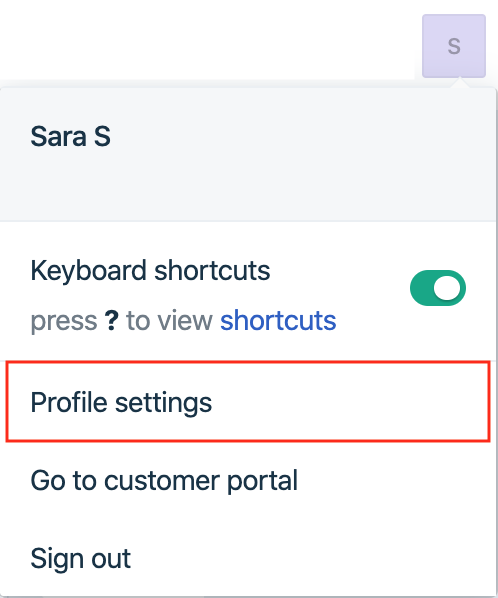
2) Click on your profile picture in the upper right corner and then on "Profile Settings"
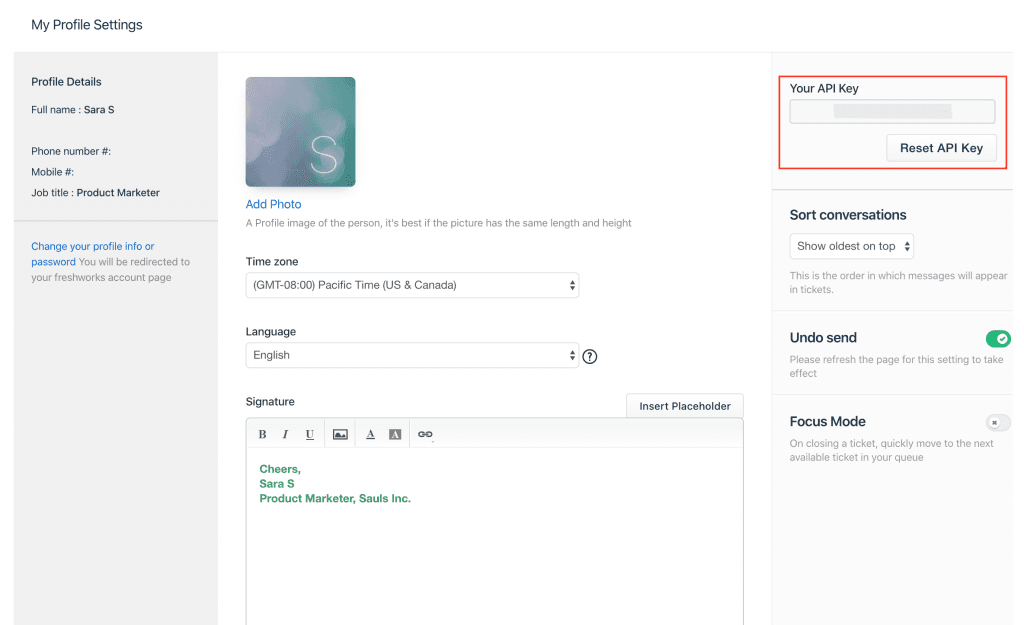
3) In the sidebar on the right you will find your API key
4) Log in to Kondado, go to the add data sources section and select the Freshdesk data source
5) On the data source page, do the following:
- In Domain, paste the first part of your Freshdesk login URL. For example, if your access URL is https://company.freshdesk.com, use the value company
- In API key, paste the value obtained in step (3)
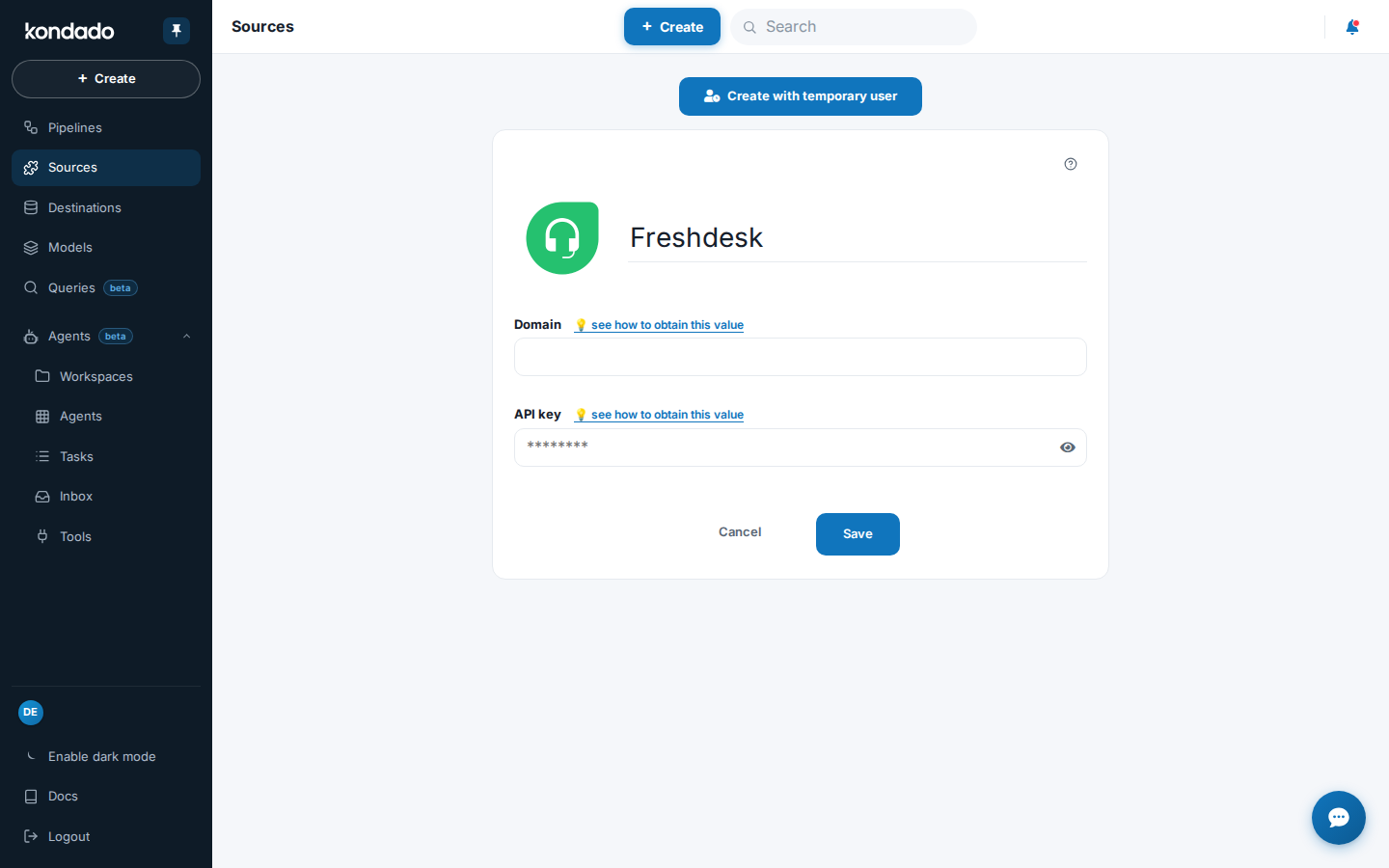
6) Now just name your data source and click SAVE
Pipelines
Summary
Relationship chart
Click to expand

Agents
Replication type: Full
Agents (internal support users) of the Freshdesk account, one per row. Includes name, email, phone, language, time zone, ticket permission scope, availability for automatic assignment and the creation, update and last-login timestamps.
| Campo | Tipo | |
|---|---|---|
|
text |
[en] User ID of the agent |
|
|
boolean |
[en] If the agent is in a group that has enabled Automatic Ticket Assignment, this attribute will be set to true if the agent is accepting new tickets |
|
|
timestamp |
[en] Agent updated timestamp |
|
|
timestamp |
[en] Timestamp that denotes when the agent became available/unavailable (depending on the value of the 'available' attribute) |
|
|
timestamp |
||
|
text |
[en] Ticket permission of the agent (1 -> Global Access, 2 -> Group Access, 3 -> Restricted Access) |
|
|
timestamp |
[en] Agent creation timestamp |
|
|
boolean |
[en] Set to true if this is an occasional agent (true => occasional, false => full-time) |
|
|
timestamp |
[en] Timestamp of the last update |
|
|
text |
[en] Telephone number of the agent |
|
|
timestamp |
[en] Timestamp of the agent's last successful login |
|
|
boolean |
[en] Set to true if the agent is verified |
|
|
text |
[en] Name of the agent |
|
|
text |
[en] Language of the agent. Default language is en |
|
|
text |
[en] Mobile number of the agent |
|
|
timestamp |
[en] Creation timestamp |
|
|
text |
[en] Time zone of the agent |
|
|
text |
[en] Email address of the agent |
|
|
text |
[en] Job title of the agent |
|
|
text |
[en] Signature of the agent in HTML format |
|
|
text |
Contacts
Replication type: Incremental
Parameters:
- Read start date (Savepoint): Data replication initial date
Contacts (requesters/end customers) of the Freshdesk account, one per row. Includes name, email, phone, mobile, job title, language, time zone, associated company, description, social-network identifiers and the creation and update timestamps.
| Campo | Tipo | |
|---|---|---|
|
text |
[en] ID of the contact |
|
|
text |
||
|
text |
||
|
text |
[en] A short description of the contact |
|
|
text |
[en] Language of the contact |
|
|
text |
[en] Twitter handle of the contact |
|
|
text |
[en] Mobile number of the contact |
|
|
text |
[en] Name of the contact |
|
|
timestamp |
[en] Contact creation timestamp |
|
|
text |
||
|
text |
[en] ID of the primary company to which this contact belongs |
|
|
text |
[en] External ID of the contact |
|
|
text |
[en] Primary email address of the contact. If you want to associate additional email(s) with this contact, use the other_emails attribute |
|
|
timestamp |
[en] Contact updated timestamp |
|
|
text |
[en] Telephone number of the contact |
|
|
text |
[en] Time zone in which the contact resides |
|
|
boolean |
||
|
text |
[en] Address of the contact |
|
|
boolean |
[en] Set to true if the contact has been verified |
|
|
text |
||
|
text |
[en] Job title of the contact |
Tickets
Replication type: Incremental
Parameters:
- Read start date (Savepoint): Data replication initial date
Relationships:
Main object
Freshdesk helpdesk support tickets, one per row. Includes subject, description, status, priority, source channel, requester, company, assigned agent and the lifecycle timestamps (creation, first response, resolution, closing).
| Campo | Tipo | |
|---|---|---|
|
text |
[pt] ID único do ticket |
|
|
timestamp |
[pt] Timestamp de atualização do ticket |
|
|
text |
[pt] Assunto do ticket |
|
|
timestamp |
||
|
timestamp |
||
|
timestamp |
||
|
timestamp |
||
|
timestamp |
||
|
timestamp |
||
|
timestamp |
||
|
timestamp |
||
|
boolean |
[pt] TRUE se o ticket foi marcado como spam |
|
|
timestamp |
[pt] Timestamp que indica quando o ticket deve ser resolvido |
|
|
text |
[pt] ID do agente para quem o ticket foi atribuído |
|
|
text |
[pt] Prioridade do ticket |
|
|
text |
[pt] O canal por onde o ticket foi criado |
|
|
text |
[pt] Ajuda a categorizar o ticket de acordo com diferentes níveis de tarefas que o seu time lida |
|
|
text |
||
|
text |
[pt] Status do ticket |
|
|
boolean |
[pt] Verdadeiro caso o ticket seja escalado por qualquer motivo |
|
|
text |
[en] ID of the email configuration (support/sales mailbox) used for this ticket. |
|
|
text |
[en] ID of the company to which this ticket belongs |
|
|
text |
[en] Name of the company to which this ticket belongs |
|
|
text |
[en] Mobile phone of the requester |
|
|
text |
[en] Email of the requester |
|
|
text |
[en] User ID of the requester |
|
|
text |
[en] Phone of the requester |
|
|
text |
[en] Name of the requester |
|
|
text |
[en] ID of the product to which the ticket is associated |
|
|
timestamp |
[en] Timestamp that denotes when the first response is due |
|
|
boolean |
[en] Set to true if the ticket has been escalated as the result of first response time being breached |
|
|
timestamp |
[en] Ticket creation timestamp |
|
|
text |
[en] ID of the group to which the ticket has been assigned |
|
|
text |
[en] HTML content of the ticket |
|
|
text |
[en] Content of the ticket in plain text |
freshdesk_tickets__tags
Child table of freshdesk_tickets listing the tags associated with each ticket, one row per tag. Linked to the parent ticket through the ticket_id column.
freshdesk_tickets__emails
Child table of freshdesk_tickets listing the email addresses tied to each ticket, one row per email, with the type of involvement (cc, reply_cc, fwd, to). Linked to the parent ticket through the ticket_id column.
Tickets: custom fields
Replication type: Incremental
Parameters:
- Read start date (Savepoint): Data replication initial date
Relationships:
Values of the custom fields configured in the Freshdesk account for tickets, one row per ticket. Each column maps to a company-defined custom field; relates to freshdesk_tickets through the id.
| Campo | Tipo | |
|---|---|---|
|
text |
[pt] ID único do ticket |
|
|
timestamp |
[pt] Timestamp de atualização do ticket |
|
|
text |
[pt] Exemplo de custom field x |
|
|
text |
[pt] Exemplo de custom field x |
|
|
text |
[pt] Exemplo de custom field x |
Notes
- Part of this documentation was automatically generated by AI and may contain errors. We recommend verifying critical information
Add Freshdesk as a data source on Kondado
Connect your Freshdesk ticket, agent, and contact data to Kondado for automated ETL into your data warehouse, BI tool, or spreadsheet.
Sign in to Freshdesk with an Administrator user
Log in to your Freshdesk account using a user with Administrator permissions, since this is required to access the API key.
Copy your Freshdesk API key
Click your profile picture in the upper-right corner, open Profile Settings, and copy the API key shown in the right sidebar.
Identify your Freshdesk domain
Locate the first segment of your Freshdesk login URL. For example, if your URL is https://company.freshdesk.com, your domain is company.
Add Freshdesk as a data source on Kondado
On the Kondado platform, open the add data sources page, select Freshdesk, paste the domain and API key, name the source and click SAVE.
Send Freshdesk data to your destination
Once the source is saved, route Agents, Contacts, Tickets and Tickets: Custom Fields to one of the supported destinations to start reporting on your support data.
Frequently asked questions
https://company.freshdesk.com, you enter company in the Domain field.cf_ (e.g., cf_custom_field_x) through the Tickets: Custom Fields pipeline, linked by ticket ID.