Creating the data source
Keap (or formerly Infusionsoft) is marketing and sales software designed to help small businesses grow their business.
Its portfolio of features includes tools for capturing new leads, sending e-mails, managing customer relationships and life cycles, and e-commerce — that is, it brings together in a single platform the most important functions for early-stage companies that intend to drive their growth.
It is also possible to integrate Keap data into your database using the Kondado platform, enabling the generation of metrics and the monitoring of the most important marketing, sales and customer success KPIs of your business.
Adding the data source
To add the Infusionsoft data source on the Kondado platform, follow the steps below:
1) Log in to the Kondado platform
2) Go to the add data sources page and select the Infusionsoft data source
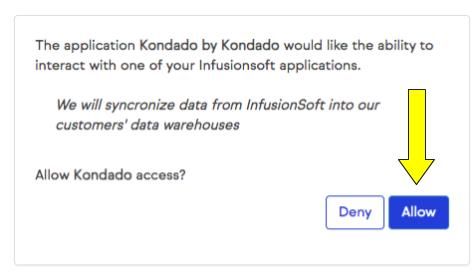
3) After selecting the Infusionsoft data source, you will be directed to the page below, where you must click on "Allow"
4) After authorizing, you will be redirected to the Kondado platform, where the data source information will be filled in automatically. Once filled in, finish creating the data source according to the figure and steps below
- Give your data source a name (e.g., Infusionsoft)
- The token and refresh token will be filled in automatically
- Click Save

Now just save the data source to start integrating your Infusionsoft data into your Data Warehouse, Data Lake or spreadsheet.
Pipelines
Summary
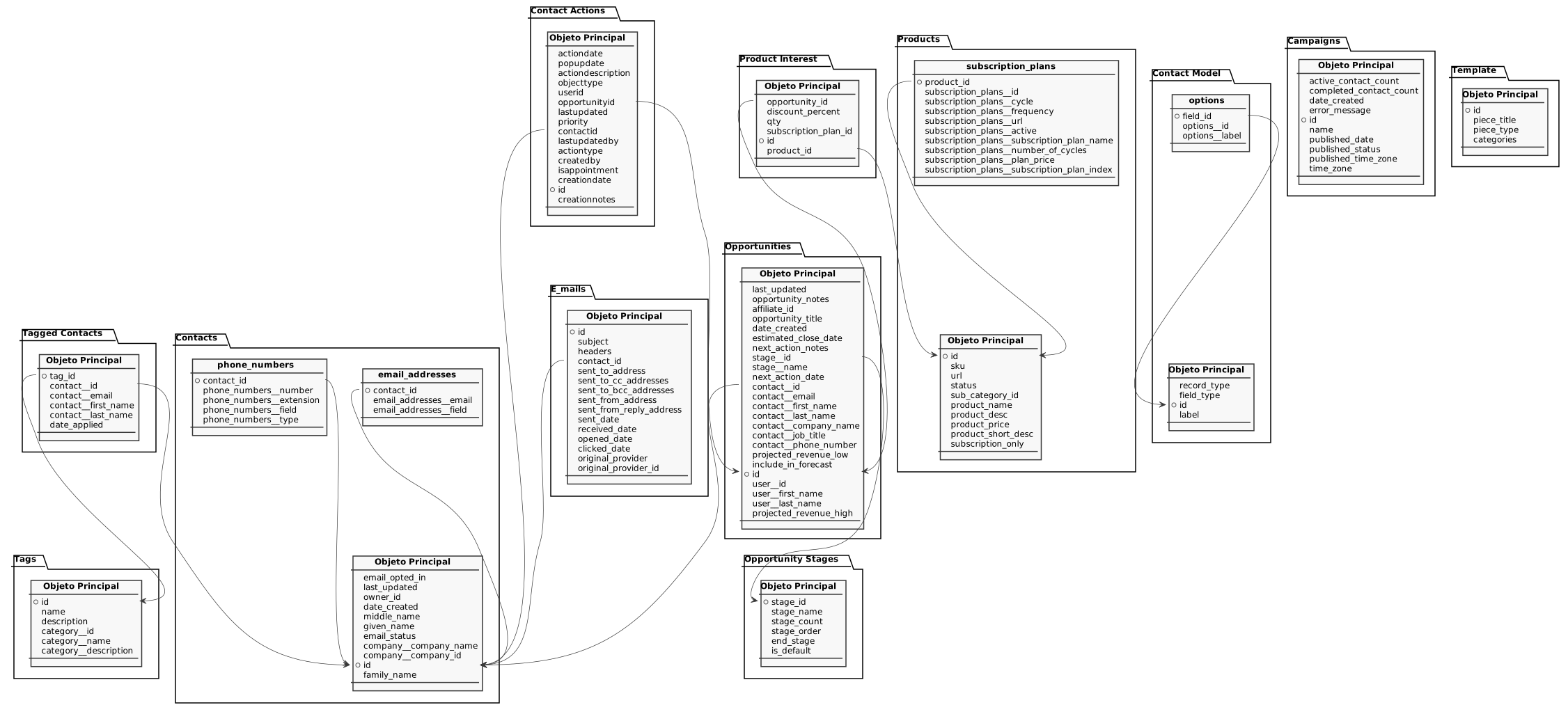
Relationship chart
Click to expand
Campaigns
Replication type: Full
Marketing campaigns (Campaign Builder) configured in the account. Each row is one campaign, with active/completed contact counts and publishing information.
| Campo | Tipo | |
|---|---|---|
|
int |
[en] Unique identifier of the campaign. |
|
|
int |
[en] Number of contacts currently active (in progress) in the campaign. |
|
|
int |
[en] Number of contacts that have already completed the campaign. |
|
|
timestamp |
[en] Date and time the campaign was created. |
|
|
text |
[en] Error message associated with the campaign, when present. |
|
|
text |
[en] Name of the campaign. |
|
|
timestamp |
[en] Date and time the campaign was published. |
|
|
boolean |
[en] Indicates whether the campaign is published. |
|
|
text |
[en] Time zone used when the campaign was published. |
|
|
text |
[en] Time zone of the campaign. |
Contact Actions
Replication type: Incremental
Actions logged on contacts (tasks, appointments and notes). Each row is one action with date, type, description, priority and the related contacts/opportunities/users.
| Campo | Tipo | |
|---|---|---|
|
timestamp |
[en] Scheduled date and time of the action. |
|
|
timestamp |
[en] Date and time of the action's reminder (pop-up). |
|
|
text |
[en] Description of the action. |
|
|
text |
[en] Type of the object the action refers to. |
|
|
float |
[en] Identifier of the user responsible for the action. |
|
|
float |
[en] Identifier of the opportunity related to the action, when present. |
|
|
timestamp |
[en] Date and time of the action's last update. |
|
|
float |
[en] Priority of the action. |
|
|
float |
[en] Identifier of the contact related to the action. |
|
|
float |
[en] Identifier of the user who last updated the action. |
|
|
text |
[en] Type of the action (for example, task, appointment, note). |
|
|
float |
[en] Identifier of the user who created the action. |
|
|
float |
[en] Indicates whether the action is an appointment. |
|
|
timestamp |
[en] Date and time the action was created. |
|
|
float |
[en] Unique identifier of the action. |
|
|
text |
[en] Notes recorded when the action was created. |
Contact Model
Replication type: Full
Main object
Definition (metadata) of contact model fields, including custom fields. Each row describes one field: its type, label and the record type it belongs to.
| Campo | Tipo | |
|---|---|---|
|
text |
[en] Record type the field belongs to (for example, contact). |
|
|
text |
[en] Type of the field (for example, text, list, date, number), defining the format of the accepted value. |
|
|
float |
[en] Unique identifier of the field in the contact model. |
|
|
text |
[en] Label (display name) of the field. |
infusionsoft_contact_model_fields__options
Selectable options available for contact model fields that are lists. Each row is one option belonging to a field (child relation of infusionsoft_contact_model_fields).
Contacts
Replication type: Incremental
Main object
Contacts (people) registered in the CRM. Each row is one contact, with name, company, dates and email/marketing status.
| Campo | Tipo | |
|---|---|---|
|
boolean |
[en] Indicates whether the contact has opted in to receive marketing emails. |
|
|
timestamp |
[en] Date and time of the contact's last update. |
|
|
int |
[en] Identifier of the user who owns the contact. |
|
|
timestamp |
[en] Date and time the contact was created. |
|
|
text |
[en] Middle name of the contact. |
|
|
text |
[en] First (given) name of the contact. |
|
|
text |
[en] Marketing status of the contact's email (for example, confirmed, unconfirmed or non-marketable). |
|
|
text |
[en] Name of the company associated with the contact. |
|
|
int |
[en] Identifier of the company associated with the contact. |
|
|
int |
[en] Unique identifier of the contact. |
|
|
text |
[en] Last (family) name of the contact. |
infusionsoft_contacts__email_addresses
Email addresses of a contact. Each row is one email associated with a contact (child relation of infusionsoft_contacts).
| Campo | Tipo | |
|---|---|---|
|
int |
[en] Identifier of the contact that owns the email address. |
|
|
text |
[en] Email address. |
|
|
text |
[en] Email field/slot (for example, EMAIL1, EMAIL2), indicating which of the contact's emails it is. |
infusionsoft_contacts__phone_numbers
Phone numbers of a contact. Each row is one phone associated with a contact (child relation of infusionsoft_contacts).
| Campo | Tipo | |
|---|---|---|
|
int |
[en] Identifier of the contact that owns the phone number. |
|
|
text |
[en] Phone number. |
|
|
text |
[en] Phone extension. |
|
|
text |
[en] Phone field/slot (for example, PHONE1, PHONE2), indicating which of the contact's phones it is. |
|
|
text |
[en] Type of phone (for example, work, home, mobile). |
E-mails
Replication type: Incremental
Emails sent to and tracked for contacts. Each row is one email, with sender, recipients, subject and dates of sending, receiving, opening and clicking.
| Campo | Tipo | |
|---|---|---|
|
int |
[en] Unique identifier of the email. |
|
|
text |
[en] Subject of the email. |
|
|
text |
[en] Headers of the email. |
|
|
int |
[en] Identifier of the contact the email was sent to. |
|
|
text |
[en] Recipient email address (To). |
|
|
text |
[en] Carbon-copy (Cc) addresses of the email. |
|
|
text |
[en] Blind carbon-copy (Bcc) addresses of the email. |
|
|
text |
[en] Sender email address (From). |
|
|
text |
[en] Reply-to email address. |
|
|
timestamp |
[en] Date and time the email was sent. |
|
|
timestamp |
[en] Date and time the email was received. |
|
|
timestamp |
[en] Date and time the email was first opened. |
|
|
timestamp |
[en] Date and time of the first click on a link in the email. |
|
|
text |
[en] Original provider of the email. |
|
|
text |
[en] Identifier of the email in the original provider. |
Opportunities
Replication type: Full
Sales opportunities (deals) recorded in the CRM. Each row is one opportunity, with its pipeline stage, the contact and the owner, projected values and follow-up dates.
| Campo | Tipo | |
|---|---|---|
|
int |
[en] Unique identifier of the opportunity. |
|
|
timestamp |
[en] Date and time of the opportunity's last update. |
|
|
text |
[en] General notes about the opportunity. |
|
|
int |
[en] Identifier of the affiliate associated with the opportunity. |
|
|
text |
[en] Title of the opportunity. |
|
|
timestamp |
[en] Date and time the opportunity was created. |
|
|
timestamp |
[en] Estimated close date of the opportunity. |
|
|
text |
[en] Notes about the next action to be taken. |
|
|
int |
[en] Identifier of the pipeline stage the opportunity is in. |
|
|
text |
[en] Name of the pipeline stage the opportunity is in. |
|
|
timestamp |
[en] Scheduled date and time of the next action. |
|
|
int |
[en] Identifier of the contact linked to the opportunity. |
|
|
text |
[en] Email of the contact linked to the opportunity. |
|
|
text |
[en] First name of the contact linked to the opportunity. |
|
|
text |
[en] Last name of the contact linked to the opportunity. |
|
|
text |
[en] Company name of the contact linked to the opportunity. |
|
|
text |
[en] Job title of the contact linked to the opportunity. |
|
|
text |
[en] Phone number of the contact linked to the opportunity. |
|
|
float |
[en] Projected low-end revenue of the opportunity. |
|
|
float |
[en] Indicates whether the opportunity is included in the sales forecast. |
|
|
int |
[en] Identifier of the user who owns the opportunity. |
|
|
text |
[en] First name of the user who owns the opportunity. |
|
|
text |
[en] Last name of the user who owns the opportunity. |
|
|
float |
[en] Projected high-end revenue of the opportunity. |
Opportunity Stages
Replication type: Full
Stages of the sales opportunity pipeline. Each row is one stage, with its order in the pipeline and the number of opportunities in it.
| Campo | Tipo | |
|---|---|---|
|
int |
[en] Unique identifier of the stage. |
|
|
text |
[en] Name of the stage. |
|
|
int |
[en] Number of opportunities currently in this stage. |
|
|
int |
[en] Position (order) of the stage within the pipeline. |
|
|
boolean |
[en] Indicates whether this is a final stage of the pipeline. |
|
|
boolean |
[en] Indicates whether this is the default stage of the pipeline. |
Product Interest
Replication type: Full
Products of interest associated with opportunities (opportunity line items). Each row links a product to an opportunity, with quantity and discount.
| Campo | Tipo | |
|---|---|---|
|
int |
[en] Identifier of the opportunity the item refers to. |
|
|
float |
[en] Discount percentage applied to the item. |
|
|
float |
[en] Quantity of the product in the item. |
|
|
int |
[en] Identifier of the subscription plan associated with the item, when applicable. |
|
|
int |
[en] Unique identifier of the product interest item. |
|
|
int |
[en] Identifier of the product in the item. |
Products
Replication type: Full
Main object
Products registered in the catalog/store. Each row is one product, with SKU, price, description and status.
| Campo | Tipo | |
|---|---|---|
|
int |
[en] Unique identifier of the product. |
|
|
text |
[en] Product SKU code. |
|
|
text |
[en] URL associated with the product. |
|
|
int |
[en] Product status, indicating whether it is active/available for sale. |
|
|
int |
[en] Identifier of the product subcategory. |
|
|
text |
[en] Name of the product. |
|
|
text |
[en] Full description of the product. |
|
|
float |
[en] Price of the product. |
|
|
text |
[en] Short description of the product. |
|
|
boolean |
[en] Indicates whether the product can only be sold as a subscription (recurring). |
infusionsoft_products__subscription_plans
Subscription (recurring) plans associated with a product. Each row is one recurring billing plan of a product (child relation of infusionsoft_products).
| Campo | Tipo | |
|---|---|---|
|
int |
[en] Identifier of the product the subscription plan belongs to. |
|
|
int |
[en] Unique identifier of the subscription plan. |
|
|
int |
[en] Billing cycle of the plan (time unit between charges, for example month or year). |
|
|
int |
[en] Billing frequency within the cycle (how many cycles between each charge). |
|
|
text |
[en] URL associated with the subscription plan. |
|
|
boolean |
[en] Indicates whether the subscription plan is active. |
|
|
text |
[en] Name of the subscription plan. |
|
|
int |
[en] Total number of billing cycles of the plan (0 usually indicates indefinite recurrence). |
|
|
float |
[en] Amount charged on each billing of the plan. |
|
|
int |
[en] Index/order of the subscription plan within the product. |
Tagged Contacts
Replication type: Full
Tag applications on contacts. Each row indicates that a contact was given a tag, with the date the tag was applied.
| Campo | Tipo | |
|---|---|---|
|
int |
[en] Identifier of the applied tag. |
|
|
int |
[en] Identifier of the contact that received the tag. |
|
|
text |
[en] Email of the contact that received the tag. |
|
|
text |
[en] First name of the contact that received the tag. |
|
|
text |
[en] Last name of the contact that received the tag. |
|
|
timestamp |
[en] Date and time the tag was applied to the contact. |
Tags
Replication type: Full
Tags available in the account to classify contacts, along with the category each tag belongs to.
| Campo | Tipo | |
|---|---|---|
|
int |
[en] Unique identifier of the tag. |
|
|
text |
[en] Name of the tag. |
|
|
text |
[en] Description of the tag. |
|
|
int |
[en] Identifier of the category the tag belongs to. |
|
|
text |
[en] Name of the tag category. |
|
|
text |
[en] Description of the tag category. |
Template
Replication type: Full
Notes
- Part of this documentation was automatically generated by AI and may contain errors. We recommend verifying critical information
Add Infusionsoft (Keap) as a Data Source on Kondado
Connect your Keap marketing and sales data to Kondado to generate metrics and monitor KPIs across marketing, sales, and customer success.
Log in to Kondado
Access the Kondado platform with your credentials to begin adding a new data source.
Select the Infusionsoft (Keap) connector
Navigate to the add data sources page and choose Infusionsoft (Keap) from the available connectors to start the integration process.
Authorize the connection
You will be redirected to Keap's authorization page where you must click "Allow" to grant Kondado access to your Infusionsoft data.
Complete the data source setup
After authorization, you'll return to Kondado where the token and refresh token are filled automatically. Name your source (e.g., "Infusionsoft") and click save to finish.
Build pipelines to your destinations
With your Infusionsoft source connected, create pipelines to send data to destinations like BI tools, data warehouses, or spreadsheets for analysis and reporting.
