Creating the data source
Recruiterbox is a recruiting and hiring platform that helps companies manage the process of hiring new employees. The Recruiterbox to Data Warehouse integration built by Kondado lets you access your recruitment data in your analytics cloud.
Adding the connector
To integrate your Recruiterbox data into your database and start gaining insights into your company's recruitment processes, just add the Recruiterbox connector on the Kondado platform by following the steps below:
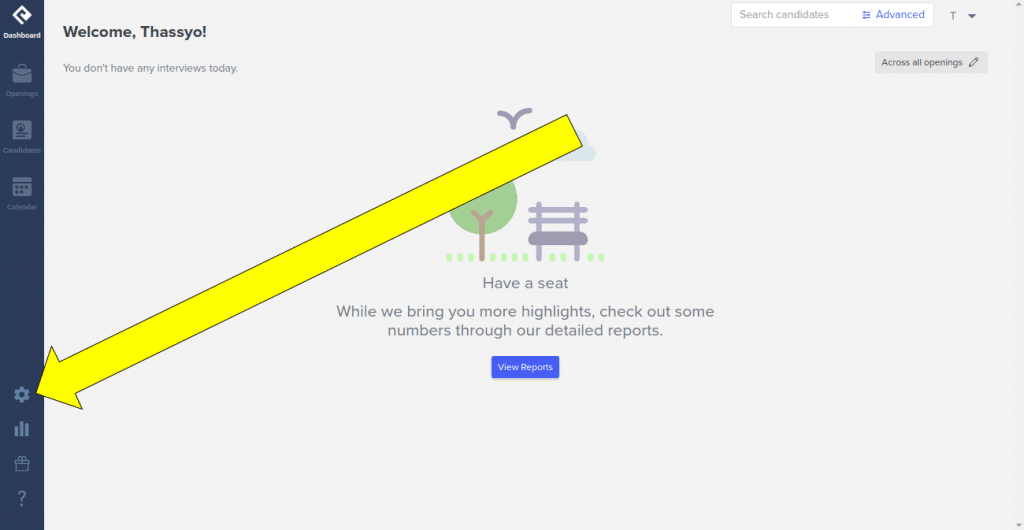
1) Log in to the Recruiterbox platform and, on the right-hand bar, click the gear icon to open your settings
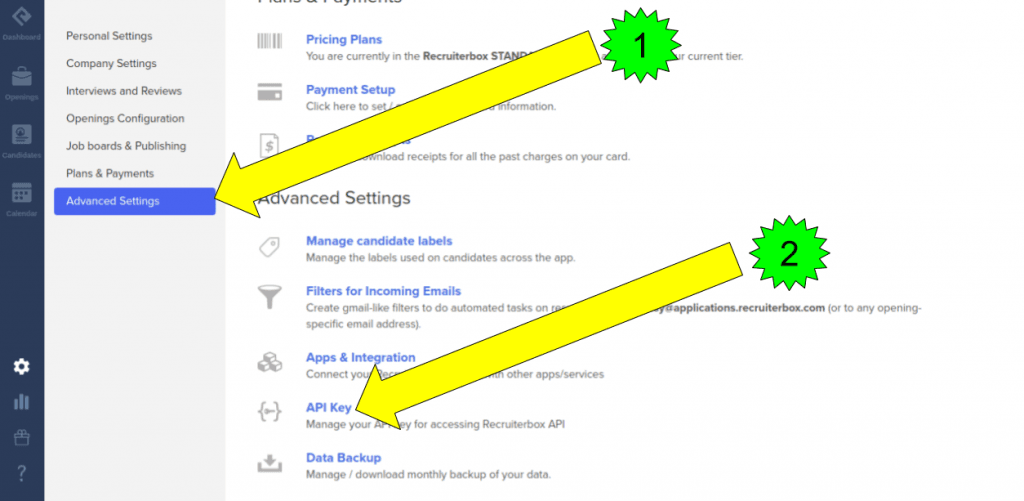
2) On the settings page, (1) click "Advanced Settings"; (2) then click "API Key"
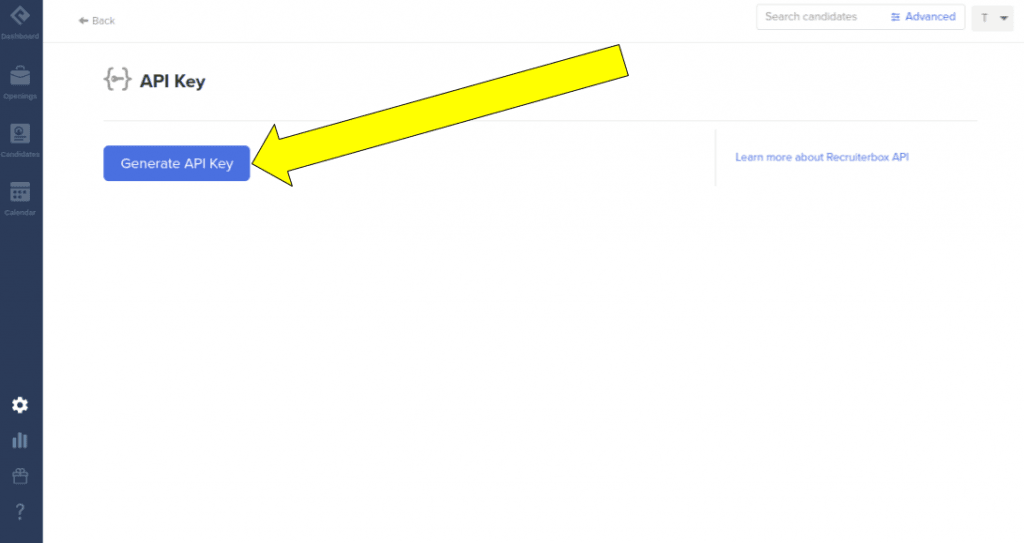
3) On the API Key page, click "Generate API Key"
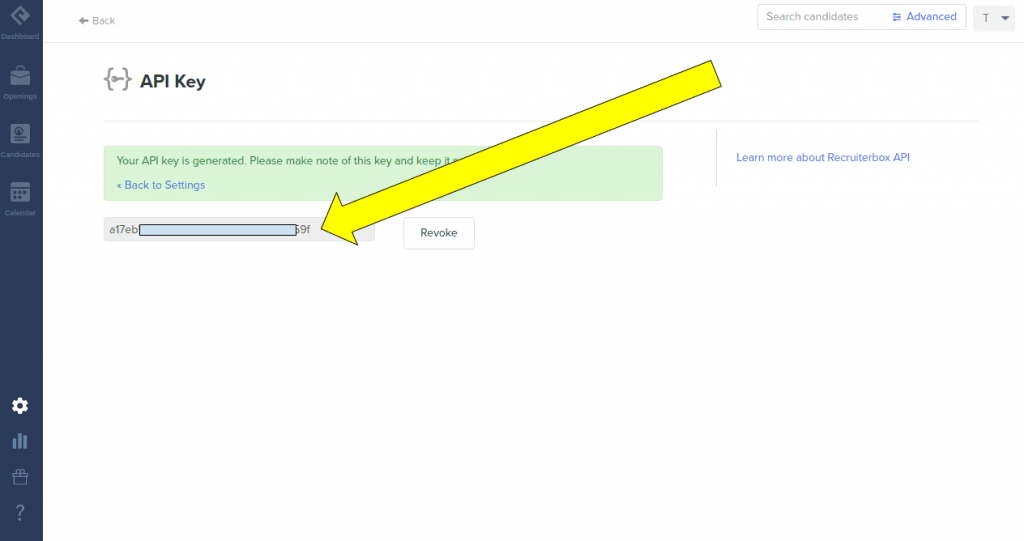
4) Copy the generated API Key
5) Log in to the Kondado platform
6) With the API Key generated in step (4), go to the add connectors page and select the Recruiterbox connector
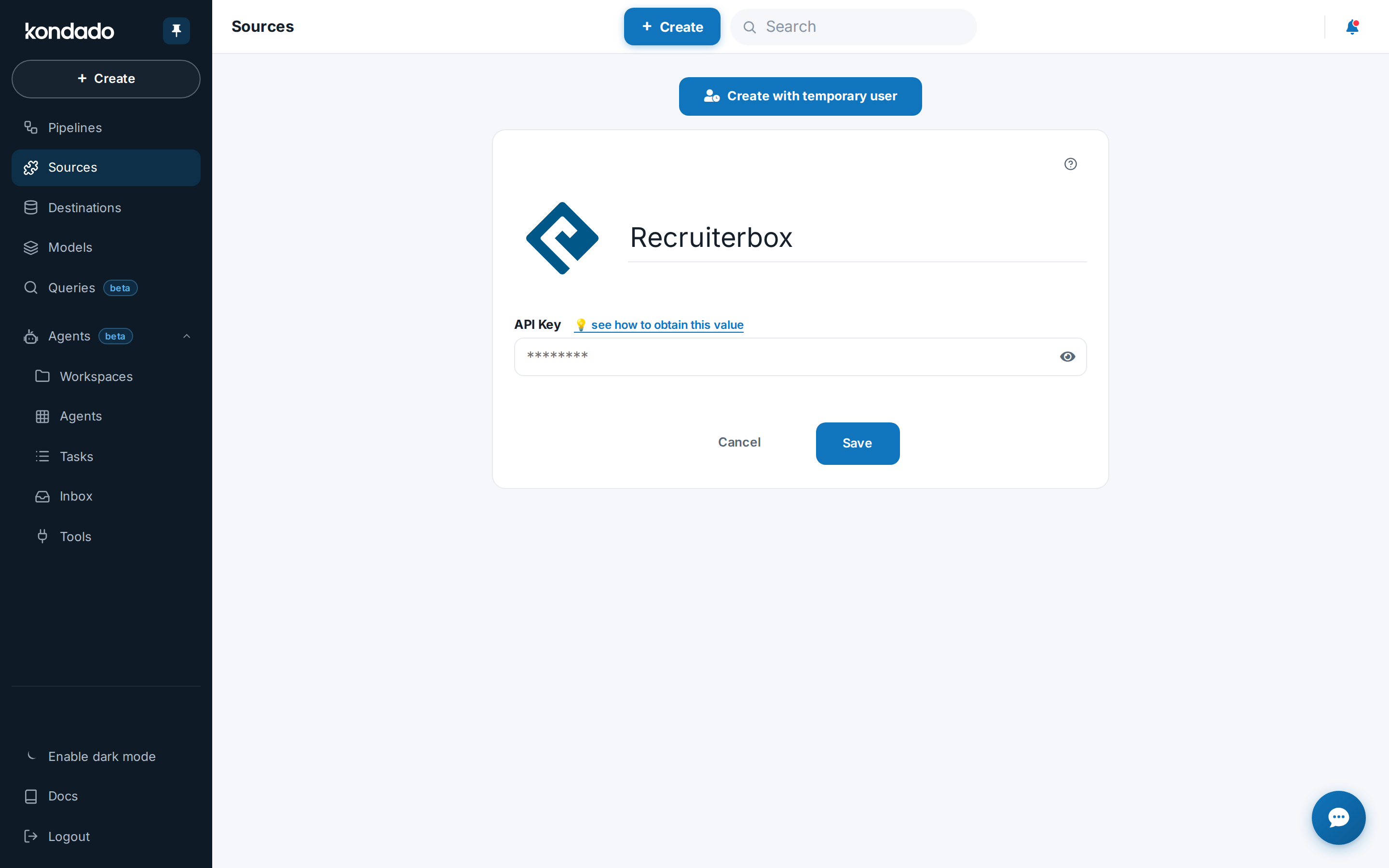
7) To add the connector, follow these steps as shown in the figure below:
- Give your connector a name (e.g., Recruiterbox)
- Enter the API Key obtained in step (4)
- Click Save
Pipelines
Summary
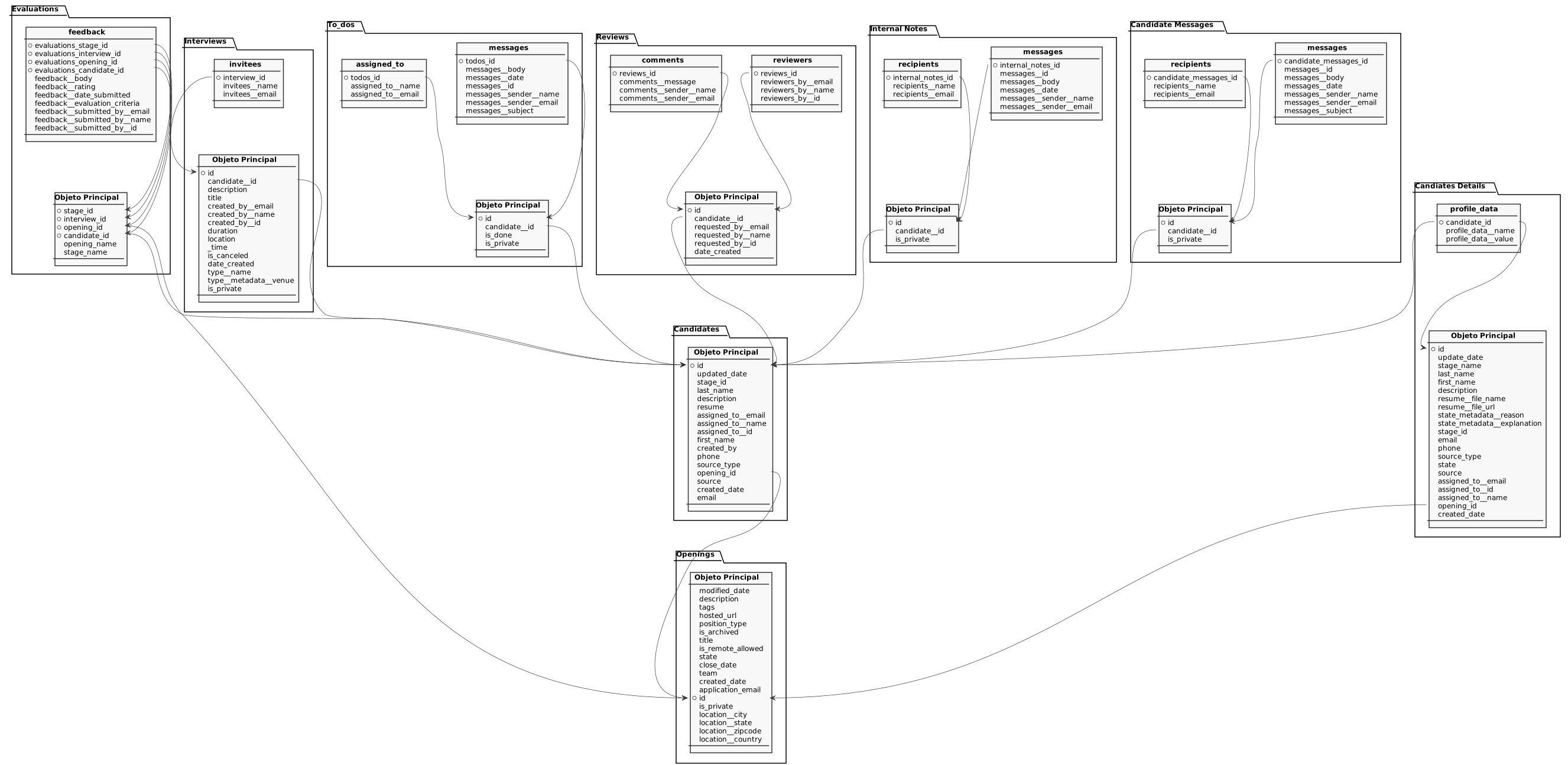
Relationship chart
Click to expand
Candiates Details
Replication type: Incremental
Main object
Detailed candidate profiles including resume, state and assignment.
| Campo | Tipo | |
|---|---|---|
|
int |
[en] Unique identifier of the candidate. |
|
|
int |
[en] Epoch timestamp of the last update made to the candidate. |
|
|
text |
[en] Name of the hiring pipeline stage. |
|
|
text |
[en] Candidate's last name. |
|
|
text |
[en] Candidate's first name. |
|
|
text |
[en] Free-text description/summary of the candidate. |
|
|
text |
[en] File name of the candidate's resume. |
|
|
text |
[en] URL to download the candidate's resume file. |
|
|
text |
[en] Reason associated with the candidate's current state (e.g. rejection reason). |
|
|
text |
[en] Detailed explanation associated with the candidate's current state. |
|
|
int |
[en] Identifier of the hiring pipeline stage the candidate is currently in. |
|
|
text |
[en] Candidate's email address. |
|
|
text |
[en] Candidate's phone number. |
|
|
text |
[en] Category of the source through which the candidate was added (e.g. job board, referral). |
|
|
text |
[en] Current state/disposition of the candidate (e.g. active, hired, rejected). |
|
|
text |
[en] Specific source/origin from which the candidate applied or was added. |
|
|
text |
[en] Email of the user the to-do is assigned to. |
|
|
int |
[en] Identifier of the user (recruiter/owner) the candidate is assigned to. |
|
|
text |
[en] Name of the user the to-do is assigned to. |
|
|
int |
[en] Identifier of the opening the candidate is associated with. |
|
|
int |
[en] Epoch timestamp of when the record was created. |
recruiterbox_candidates_details__profile_data
Custom application-form/profile fields captured for the candidate.
| Campo | Tipo | |
|---|---|---|
|
int |
[en] Identifier of the candidate this profile data belongs to. |
|
|
text |
[en] Name/key of a custom application-form/profile field. |
|
|
text |
[en] Value of the custom application-form/profile field. |
Candidate Messages
Replication type: Full
Main object
Messages exchanged with candidates (parent record grouping a message thread).
| Campo | Tipo | |
|---|---|---|
|
int |
[en] Unique identifier of the candidate message record. |
|
|
int |
[en] Identifier of the candidate this record relates to. |
|
|
boolean |
[en] Indicates whether the record is private/confidential, with restricted visibility. |
recruiterbox_candidate_messages__messages
Individual messages within a candidate message thread.
| Campo | Tipo | |
|---|---|---|
|
int |
[en] Identifier of the parent candidate message record. |
|
|
int |
[en] Identifier of the individual message in the thread. |
|
|
text |
[en] Body/content of the message. |
|
|
int |
[en] Date/time the message was sent. |
|
|
text |
[en] Name of the message sender. |
|
|
text |
[en] Email of the message sender. |
|
|
text |
[en] Subject line of the message. |
recruiterbox_candidate_messages__recipients
Recipients of the candidate messages.
Candidates
Replication type: Full
Candidates (applicants) tracked in Trakstar Hire, with stage, source and assignment.
| Campo | Tipo | |
|---|---|---|
|
int |
[en] Unique identifier of the candidate. |
|
|
int |
[en] Epoch timestamp of the last update made to the candidate. |
|
|
int |
[en] Identifier of the hiring pipeline stage the candidate is currently in. |
|
|
text |
[en] Candidate's last name. |
|
|
text |
[en] Free-text description/summary of the candidate. |
|
|
text |
[en] Candidate resume content or reference. |
|
|
text |
[en] Email of the user the to-do is assigned to. |
|
|
text |
[en] Name of the user the to-do is assigned to. |
|
|
int |
[en] Identifier of the user (recruiter/owner) the candidate is assigned to. |
|
|
text |
[en] Candidate's first name. |
|
|
text |
[en] Information about the user who created the candidate record, serialized as text. |
|
|
text |
[en] Candidate's phone number. |
|
|
text |
[en] Category of the source through which the candidate was added (e.g. job board, referral). |
|
|
int |
[en] Identifier of the opening the candidate is associated with. |
|
|
text |
[en] Specific source/origin from which the candidate applied or was added. |
|
|
int |
[en] Epoch timestamp of when the record was created. |
|
|
text |
[en] Candidate's email address. |
Evaluations
Replication type: Full
Main object
Candidate evaluations per hiring stage, interview and opening.
| Campo | Tipo | |
|---|---|---|
|
int |
[en] Identifier of the hiring pipeline stage the evaluation refers to. |
|
|
int |
[en] Identifier of the interview the evaluation refers to. |
|
|
int |
[en] Identifier of the opening the evaluation refers to. |
|
|
int |
[en] Identifier of the candidate being evaluated. |
|
|
text |
[en] Name of the opening the evaluation refers to. |
|
|
text |
[en] Name of the hiring pipeline stage. |
recruiterbox_evaluations__feedback
Feedback entries (rating and comments) submitted for each evaluation.
| Campo | Tipo | |
|---|---|---|
|
int |
[en] Stage identifier of the parent evaluation. |
|
|
int |
[en] Interview identifier of the parent evaluation. |
|
|
int |
[en] Opening identifier of the parent evaluation. |
|
|
int |
[en] Candidate identifier of the parent evaluation. |
|
|
text |
[en] Written feedback provided in the evaluation. |
|
|
int |
[en] Numeric rating given in the evaluation feedback. |
|
|
int |
[en] Epoch timestamp when the feedback was submitted. |
|
|
text |
[en] Evaluation criteria the feedback was given against. |
|
|
text |
[en] Email of the user who submitted the feedback. |
|
|
text |
[en] Name of the user who submitted the feedback. |
|
|
int |
[en] Identifier of the user who submitted the feedback. |
Internal Notes
Replication type: Full
Main object
Internal notes about candidates (parent record grouping the note thread).
| Campo | Tipo | |
|---|---|---|
|
int |
[en] Unique identifier of the internal note record. |
|
|
int |
[en] Identifier of the candidate this record relates to. |
|
|
boolean |
[en] Indicates whether the record is private/confidential, with restricted visibility. |
recruiterbox_internal_notes__messages
Individual messages within an internal note thread.
| Campo | Tipo | |
|---|---|---|
|
int |
[en] Identifier of the parent internal note record. |
|
|
int |
[en] Identifier of the individual message in the thread. |
|
|
text |
[en] Body/content of the message. |
|
|
int |
[en] Date/time the message was sent. |
|
|
text |
[en] Name of the message sender. |
|
|
text |
[en] Email of the message sender. |
recruiterbox_internal_notes__recipients
Recipients of the internal notes.
Interviews
Replication type: Full
Main object
Interviews scheduled for candidates, including type, time and duration.
| Campo | Tipo | |
|---|---|---|
|
int |
[en] Unique identifier of the interview. |
|
|
int |
[en] Identifier of the candidate this record relates to. |
|
|
text |
[en] Description/notes for the interview. |
|
|
text |
[en] Title of the interview. |
|
|
text |
[en] Email of the user who created/scheduled the interview. |
|
|
text |
[en] Name of the user who created/scheduled the interview. |
|
|
int |
[en] Identifier of the user who created/scheduled the interview. |
|
|
float |
[en] Duration of the interview, as provided by the API. |
|
|
text |
[en] Location details of the interview, serialized as text. |
|
|
int |
[en] Scheduled time of the interview (epoch timestamp). |
|
|
boolean |
[en] Indicates whether the interview has been canceled. |
|
|
float |
[en] Epoch timestamp of when the record was created. |
|
|
text |
[en] Name of the interview type. |
|
|
text |
[en] Venue metadata associated with the interview type. |
|
|
boolean |
[en] Indicates whether the record is private/confidential, with restricted visibility. |
recruiterbox_interviews__invitees
Invitees (participants) of each interview.
Openings
Replication type: Full
Job openings/vacancies published in Trakstar Hire, including title, location and status.
| Campo | Tipo | |
|---|---|---|
|
int |
[en] Epoch timestamp of the last modification made to the opening. |
|
|
text |
[en] Full text description of the job opening. |
|
|
text |
[en] Tags/labels associated with the opening, serialized as text. |
|
|
text |
[en] Public URL of the hosted job posting for this opening. |
|
|
text |
[en] Employment type of the opening (e.g. full_time, part_time, contract). |
|
|
boolean |
[en] Indicates whether the opening has been archived (made inactive). |
|
|
text |
[en] Title/name of the job opening. |
|
|
boolean |
[en] Indicates whether the opening allows remote work. |
|
|
text |
[en] Current workflow status of the opening (e.g. open, closed, on hold). |
|
|
int |
[en] Epoch timestamp when the opening was or is to be closed. |
|
|
text |
[en] Team or department the opening belongs to. |
|
|
int |
[en] Epoch timestamp of when the record was created. |
|
|
text |
[en] Dedicated email address that receives applications for this opening. |
|
|
int |
[en] Unique identifier of the opening. |
|
|
boolean |
[en] Indicates whether the record is private/confidential, with restricted visibility. |
|
|
text |
[en] City of the opening location. |
|
|
text |
[en] State/region of the opening location. |
|
|
text |
[en] Zip/postal code of the opening location. |
|
|
text |
[en] Country of the opening location. |
Reviews
Replication type: Full
Main object
Review requests made about candidates.
| Campo | Tipo | |
|---|---|---|
|
int |
[en] Unique identifier of the review record. |
|
|
int |
[en] Identifier of the candidate this record relates to. |
|
|
text |
[en] Email of the user who requested the review. |
|
|
text |
[en] Name of the user who requested the review. |
|
|
int |
[en] Identifier of the user who requested the review. |
|
|
int |
[en] Epoch timestamp of when the record was created. |
recruiterbox_reviews__reviewers
Reviewers assigned to each review request.
| Campo | Tipo | |
|---|---|---|
|
int |
[en] Identifier of the parent review record. |
|
|
text |
[en] Email of a reviewer assigned to the review. |
|
|
text |
[en] Name of a reviewer assigned to the review. |
|
|
int |
[en] Identifier of a reviewer assigned to the review. |
recruiterbox_reviews__comments
Comments left on each review.
To-dos
Replication type: Full
Main object
To-dos/tasks associated with candidates.
| Campo | Tipo | |
|---|---|---|
|
int |
[en] Unique identifier of the to-do/task. |
|
|
int |
[en] Identifier of the candidate this record relates to. |
|
|
boolean |
[en] Indicates whether the to-do/task has been completed. |
|
|
boolean |
[en] Indicates whether the record is private/confidential, with restricted visibility. |
recruiterbox_todos__messages
Messages within a to-do thread.
| Campo | Tipo | |
|---|---|---|
|
int |
[en] Identifier of the parent to-do/task record. |
|
|
text |
[en] Body/content of the message. |
|
|
text |
[en] Date/time the message was sent. |
|
|
int |
[en] Identifier of the individual message in the thread. |
|
|
text |
[en] Name of the message sender. |
|
|
text |
[en] Email of the message sender. |
|
|
text |
[en] Subject line of the message. |
recruiterbox_todos__assigned_to
Users a to-do is assigned to.
Notes
- Part of this documentation was automatically generated by AI and may contain errors. We recommend verifying critical information
Add Recruiterbox as a Data Source on Kondado
Connect your Recruiterbox recruitment data to Kondado's platform to gain insights into your hiring process.
Generate your Recruiterbox API Key
Log in to Recruiterbox, click the gear icon for settings, then navigate to Advanced Settings > API Key and click Generate API Key. Copy the generated key for use in Kondado.
Add Recruiterbox to Kondado
Log in to the Kondado platform, go to the add data sources page, and select Recruiterbox. Give it a name, paste your API Key, and click save to complete the connection.
Explore available tables and fields
Once connected, you can access Recruiterbox tables including Openings, Candidates, Interviews, Evaluations, and more. Review the data integration documentation to understand how these tables relate and how to build pipelines for your recruitment analytics.
Build pipelines to your destination
Create pipelines from your Recruiterbox source to your preferred destination—such as a data warehouse, BI tool, or spreadsheet—to start analyzing your hiring metrics and making data-driven decisions.
