Creating the data source
Requirements
- Active Salesforce Marketing Cloud (ExactTarget) account.
- Access to the Installed Packages area in SFMC.
- Permission to create an API Integration > Server-to-Server package.
Instructions
-
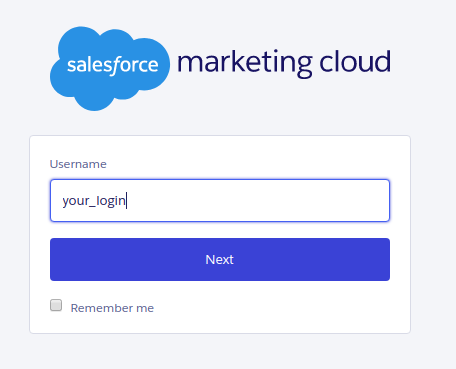
Go to the Salesforce Marketing Cloud login page at
https://mc.exacttarget.com,
enter your username and click Next.
-
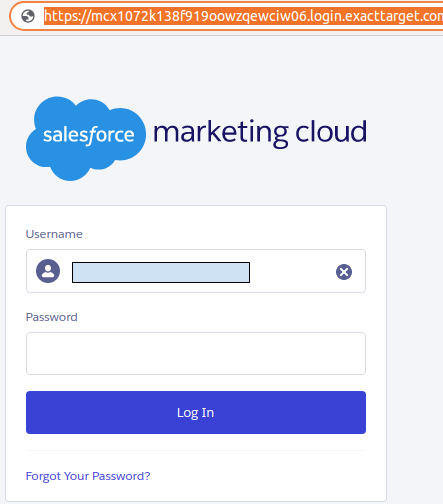
You will be redirected to the login page for your specific account. Copy the full URL that is generated
in the browser (it contains your company subdomain).
-
From this URL, identify your subdomain by taking the value before
.login. In the example above, the subdomain ismcx1072k138f919oowzqewciw06, taken fromhttps://mcx1072k138f919oowzqewciw06.login.exacttarget.com. - Keep this subdomain value. You will use it later when creating the Salesforce Marketing Cloud connector in Kondado.
- Finish logging in and access the Salesforce Marketing Cloud interface.
-
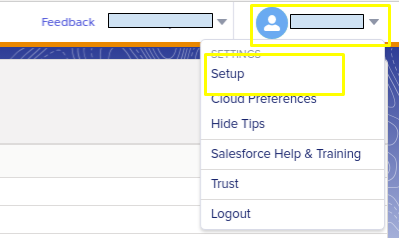
Once logged in, click your user in the top-right corner and then click Setup.
-
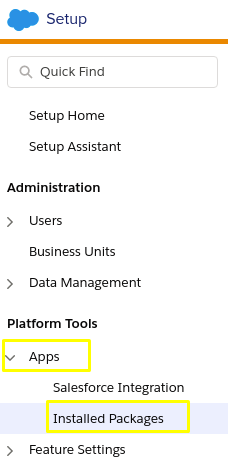
In the Setup page, in the left sidebar, go to Apps > Installed Packages.
-
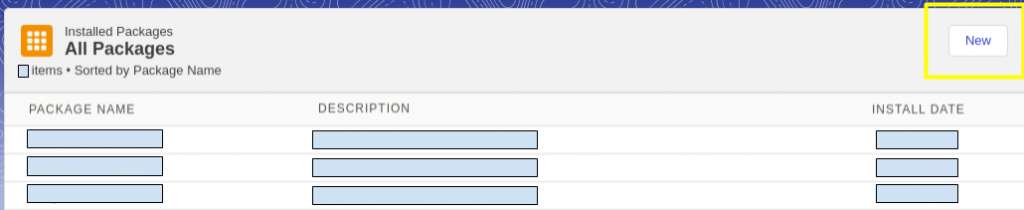
On the Installed Packages page you will see the list of connected applications.
To create the integration with Kondado, click the New button in the upper-right corner.
-
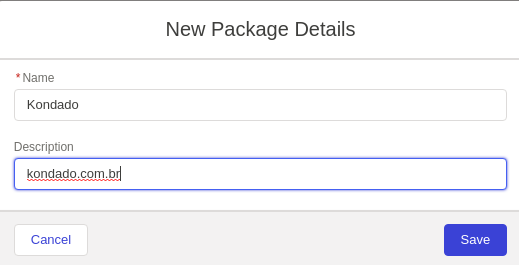
Enter a Name and Description for the package (for example, Name:
Kondado, Description: kondado.com.br) and click Save.
-
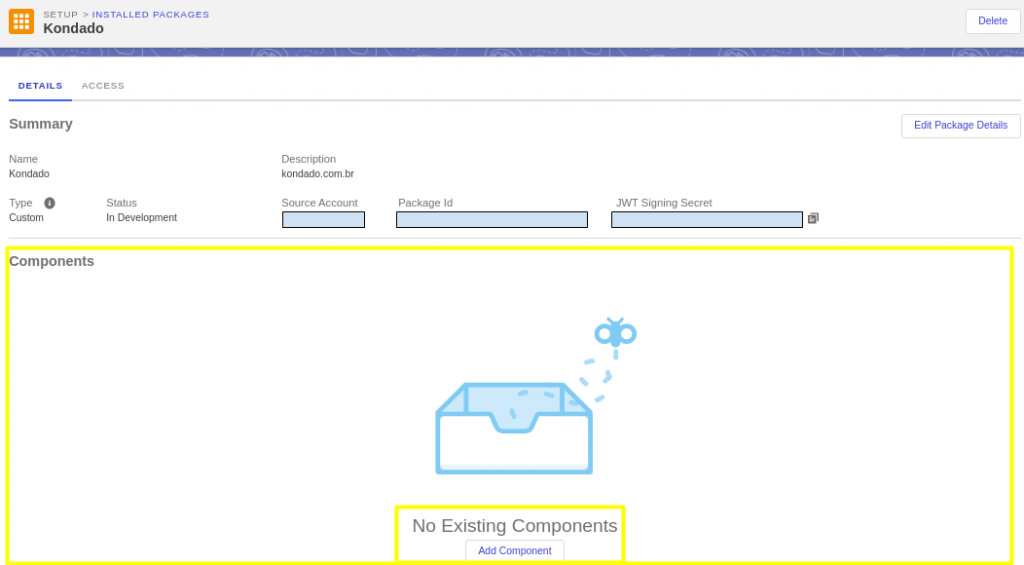
After creating the Installed Package, in the DETAILS tab, find the
Components section and click the Add Component button.
-
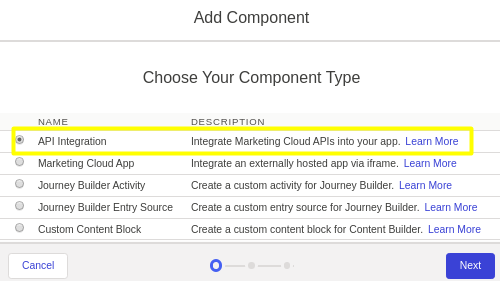
In the first step of the popup, select API Integration and click Next.
-
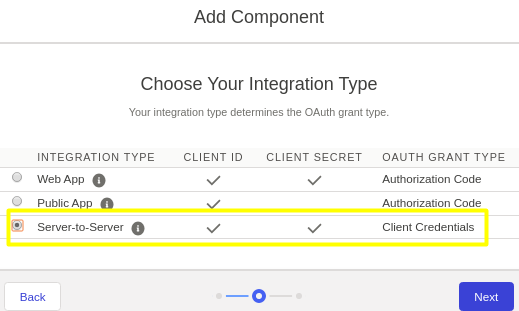
In the next step, choose Server-to-Server and click Next.
-
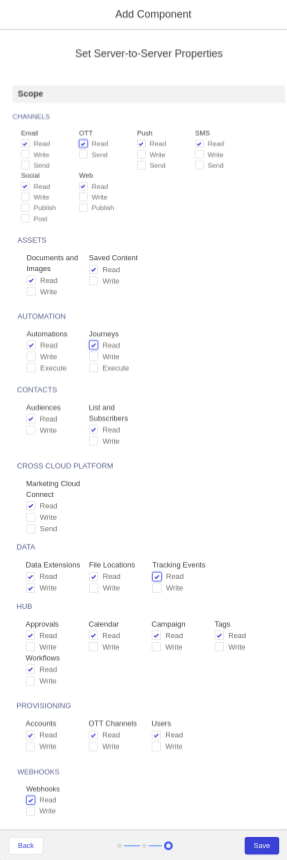
Then select the permissions/properties for the integration with Kondado.
For Data > Data Extensions, select both Read and Write,
and for the other relevant categories select at least Read. After configuring
permissions, click Save.
-
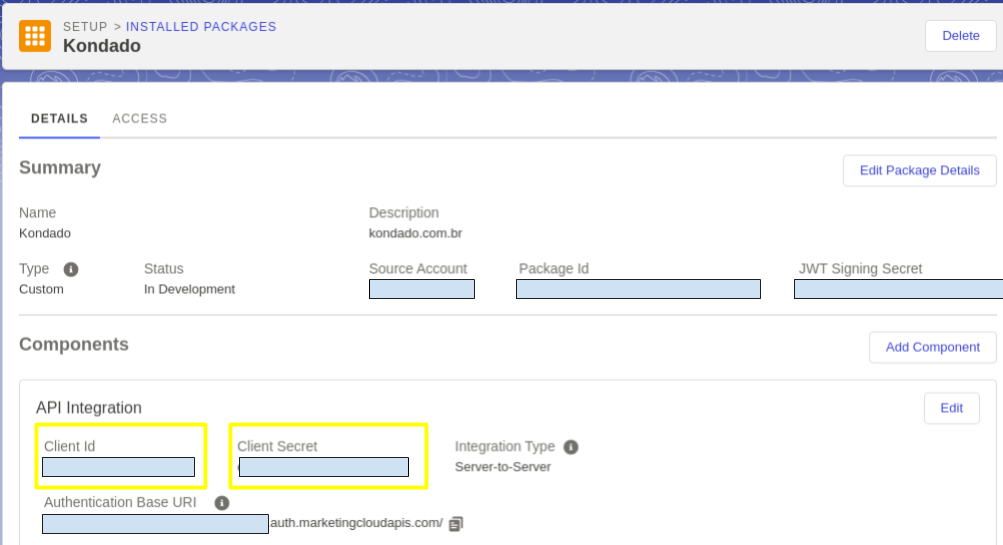
After adding the Component, copy the Client Id and
Client Secret values from the DETAILS > Components > API Integration
section.
- In the Kondado app, go to the Add connectors page and select the Salesforce Marketing Cloud connector.
-
Fill in the connector fields as follows:
- Subdomain: the value identified in step (3).
- Client ID and Client Secret: the values obtained in step (14).
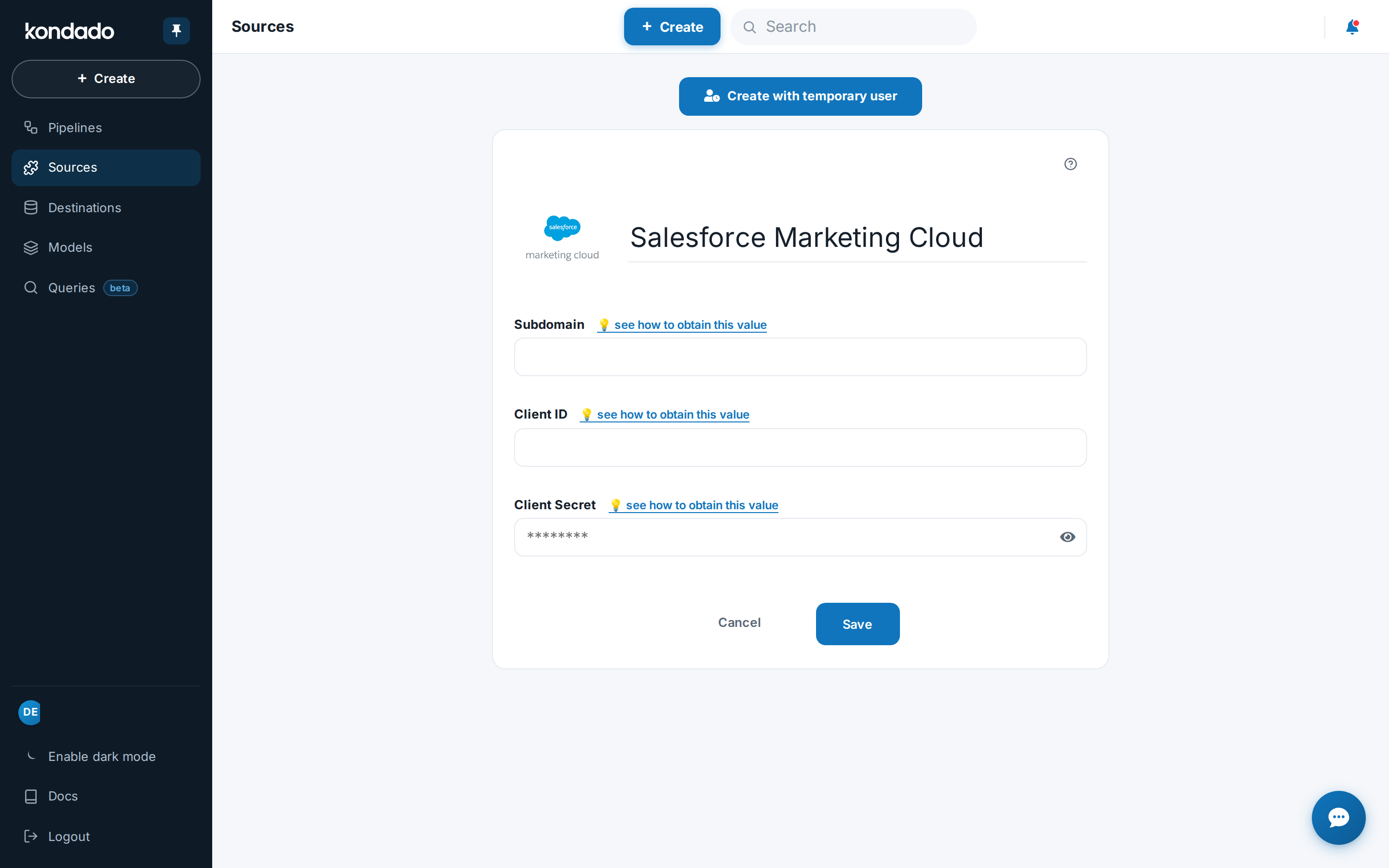
After configuring the connector, click SAVE and you will be ready to start integrating your Salesforce Marketing Cloud data into your Data Warehouse.
Pipelines
Summary
Relationship chart
Click to expand
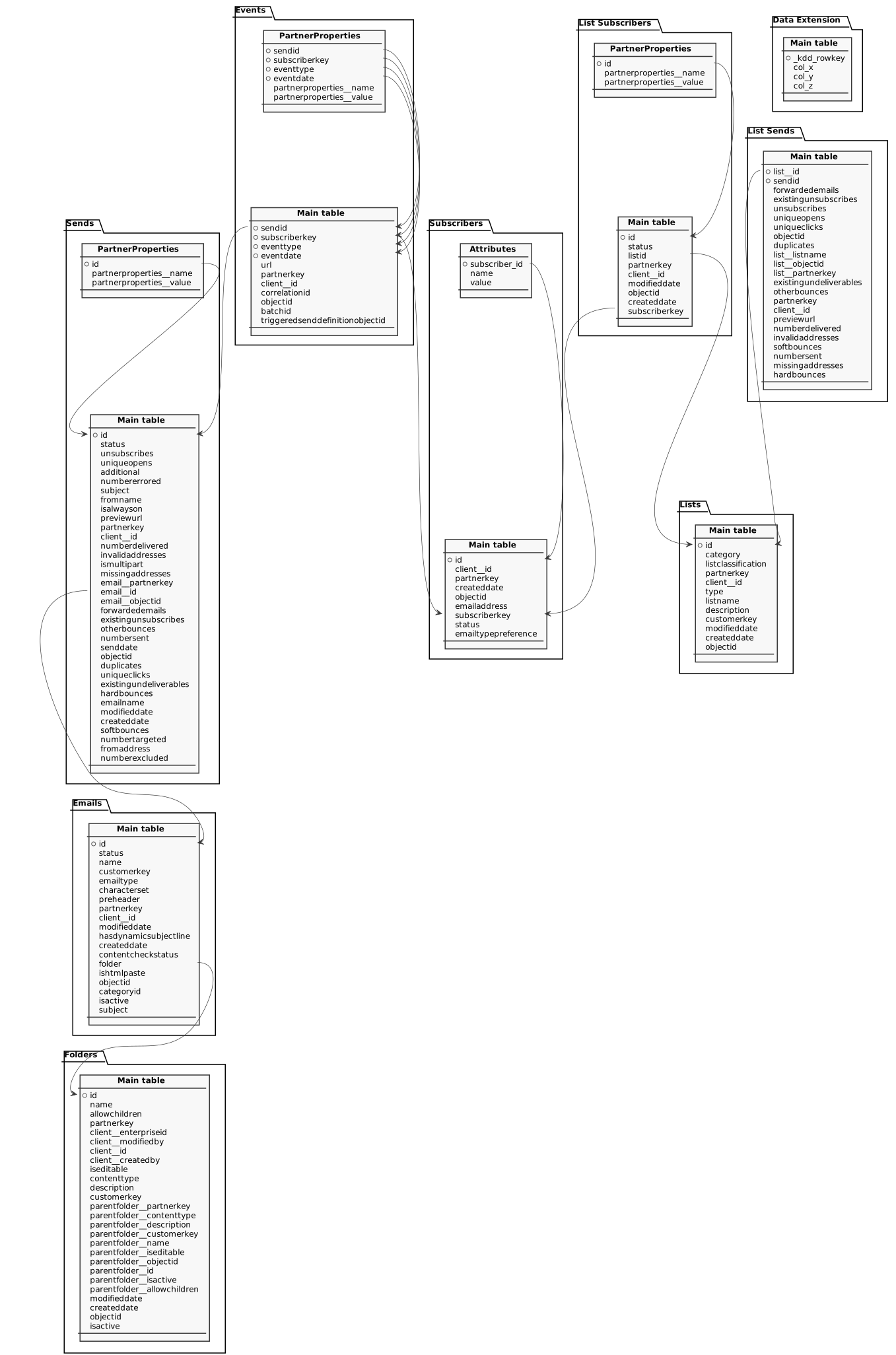
Data Extension
Replication type: Incremental or Full (user configurable)
Parameters:
- Data Extension: Select which data extension you would like to replicate
This pipeline can be full or incremental, and for it to be incremental, the following conditions must be met: (i) there must be a timestamp column (or Date for SFMC) that marks when the record was updated or inserted, and this column must be selected to be sent to the pipeline (if timestamp columns exist but do not behave this way, the pipeline should remain full); (ii) records must not be deleted from the table (if they are deleted, the pipeline should remain full). Once both conditions are satisfied, you can mark the pipeline as incremental in the final step of its creation and also select the incremental column. The incremental update will always read data starting from one day before the savepoint date
Data retrieved from a specific Marketing Cloud data extension.
| Campo | Tipo | |
|---|---|---|
|
text |
[en] Replication key generated for each row. |
|
|
text |
[en] Generic value captured from the data extension (column X). |
|
|
boolean |
[en] Boolean indicator returned from the data extension column Y. |
|
|
timestamp |
[en] Timestamp value returned from the data extension column Z. |
Emails
Replication type: Incremental with update window
Parameters:
- Update window (days): How many days previous to the savepoint records can still be replicated
- Read start date (Savepoint): Initial date for the data replication
Relationships:
Stored Marketing Cloud email definitions with content, folder, and status metadata.
| Campo | Tipo | |
|---|---|---|
|
text |
[en] Read-only identifier for an object. Some objects use the ObjectID property as the Marketing Cloud unique ID |
|
|
text |
[en] Defines status of object. Status of an address. |
|
|
text |
[en] Name of the object or property |
|
|
text |
[en] User-supplied unique identifier for an object within an object type. This property corresponds to the external key assigned to an object in Marketing Cloud. |
|
|
text |
[en] Defines preferred email type |
|
|
text |
[en] Indicates encoding used in an email message. Valid values include |
|
|
text |
[en] Contains text used in preheader of email message on mobile devices |
|
|
text |
[en] Unique identifier provided by partner for an object. This property is accessible only via API |
|
|
text |
[en] Specifies the account ownership and context of an object |
|
|
timestamp |
[en] Indicates the last time object information was modified |
|
|
boolean |
[en] Indicates whether email message contains a dynamic subject line |
|
|
timestamp |
[en] Read-only date and time of the object's creation |
|
|
text |
[en] Indicates whether content validation has completed for this email message |
|
|
text |
[en] Specifies folder information |
|
|
boolean |
[en] Indicates whether email message was created via pasted HTML |
|
|
text |
[en] System-controlled, read-only text string identifier for object |
|
|
text |
[en] Specifies the identifier of the folder containing the email |
|
|
boolean |
[en] Specifies whether the object is active |
|
|
text |
[en] Contains subject area information for a message |
Events
Replication type: Incremental with update window
Parameters:
- Update window (days): How many days previous to the savepoint records can still be replicated
- Read start date (Savepoint): Initial date for the data replication
Relationships:
Main object
Marketing Cloud tracking events such as opens, clicks, and bounces per send and subscriber.
| Campo | Tipo | |
|---|---|---|
|
text |
[en] Contains identifier for a specific send |
|
|
text |
[en] Identification of a specific subscriber |
|
|
text |
[en] The type of tracking event |
|
|
timestamp |
[en] Date when a tracking event occurred |
|
|
text |
[en] Indicates URL included in an event or configuration |
|
|
text |
[en] Unique identifier provided by partner for an object. This property is accessible only via API |
|
|
text |
[en] Specifies the account ownership and context of an object |
|
|
text |
[en] Identifies correlation of objects across several requests |
|
|
text |
[en] System-controlled, read-only text string identifier for object |
|
|
text |
[en] Ties triggered send sent events to other events (like clicks and opens that occur at a later date and time) |
|
|
text |
[en] Identifies the triggered send definition associated with an event. This value also appears in tracking events to allow you to tie those events to a specific triggered send |
marketingcloud_events__PartnerProperties
Additional partner metadata associated with each tracking event.
| Campo | Tipo | |
|---|---|---|
|
text |
[en] Identifier of the send associated with the event. |
|
|
text |
[en] Subscriber key involved in the event. |
|
|
text |
[en] Type of tracking event (open, click, bounce, etc.). |
|
|
timestamp |
[en] Date and time when the event was recorded (UTC). |
|
|
text |
[en] Name of the metadata record supplied by the client and stored by the system |
|
|
text |
[en] Value of the metadata record supplied by the client and stored by the system |
Folders
Replication type: Incremental with update window
Parameters:
- Update window (days): How many days previous to the savepoint records can still be replicated
- Read start date (Savepoint): Initial date for the data replication
Marketing Cloud folder structure with metadata and hierarchy permissions.
| Campo | Tipo | |
|---|---|---|
|
text |
[en] Read-only identifier for an object. Some objects use the ObjectID property as the Marketing Cloud unique ID |
|
|
text |
[en] Name of the object or property |
|
|
boolean |
[en] Specifies whether a data folder can have child data folders |
|
|
text |
[en] Unique identifier provided by partner for an object. This property is accessible only via API |
|
|
text |
[en] Unique identifier provided by partner for an object. This property is accessible only via API |
|
|
text |
[en] Identifier of the user who last modified the record. |
|
|
text |
[en] Identifier of the client account or business unit that owns the record. |
|
|
text |
[en] Identifier of the user who created the record. |
|
|
boolean |
[en] Indicates if the property can be edited by the end-user in the profile center |
|
|
text |
[en] Defines the type of content contained within a folder |
|
|
text |
[en] Describes and provides information regarding the object |
|
|
text |
[en] User-supplied unique identifier for an object within an object type. This property corresponds to the external key assigned to an object in Marketing Cloud |
|
|
text |
[en] Partner key of the parent folder. |
|
|
text |
[en] Content type assigned to the parent folder. |
|
|
text |
[en] Description stored for the parent folder. |
|
|
text |
[en] Customer key (external identifier) of the parent folder. |
|
|
text |
[en] Name of the parent folder. |
|
|
boolean |
[en] Indicates whether the parent folder can be edited. |
|
|
text |
[en] ObjectID of the parent folder. |
|
|
text |
[en] Numeric ID of the parent folder. |
|
|
boolean |
[en] Indicates whether the parent folder is active. |
|
|
boolean |
[en] Indicates whether the parent folder allows child folders. |
|
|
timestamp |
[en] Indicates the last time object information was modified |
|
|
timestamp |
[en] Read-only date and time of the object's creation |
|
|
text |
[en] System-controlled, read-only text string identifier for object |
|
|
boolean |
[en] Specifies whether the object is active |
List Sends
Email send metrics per list, covering deliveries, bounces, unsubscribes, and exclusions.
| Campo | Tipo | |
|---|---|---|
|
text |
[en] ID of the list associated with an object |
|
|
text |
[en] Contains identifier for a specific send |
|
|
float |
[en] Number of emails forwarded for a send |
|
|
float |
[en] Indicates whether unsubscriptions occurred on previous send |
|
|
float |
[en] Indicates the number of unsubscribe events associated with a send |
|
|
float |
[en] Indicates number of unique opens resulting from a triggered send |
|
|
float |
[en] Indicates number of unique clicks on message |
|
|
text |
[en] System-controlled, read-only text string identifier for object |
|
|
float |
[en] Represent the number of duplicate email addresses associated with a send (exists only when a send occurs to multiple lists) |
|
|
text |
[en] Name of the list associated with an object |
|
|
text |
[en] ObjectID of the list associated with an object |
|
|
text |
[en] PartnerKey of the list associated with an object |
|
|
float |
[en] Indicates whether bounces occurred on previous send |
|
|
float |
[en] Specifies number of Other-type bounces in a send |
|
|
text |
[en] Unique identifier provided by partner for an object. This property is accessible only via API |
|
|
text |
[en] Specifies the account ownership and context of an object |
|
|
text |
[en] Indicates URL used to preview the message associated with a send |
|
|
float |
[en] Number of sent emails that did not bounce |
|
|
float |
[en] Specifies the number of invalid addresses associated with a send |
|
|
float |
[en] Indicates number of soft bounces associated with a specific send |
|
|
float |
[en] Number of emails actually sent as part of an email send. This number reflects all of the sent messages and may include bounced messages |
|
|
float |
[en] Specifies number of missing addresses encountered within a send |
|
|
float |
[en] Indicates number of hard bounces associated with a send |
List Subscribers
Replication type: Incremental with update window
Parameters:
- Update window (days): How many days previous to the savepoint records can still be replicated
- Read start date (Savepoint): Initial date for the data replication
Relationships:
Main object
Subscribers associated with lists, including status and reference keys per list.
| Campo | Tipo | |
|---|---|---|
|
text |
[en] Read-only identifier for an object. Some objects use the ObjectID property as the Marketing Cloud unique ID |
|
|
text |
[en] Defines status of a subscriber's address. Valid values include: Active, Bounced, Held, Unsubscribed, Deleted |
|
|
text |
[en] Defines identification for a list the subscriber resides on |
|
|
text |
[en] Unique identifier provided by partner for an object. This property is accessible only via API |
|
|
text |
[en] Specifies the account ownership and context of an object |
|
|
timestamp |
[en] Indicates the last time object information was modified |
|
|
text |
[en] System-controlled, read-only text string identifier for object |
|
|
timestamp |
[en] Read-only date and time of the object's creation |
|
|
text |
[en] Identification of a specific subscriber |
marketingcloud_listsubscribers__PartnerProperties
Partner metadata associated with list subscriber records.
Lists
Replication type: Incremental with update window
Parameters:
- Update window (days): How many days previous to the savepoint records can still be replicated
- Read start date (Savepoint): Initial date for the data replication
Marketing Cloud lists with metadata, external keys, and send status settings.
| Campo | Tipo | |
|---|---|---|
|
text |
[en] Read-only identifier for an object. Some objects use the ObjectID property as the Marketing Cloud unique ID |
|
|
text |
[en] ID of the folder that an item is located in |
|
|
text |
[en] Specifies the classification for a list. Valid values include: ExactTargetList, PublicationList, SuppressionList |
|
|
text |
[en] Unique identifier provided by partner for an object. This property is accessible only via API |
|
|
text |
[en] Specifies the account ownership and context of an object |
|
|
text |
[en] Indicates type of specific list. Valid values include Public, Private, Salesforce, GlobalUnsubscribe, and Master. Indicates the type of email to send to the address. Valid values include Text and HTML |
|
|
text |
[en] Name of a specific list |
|
|
text |
[en] Describes and provides information regarding the object |
|
|
text |
[en] User-supplied unique identifier for an object within an object type. This property corresponds to the external key assigned to an object in Marketing Cloud |
|
|
timestamp |
[en] Indicates the last time object information was modified |
|
|
timestamp |
[en] Read-only date and time of the object's creation |
|
|
text |
[en] System-controlled, read-only text string identifier for object |
Sends
Replication type: Incremental with update window
Parameters:
- Update window (days): How many days previous to the savepoint records can still be replicated
- Read start date (Savepoint): Initial date for the data replication
Relationships:
Main object
Aggregated performance metrics for Marketing Cloud sends, including delivery, bounce, and audience counts.
| Campo | Tipo | |
|---|---|---|
|
text |
[en] Read-only identifier for an object. Some objects use the ObjectID property as the Marketing Cloud unique ID |
|
|
text |
[en] Defines status of object. Status of an address |
|
|
float |
[en] Indicates the number of unsubscribe events associated with a send |
|
|
float |
[en] Indicates number of unique opens resulting from a triggered send |
|
|
text |
[en] The ID for a send that customers use as a campaign ID |
|
|
float |
[en] Number of emails not sent as part of a send because an error occurred while trying to build the email |
|
|
text |
[en] Contains subject area information for a message |
|
|
text |
[en] Specifies the default email message From Name. Deprecated for email send definitions and triggered send definitions |
|
|
boolean |
[en] Indicates whether the request can be performed while the system is is maintenance mode. A value of true indicates that the system processes the request |
|
|
text |
[en] Indicates URL used to preview the message associated with a send |
|
|
text |
[en] Unique identifier provided by partner for an object. This property is accessible only via API |
|
|
text |
[en] Specifies the account ownership and context of an object |
|
|
float |
[en] Number of sent emails that did not bounce |
|
|
float |
[en] Specifies the number of invalid addresses associated with a send |
|
|
boolean |
[en] Indicates whether the email is sent with Multipart/MIME enabled |
|
|
float |
[en] Specifies number of missing addresses encountered within a send |
|
|
text |
[en] Unique identifier provided by partner for an object. This property is accessible only via API |
|
|
text |
[en] Default email address for object. Indicates if subscriber information can be used for email sends |
|
|
text |
[en] ObjectID of the email associated with the send. |
|
|
float |
[en] Number of emails forwarded for a send |
|
|
float |
[en] Indicates whether unsubscriptions occurred on previous send |
|
|
float |
[en] Specifies number of Other-type bounces in a send |
|
|
float |
[en] Number of emails actually sent as part of an email send. This number reflects all of the sent messages and may include bounced messages |
|
|
timestamp |
[en] Indicates the date on which a send occurred. CST (Central Standard Time) value |
|
|
text |
[en] System-controlled, read-only text string identifier for object |
|
|
float |
[en] Represent the number of duplicate email addresses associated with a send (exists only when a send occurs to multiple lists) |
|
|
float |
[en] Indicates number of unique clicks on message |
|
|
float |
[en] Indicates whether bounces occurred on previous send |
|
|
float |
[en] Indicates number of hard bounces associated with a send |
|
|
text |
[en] Specifies the name of an email message associated with a send |
|
|
timestamp |
[en] Indicates the last time object information was modified |
|
|
timestamp |
[en] Read-only date and time of the object's creation |
|
|
float |
[en] Indicates number of soft bounces associated with a specific send |
|
|
float |
[en] Indicates the number of possible recipients for an email send. This number does not include unsubscribed or excluded subscribers for a given list or data extension |
|
|
text |
[en] Indicates From address associated with a object. Deprecated for email send definitions and triggered send definitions |
|
|
float |
[en] Indicates the number recipients excluded froman email send because of a held, unsubscribed, master unsubscribed, or global unsubscribed status |
marketingcloud_sends__PartnerProperties
Partner metadata stored for send records.
Subscribers
Replication type: Incremental with update window
Parameters:
- Update window (days): How many days previous to the savepoint records can still be replicated
- Read start date (Savepoint): Initial date for the data replication
Main object
Marketing Cloud subscribers with identification, status, and delivery preference data.
| Campo | Tipo | |
|---|---|---|
|
text |
[en] Read-only identifier for an object. Some objects use the ObjectID property as the Marketing Cloud unique ID |
|
|
text |
[en] Specifies the account ownership and context of an object. |
|
|
text |
[en] Unique identifier provided by partner for an object. This property is accessible only via API |
|
|
timestamp |
[en] date and time of the objects creation |
|
|
text |
[en] System-controlled, read-only text string identifier for object |
|
|
text |
[en] Contains the email address for a subscriber. Indicates the data extension field contains email address data |
|
|
text |
[en] Identification of a specific subscriber |
|
|
text |
[en] Defines status of object. Status of an address. |
|
|
text |
[en] The format to use when sending an email to a subscriber. Valid values include: HTML, Text |
marketingcloud_subscribers__attributes
Custom attributes linked to each Marketing Cloud subscriber.
Notes
- Part of this documentation was automatically generated by AI and may contain errors. We recommend verifying critical information
Add Salesforce Marketing Cloud as a Kondado data source
Configure a Server-to-Server API integration in Salesforce Marketing Cloud and connect it to Kondado to replicate marketing data to your Data Warehouse.
Extract your Salesforce Marketing Cloud subdomain
Log in at mc.exacttarget.com, copy the generated URL, and extract the subdomain value that appears before ".login" (for example, mcx1072k138f919oowzqewciw06). Save this value for later use in Kondado.
Create an Installed Package with API Integration
In Salesforce Marketing Cloud, go to Setup > Apps > Installed Packages, click "New", enter a name and description (e.g., Kondado and kondado.com.br), and save. Then add an "API Integration" component with "Server-to-Server" type.
Configure API permissions for the integration
Set Data > Data Extensions to Read and Write, and set all other categories (Email, SMS, Push, Social, Automations, Journeys, Tracking Events, etc.) to Read only. Save the component and copy the Client Id and Client Secret from the DETAILS tab.
Add the data source in Kondado
On the Kondado platform, go to the add new sources page and select Salesforce Marketing Cloud. Fill in the Subdomain, Client ID, and Client Secret fields with the values obtained in the previous steps, then click SAVE.
Choose pipeline type and replicate data
After saving, configure your pipeline as integral or incremental. For incremental replication, ensure you have a timestamp column that marks when records are updated or inserted, and that records are not deleted from the table. You can then send your Salesforce Marketing Cloud data to any Kondado destination such as a Data Warehouse or BI tool.
