Mercado Libre Power BI Report: Orders, Ads, Fees, Customers, and Inventory in One View
Sellers on Mercado Libre juggle several screens every day: the orders panel, the ads manager, the fees report, the inventory page, the customer list, and the payouts area. Kondado is releasing a ready-made Mercado Libre report for Power BI that brings all of that into a single view, refreshed automatically at the cadence you choose.
This article explains what the new report covers, why Power BI is a strong fit for this analysis, and how to activate it.
In short: Kondado's ready-made Mercado Libre report for Power BI opens already populated with your sales, ads, customers, products, inventory, and ABC curve. Connect your Mercado Libre account in Kondado, select the template inside the platform, and you get seven combined seller views inside Power BI (Overview, Ads Campaign level, Ads Ad level, Customers, Products, Inventory, and ABC Curve). Kondado replicates the data at the cadence you configure, removing the need for manual spreadsheet exports.
What pain points does the Mercado Libre seller face?
Selling on Mercado Libre means tracking many things at once. The native panels answer each question in isolation, but rarely cross data. In practice, sellers spend hours pulling spreadsheets to answer simple questions:
- How much margin is left after marketplace fees and shipping cost?
- Which sponsored ads drive return on ad spend, and which are burning budget?
- What is the ROAS by campaign and the average ACOS of the operation?
- Which products belong to the A class of the ABC curve and deserve inventory priority?
- Which regions and cities concentrate the most revenue?
- How is inventory distributed by SKU, color, and size?
Without a consolidated report, every one of these questions becomes a recurring manual task. In operations with mid or high order volume, that drains days per month just to keep tracking up to date.
What the new Kondado Mercado Libre report shows on Power BI
The ready-made report brings the views sellers use most into a single workspace, organized by tab.
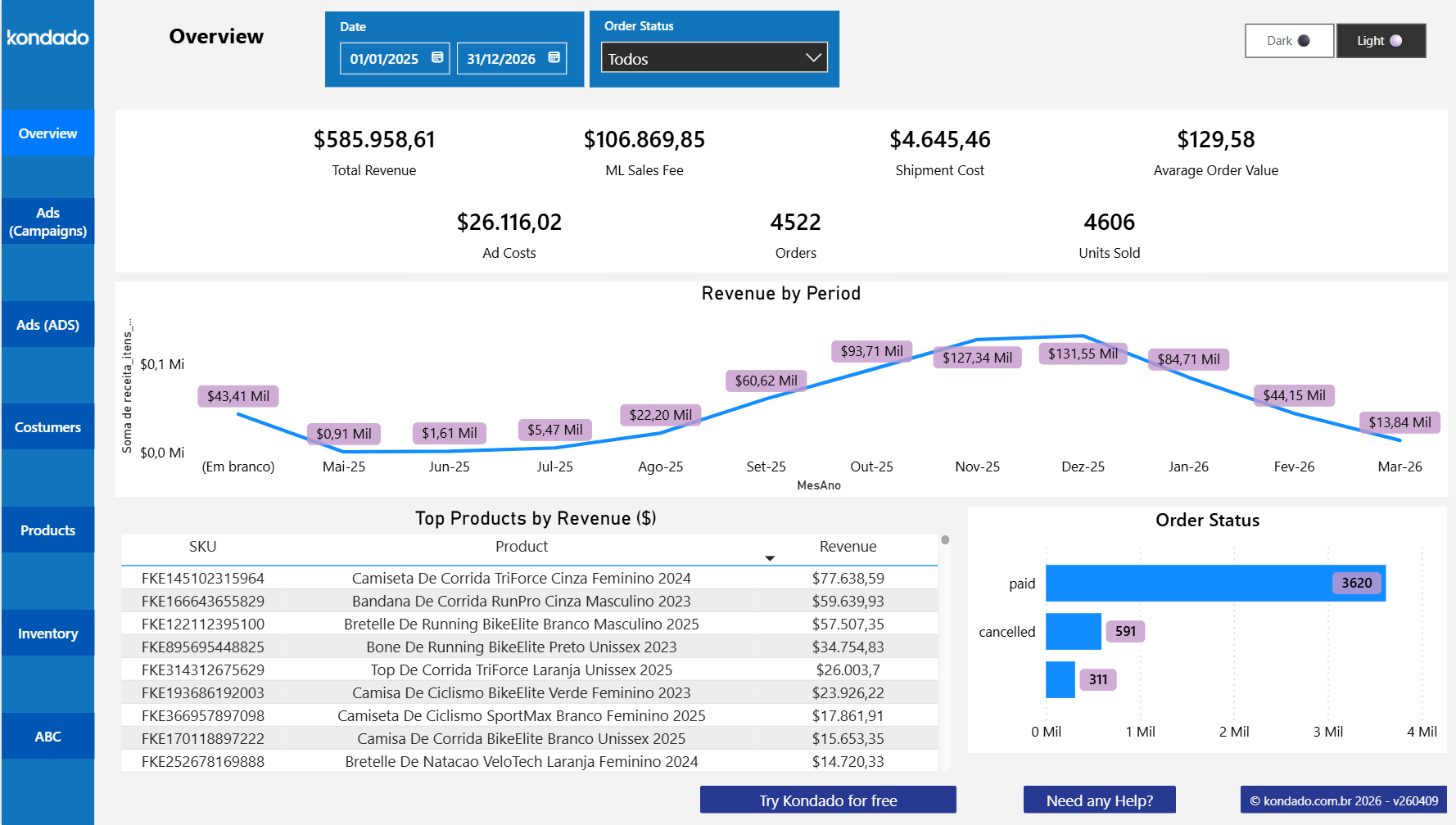
Overview
Top-level view of the operation, with the period KPIs: total revenue, ML sales fee, shipment cost, ad costs, total orders, units sold, and average order value. Includes the revenue-by-period chart, the top products ranking, and the order status breakdown (delivered, in transit, and other statuses).
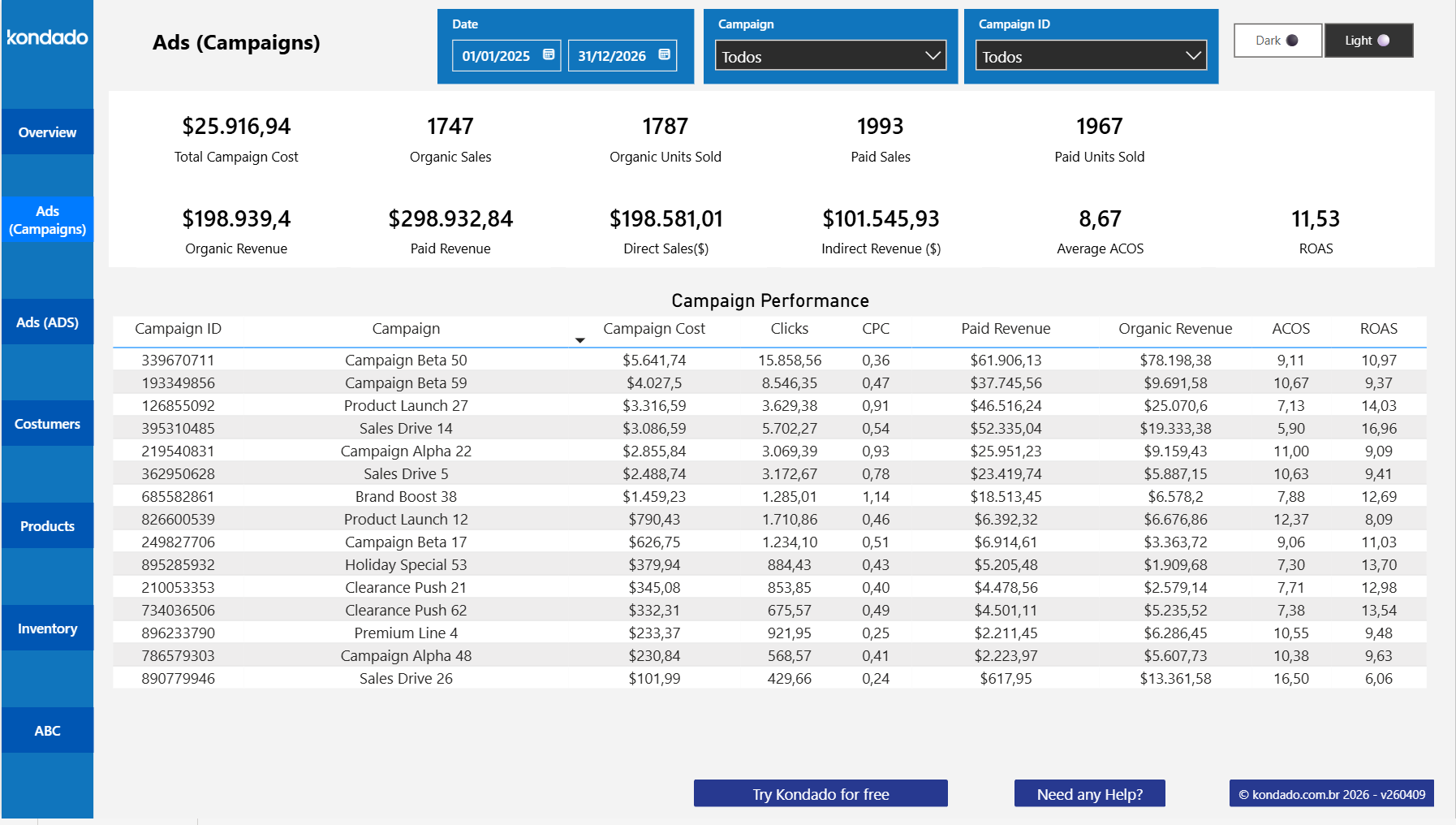
Ads - Campaign level
Campaign-level Mercado Libre Ads performance. Shows campaign cost, paid sales, organic sales, paid revenue, organic revenue, direct and indirect sales, average ACOS, and average ROAS, with a detailed table per campaign ID.
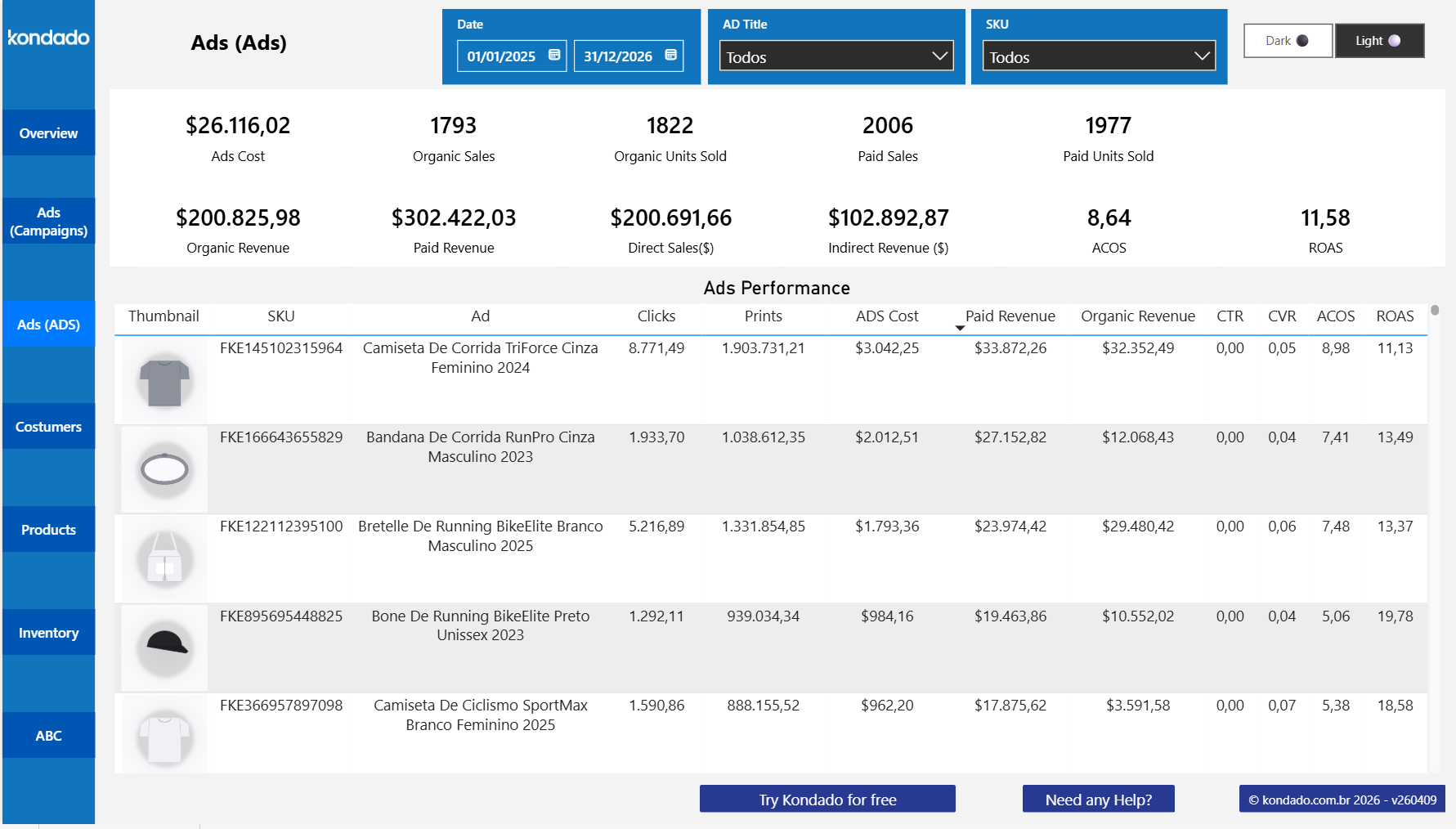
Ads - Ad level
Individual ad granularity: thumbnail, SKU, ad title, clicks, impressions, CTR, CVR, ad cost, paid revenue, organic revenue, ACOS, and ROAS per ad. Useful to spot SKUs with high cost and low return.
Customers
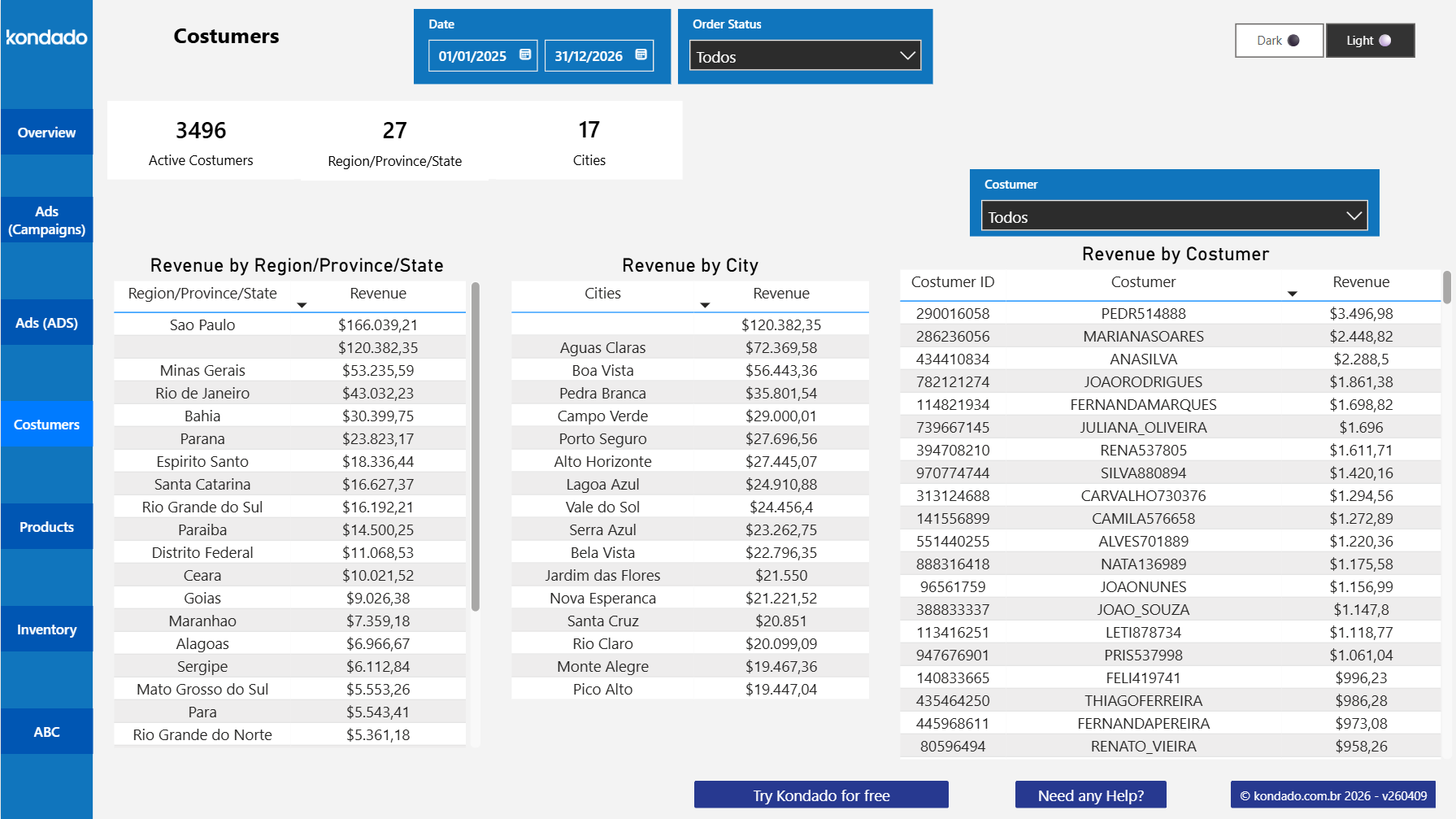
Active base mapping: total active customers, number of regions/states, and cities, plus tables of revenue by region/state, by city, and by customer. Surfaces geographic concentration and strategic accounts.
Products
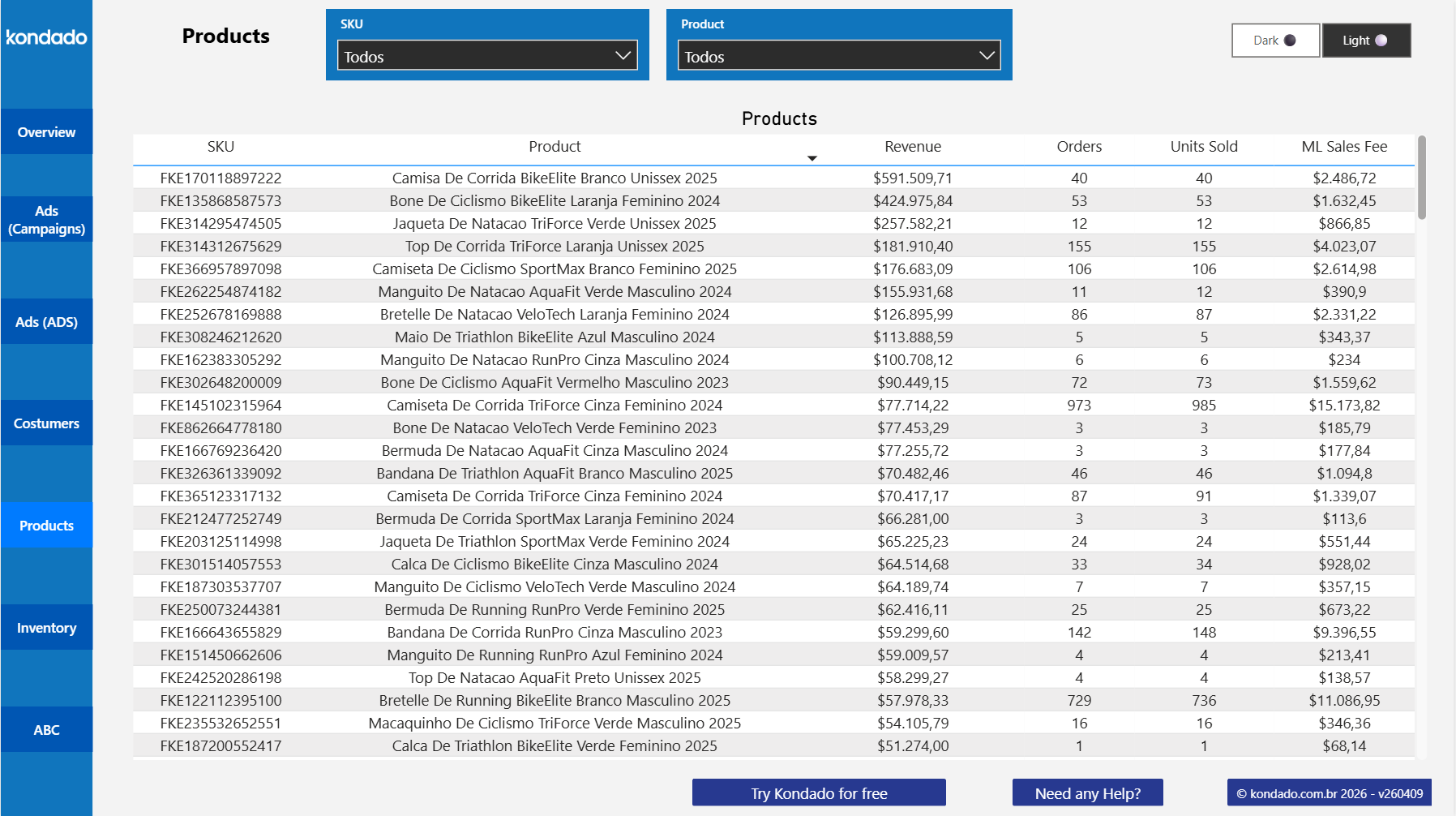
SKU-level view with revenue, orders, units sold, and ML sales fee per product. Direct input for product mix and pricing decisions.
Inventory
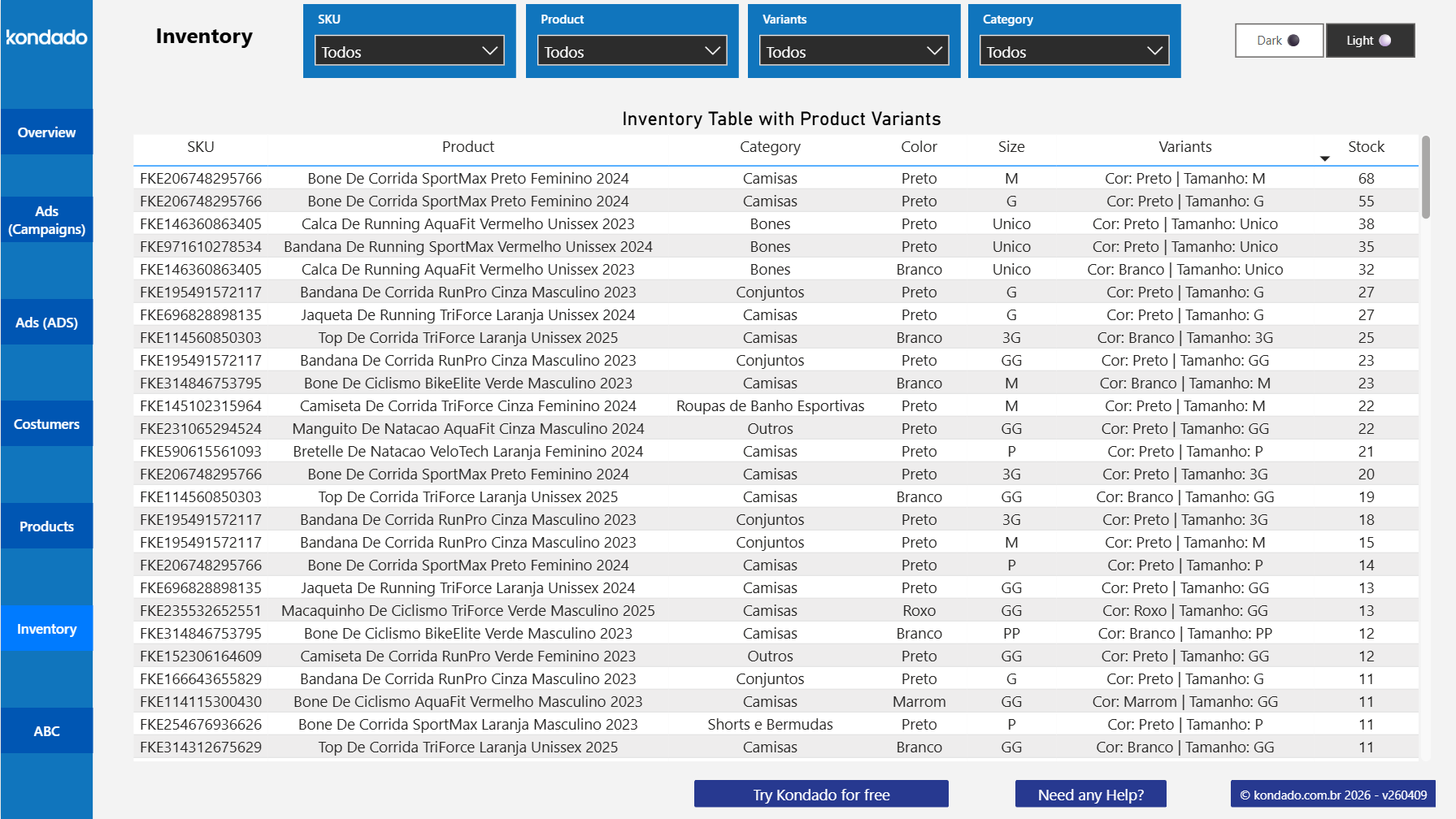
Inventory table with available stock per SKU, product, category, color, size, and full variant string. Useful to quickly identify low-stock products.
ABC Curve
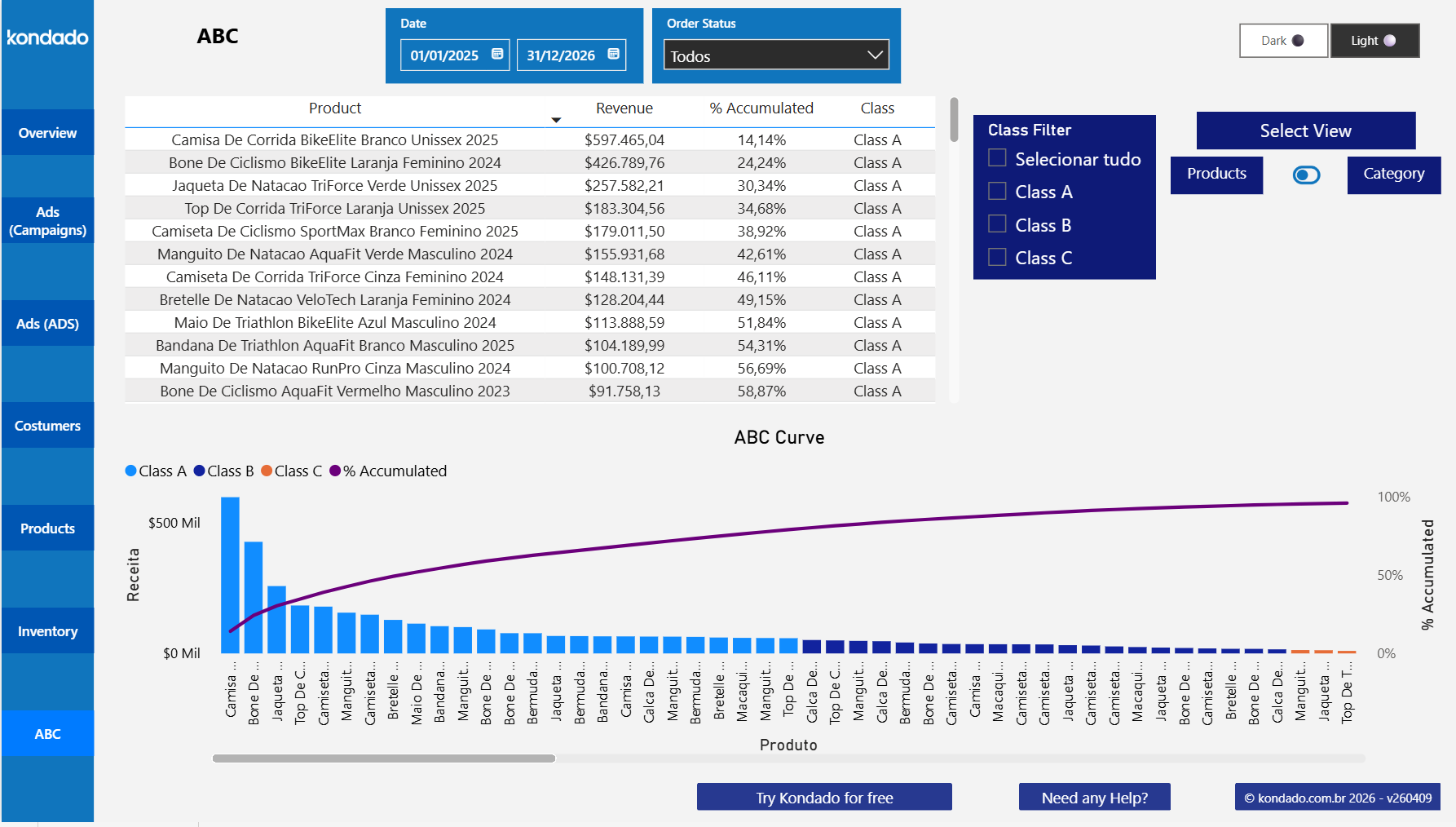
Automatic product classification into classes A, B, and C based on revenue contribution. Includes class filter, toggle between product or category view, accumulated % table, and the ABC chart with revenue bars and Pareto curve.
Why run this analysis on Power BI?
Teams already on the Microsoft stack get immediate gains from Power BI:
- Ecosystem continuity: works alongside Excel, Teams, SharePoint, and Microsoft 365 without extra steps.
- Enterprise sharing: publishing to Power BI Service lets you control permissions by area, team, or client.
- Drill-down and DAX: technical users can customize measures and build extra views on top of the template, while Kondado keeps the report continuously refreshed.
- Mobile and desktop: the same report is available on the Power BI mobile app for operations and on desktop for managers.
For teams standardizing analytics on Microsoft 365, this is a direct use case to get started.
How to activate the Mercado Libre report on Power BI
Activation happens directly inside the Kondado platform, the same way as other Kondado ready-made reports:
- Create your Kondado account. The 14-day free trial includes access to the full catalog of pipelines and ready-made reports.
- Connect Mercado Libre inside Kondado, authorizing access to your seller account through the source onboarding flow.
- Select the template under Create+ > Reports, picking the Mercado Libre report for Power BI. Kondado automatically creates the required pipelines (orders, items, ads, and variants) and the data models that power the report.
- Use "Via Kondado" as the destination when configuring the template. Power BI reads the data already prepared by Kondado, with no need to set up a spreadsheet or database.
- Wait for the initial sync. Once data is ready, you receive an email with the link to your Power BI report, already populated with your Mercado Libre data.
The pipeline runs at the cadence you set inside Kondado, keeping the report up to date without anyone reopening the workbook.
Mercado Libre on both Power BI and Looker Studio
With this release, Mercado Libre joins the set of Kondado data sources with ready-made reports on the two most-used BI tools: Power BI and Looker Studio. Kondado connects data to 26 visualization tools, so teams that prefer another tool can build their own analysis by replicating Mercado Libre to a spreadsheet (Google Sheets, Excel) or analytical database (BigQuery, PostgreSQL, MySQL, SQL Server, Redshift). Teams already using the Looker Studio template replicate the same analysis on Power BI without reconfiguring the pipeline; teams starting now pick the BI tool that fits best.
Both templates run on top of the same data replicated by Kondado, so metrics match across the two views.
Frequently Asked Questions
Is the Mercado Libre Power BI report free?
The report template is free and any Kondado customer can activate it directly in the platform. To populate it, you need an active Mercado Libre pipeline inside a Kondado plan, including the 14-day free trial.
Which Mercado Libre data feeds the report?
The report covers orders, order items, sponsored ads and campaigns (Mercado Libre Ads), marketplace fees, shipping cost, customer data, and inventory by SKU and variant. The full list of available fields is in the Mercado Libre source documentation.
Can I combine Mercado Libre with other sources in the same report?
Yes. You can replicate other Kondado sources to a spreadsheet (Google Sheets, Excel) or analytical database (BigQuery, PostgreSQL, MySQL, SQL Server, Redshift) and join them with Mercado Libre data in Power BI. Common cases: Mercado Libre with an ERP (Bling!, Tiny ERP, Omie, Conta Azul) for order-to-invoice reconciliation; Mercado Libre with Meta Ads or Google Ads to measure the impact of external campaigns on the marketplace channel.
Do I need DAX or Power Query knowledge to use the report?
Not for standard usage. The template ships with the views sellers need most. If you want to customize, add measures, or change visualizations, just open an editable copy in your Power BI workspace from the template Kondado delivers.
How does the ABC Curve tab work?
The ABC tab automatically classifies products into A, B, and C classes based on accumulated revenue contribution (Pareto principle). You can filter by class, toggle between product or category view, and read the ABC chart with revenue bars and the cumulative percentage line. Useful to prioritize inventory, marketing, and account management on class A items.
Does Kondado also offer a Mercado Libre report for Looker Studio?
Yes. Mercado Libre is one of the data sources with ready-made Kondado reports on Power BI and on Looker Studio. The choice between the two depends on the team's preference and the existing stack.
Get started with the Mercado Libre Power BI report
To put the Mercado Libre Power BI report into production, start the Kondado free trial for 14 days and activate the template directly in the platform under Create+ > Reports.
