The Intercom lets tasks from one agent talk to tasks from another agent (or to other tasks of the same agent). This way, one agent can ask another for information or hand work over to it.
Allow the conversation
The message only goes through when both sides allow it:
The agent's Intercom tab has one row per agent, with switches that apply right away:
- In the agent that will speak, turn on Sends it messages in the other agent's row.
- In the agent that will listen, turn on Receives its messages in the first agent's row.
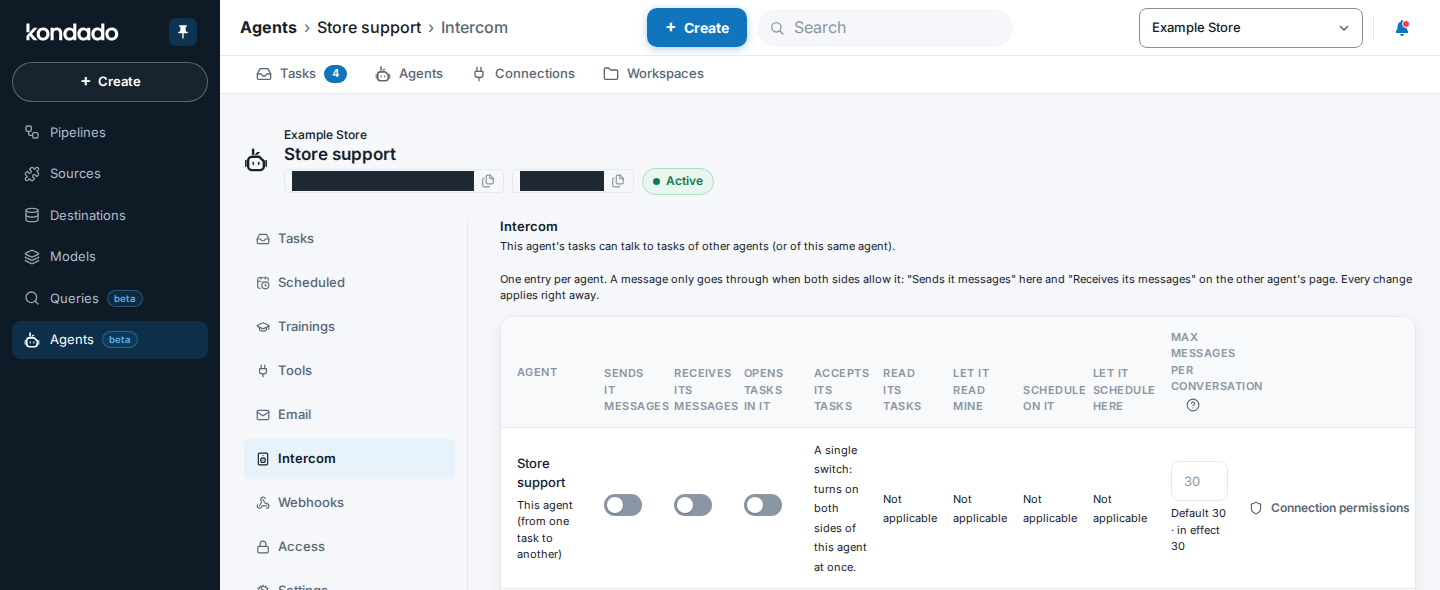
The same row has the other switches: Opens tasks in it, Accepts its tasks, Read its tasks, Let it read mine, Schedule on it and Let it schedule here, plus the Max messages per conversation.
Good to know
- Mentioning another task or agent with @ does not send a message: it is only a reference. Agents talk to each other through the Intercom.
- In the other capabilities settings, you choose what tasks created from the Intercom can use. By default, everything is on.
Make two agents talk through the Intercom
Allow sending in one agent and receiving in the other.
Open the agent that speaks
In the Intercom tab, turn on Sends it messages in the other agent's row.
Open the agent that listens
In the Intercom tab, turn on Receives its messages in the first agent's row.
Set reading and scheduling
Choose whether one can read the other's tasks and schedule on it.