Every operation of every tool has a permission that says whether the agent can run it on its own. This is how you stay in control of what the agent does in your company's systems.
The three options
| Option | What happens |
|---|---|
| Without asking | The agent runs the operation without asking for approval. |
| Always ask | The agent stops and asks for your approval before every run. |
| Denied | The agent never runs the operation. |
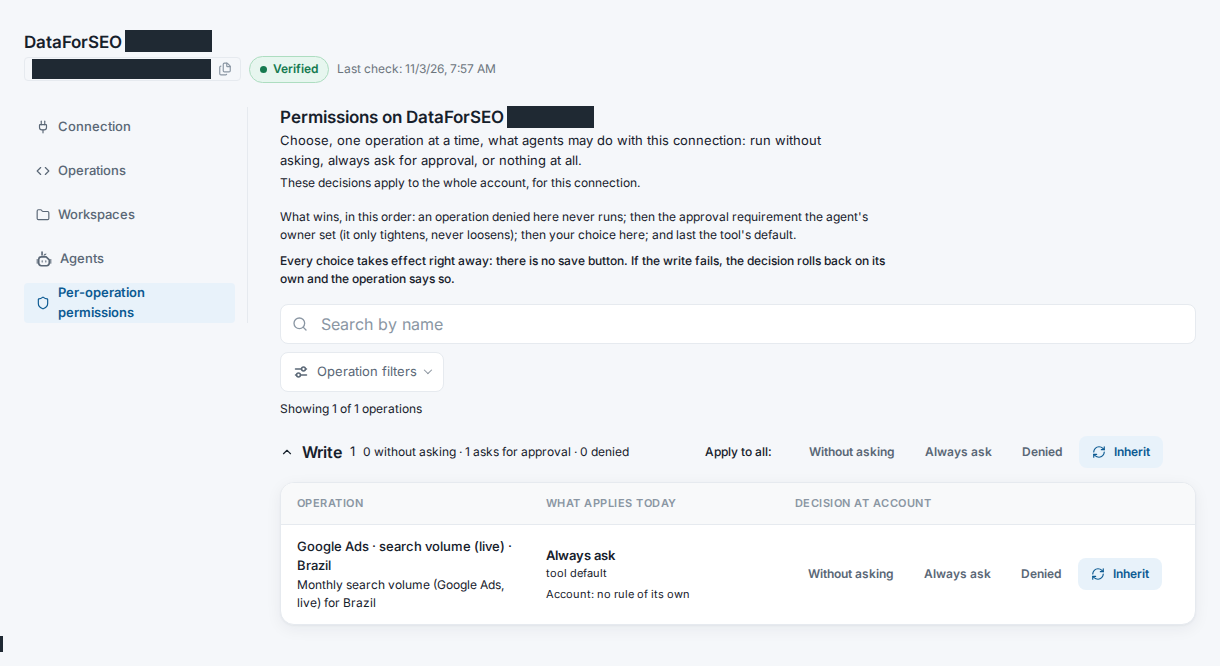
Where to set them
In the connection, the Per-operation permissions tab groups operations into Read, Write and Delete. Each operation also has a fourth option, Inherit, and each group has an Apply to all shortcut.
Permissions can be set at four levels: account, workspace, agent and user. At each level, you can inherit the permissions from the level above. Your choice applies immediately, with no save button.
When choices differ, this order applies:
- A Denied operation never runs.
- The approval requirement set by whoever manages the agent can only make the rule stricter, never looser.
- Then, the choice made on screen applies.
- Without a choice, the tool's default applies.
Approve or deny an action
When an action needs approval, the task waits for authorization and shows an approval card:
- Approve, just this once or always (from then on, the operation runs without asking).
- Deny.
- With several pending requests, approve all or deny all at once.
The Approvals page, inside Agents, gathers the authorization requests from your tasks.
Good to know
- The "always" approval option only appears for whoever manages the agent.
- If you cannot approve, send the request to someone who can: that person receives an email with the request.
- Some actions always ask for approval, whatever the setting.
- In simulations, every action asks for approval.
- When a conversation piles up many writes, each new write starts asking for confirmation.
Set permissions and approve an agent's actions
Choose each operation's permission and answer authorization requests.
Open the permissions
In Agents › Connections, open the connection and go to the Per-operation permissions tab.
Choose the permission
For each operation, choose Without asking, Always ask or Denied, or Inherit.
Answer requests
In the task, use the approval card to approve or deny.
Follow pending requests
Use the Approvals page to see every request.