Creating the data source
Adding the InfluxDB v1.x Connector
Requirements
- InfluxDB v1.x installed and network accessible (see our IPs List)
- Access credentials (username and password) with read permissions
- Database name to be synchronized
Instructions
- Go to Data Sources and click "Add Source"
- Select InfluxDB v1.x from the connector list
- Fill in the connection parameters:
- Host: InfluxDB server address (e.g., influxdb.example.com)
- Port: Connection port (default: 8086 without SSL, 443 with SSL)
- Use SSL: Select "On" if the server uses HTTPS, "Off" for HTTP
- Database: Database name in InfluxDB
- User: Username for authentication
- Password: Authentication password
- Click Test Connection to verify the parameters are correct
- After successful test, click Save
Available integration types
The InfluxDB v1.x connector offers different extraction strategies:
- Measurement Data (Incremental): Extracts data from a measurement (table) based on a time savepoint, allowing you to load only new data since the last execution. Supports lookback window to capture late-arriving data.
- Measurement Data Rolling Window: Extracts the last N days of data in each execution, useful for dashboards that need a moving window of recent data.
Data aggregation
You can choose different time granularity levels:
- Raw (timestamp-level): Raw data, no aggregation
- 1 second, 1 minute, 1 hour, 1 day: Data aggregated by period, with MEAN, MIN, MAX, SUM, and COUNT calculations for all numeric fields
Pipelines
Summary
Relationship chart
Click to expand
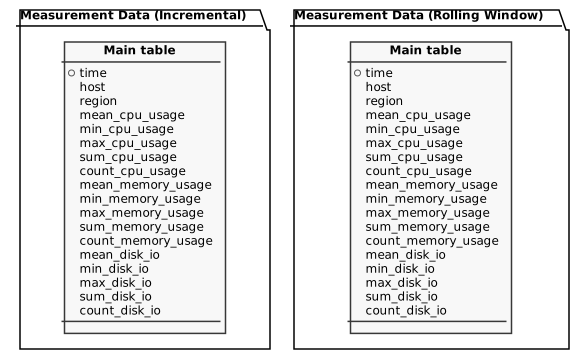
Measurement Data (Incremental)
Replication type: Incremental
Parameters:
- Read start date (Savepoint): Starting date to filter results
- Lookback Window (hours): How many hours to look back from savepoint to catch late-arriving data (0 = no lookback)
- Granularity: Time aggregation level
- Measurement: Select the InfluxDB measurement (table)
| Campo | Tipo | |
|---|---|---|
|
timestamp |
[pt] Timestamp agregado por hour |
|
|
text |
[en] Tag: host |
|
|
text |
[en] Tag: region |
|
|
float |
[en] MEAN of cpu_usage aggregated by time |
|
|
float |
[en] MIN of cpu_usage aggregated by time |
|
|
float |
[en] MAX of cpu_usage aggregated by time |
|
|
float |
[en] SUM of cpu_usage aggregated by time |
|
|
float |
[en] COUNT of cpu_usage aggregated by time |
|
|
float |
[en] MEAN of memory_usage aggregated by time |
|
|
float |
[en] MIN of memory_usage aggregated by time |
|
|
float |
[en] MAX of memory_usage aggregated by time |
|
|
float |
[en] SUM of memory_usage aggregated by time |
|
|
float |
[en] COUNT of memory_usage aggregated by time |
|
|
int |
[en] MEAN of disk_io aggregated by time |
|
|
int |
[en] MIN of disk_io aggregated by time |
|
|
int |
[en] MAX of disk_io aggregated by time |
|
|
int |
[en] SUM of disk_io aggregated by time |
|
|
int |
[en] COUNT of disk_io aggregated by time |
Measurement Data (Rolling Window)
Replication type: Incremental
Parameters:
- Window Size (days): How many days of data to extract in each execution
- Granularity: Time aggregation level
- Measurement: Select the InfluxDB measurement (table)
| Campo | Tipo | |
|---|---|---|
|
timestamp |
[pt] Timestamp agregado por hour |
|
|
text |
[en] Tag: host |
|
|
text |
[en] Tag: region |
|
|
float |
[en] MEAN of cpu_usage aggregated by time |
|
|
float |
[en] MIN of cpu_usage aggregated by time |
|
|
float |
[en] MAX of cpu_usage aggregated by time |
|
|
float |
[en] SUM of cpu_usage aggregated by time |
|
|
float |
[en] COUNT of cpu_usage aggregated by time |
|
|
float |
[en] MEAN of memory_usage aggregated by time |
|
|
float |
[en] MIN of memory_usage aggregated by time |
|
|
float |
[en] MAX of memory_usage aggregated by time |
|
|
float |
[en] SUM of memory_usage aggregated by time |
|
|
float |
[en] COUNT of memory_usage aggregated by time |
|
|
int |
[en] MEAN of disk_io aggregated by time |
|
|
int |
[en] MIN of disk_io aggregated by time |
|
|
int |
[en] MAX of disk_io aggregated by time |
|
|
int |
[en] SUM of disk_io aggregated by time |
|
|
int |
[en] COUNT of disk_io aggregated by time |
Notes
- Part of this documentation was automatically generated by AI and may contain errors. We recommend verifying critical information
