Microsoft Advertising (Bing)
Creating the data source
Requirements
- A work or school account linked to the Microsoft Advertising account must be used to authenticate the connector
Instructions
- Log in to Kondado, click the '+ Create' button, then select 'Source' > ‘Microsoft Advertising’
- Click the 'Sign in with Microsoft' button
- Click Accept in the next page
- You must use a work or school account - personal accounts are not suported

- Back in Kondado, click the Save button
View the reference for reports, metrics and dimensions
Pipelines
Summary
Relationship chart
Click to expand
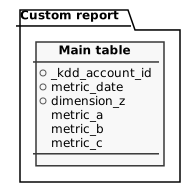
Custom report
To build a Microsoft Ads Custom Report pipeline, the following parameters are available:
- Accounts: Include one or multiple advertising accounts in the pipeline. If left blank, all ad accounts linked to your data source will be used. All pipelines include the following fields by default:
_kdd_account_id: The account ID that represents the unique identifier of the account within the system_kdd_account_name: The name of the account as it is registered or displayed within the system.
- Report: Select a report to base your pipeline on. More details about available reports can be found in our reference
- Time Aggregation: Defines the date aggregation of the report. A
metric_datefield is automatically added, depending on the selected aggregation. Note that not all reports, metrics, and dimensions support every aggregation type:- Daily: Uses the actual date. Sets replication type to incremental.
- Weekly: Uses the Sunday of the given week. Sets replication type to incremental.
- Monthly: Uses the first day of the month. Sets replication type to incremental.
- Hourly: Uses the actual date, adding a
timeperiodcolumn representing a timestamp withmetric_dateplus hour or plus hour and minute, depending on the report. Sets replication type to incremental. - Summary: No date column is added; data represents the lifetime. Sets replication type to integral.
- Default: No date column is added; data represents the lifetime. Sets replication type to integral.
- Savepoint: Required for incremental replication. Defines the start date for data reading
- Update Window: Required for incremental replication. Defines how many days before the savepoint the data should be refreshed
- Dimensions: Specifies the report's dimensions. All available dimensions are listed in our reference. Note that not all dimensions, metrics, and time aggregations are compatible with one another. The user interface will adjust available options based on your selections.
- Metrics: Specifies the report's metrics. All available metrics are listed in our reference. Note that not all dimensions, metrics, and time aggregations are compatible with one another. The user interface will adjust available options based on your selections
Notes
- Some metrics, dimensions and time aggregations cannot be combined, so during the process of creating the pipeline, the list of possible metrics and dimensions will constantly reload for a few seconds to reflect the possible selections
- The report might include results with “zero impressions”, depending on some criteria
- Data is reported in UTC timezone
- Incomplete data might be returned, that's why the update window is important
- The data retention period provided by the API may vary depending on the type of report and time aggregation. Generally, for the Hourly period, data is available for up to 6 months in the past, and for the other reports, data is available for 36 months. See more here
