For endpoints that require a pipeline_id, you can retrieve it in our app directly from the Pipeline URL.
Our Pipeline URLs follow the format below:
https://app.kondado.com.br/pipelines/:pipeline_id
Run a Pipeline
Description
Sends a Pipeline to the execution queue — it performs the same action as a user clicking "RUN" in our app.
Method
POST
Endpoint
/pipelines/:pipeline_id/run
URL Parameters
None
Example Response
{
    "success": true
}
Response Description
The response only returns a success value (true or false), indicating the operation status. If success = false, an error key will be included in the JSON explaining what happened.
Get Pipeline Status
Description
Returns the status of a given Pipeline using its pipeline_id.
Method
GET
Endpoint
/pipelines/:pipeline_id/status
URL Parameters
None
Example Response
{
    "2040": {
        "status": "active",
        "is_running": false,
        "is_active": true,
        "is_blocked": false,
        "raw_msg": null
    }
}
Response Description
The response will be a JSON object where the Pipeline ID is used as the key of a nested JSON object containing the fields described below.
status
Status description. Possible values are:
- running: The Pipeline is currently running.
- scheduled: The Pipeline is queued for execution.
- active: The Pipeline is not running and not queued, but is active.
- not_active: The Pipeline is not running, not queued, and is disabled.
- building_tables: The Pipeline is (re)creating tables after creation or advanced editing.
- error_building_tables: An error occurred while (re)creating the Pipeline tables (see
raw_msg). - too_many_consecutive_failed_builds: The Pipeline has a high error rate in its most recent executions (see
raw_msg). - too_many_consecutive_failed_builds__blocked: The Pipeline was automatically disabled.
raw_msg
If the Pipeline encounters any issues, this field will contain the error description (for example, if we are unable to connect to your source or destination).
is_running
Boolean indicating whether the Pipeline is currently running (status = running).
is_active
Boolean indicating whether the Pipeline is active (status = active) or disabled (status = not_active).
is_blocked
Boolean indicating whether the Pipeline is blocked for any reason. Reasons that may cause a Pipeline to be blocked include:
- Building tables: Initial status (lasting only a few seconds) indicating that Kondado is creating tables in the destination.
- Multiple consecutive failures: Indicates that the Pipeline was disabled after multiple consecutive failures.
Duplicate a Pipeline
Description
Allows the creation of a new Pipeline based on an existing one.
- The newly created Pipeline will inherit the same savepoint and execution frequency as the original Pipeline.
- Pipelines created this way will not include free record days.
Method
POST
Endpoint
/pipelines
URL Parameters
None
Request Body (payload)
The request body must be a JSON object with the following attributes:
pipeline_id
- Description: ID of the Pipeline used as the base for duplication.
- Required: Yes
- Format: integer number
dest_collection_id
- Description: ID of the new destination. It must be of the same type used in the base Pipeline and must be active.
- Required: Yes
- Format: integer number
src_collection_id
- Description: ID of the new source. It must be of the same type used in the base Pipeline and must be active.
- Required: Yes
- Format: integer number
client_id
- Description: ID of the account where the new Pipeline will be created. If not provided, the Pipeline will be created in the same account as the base Pipeline. You can obtain your account ID at
app.kondado.com.br/account— it is the ID of one of your associated teams in the formatYYYYY-X, whereYYYYYis the ID you are looking for. - Required: No
- Format: integer number
full_tables
- Description: JSON object where table paths are used as keys and new table names as values. The paths for each table can be obtained when performing an advanced edit on the Pipeline, at the moment you name the tables (see image below). The main table must be informed with an empty string path (
""). All paths present in the Pipeline must be provided. The created Pipeline will not validate or warn if tables with the provided names already exist in the destination — they will simply be recreated with the new configuration. - Required: Yes
- Format: JSON
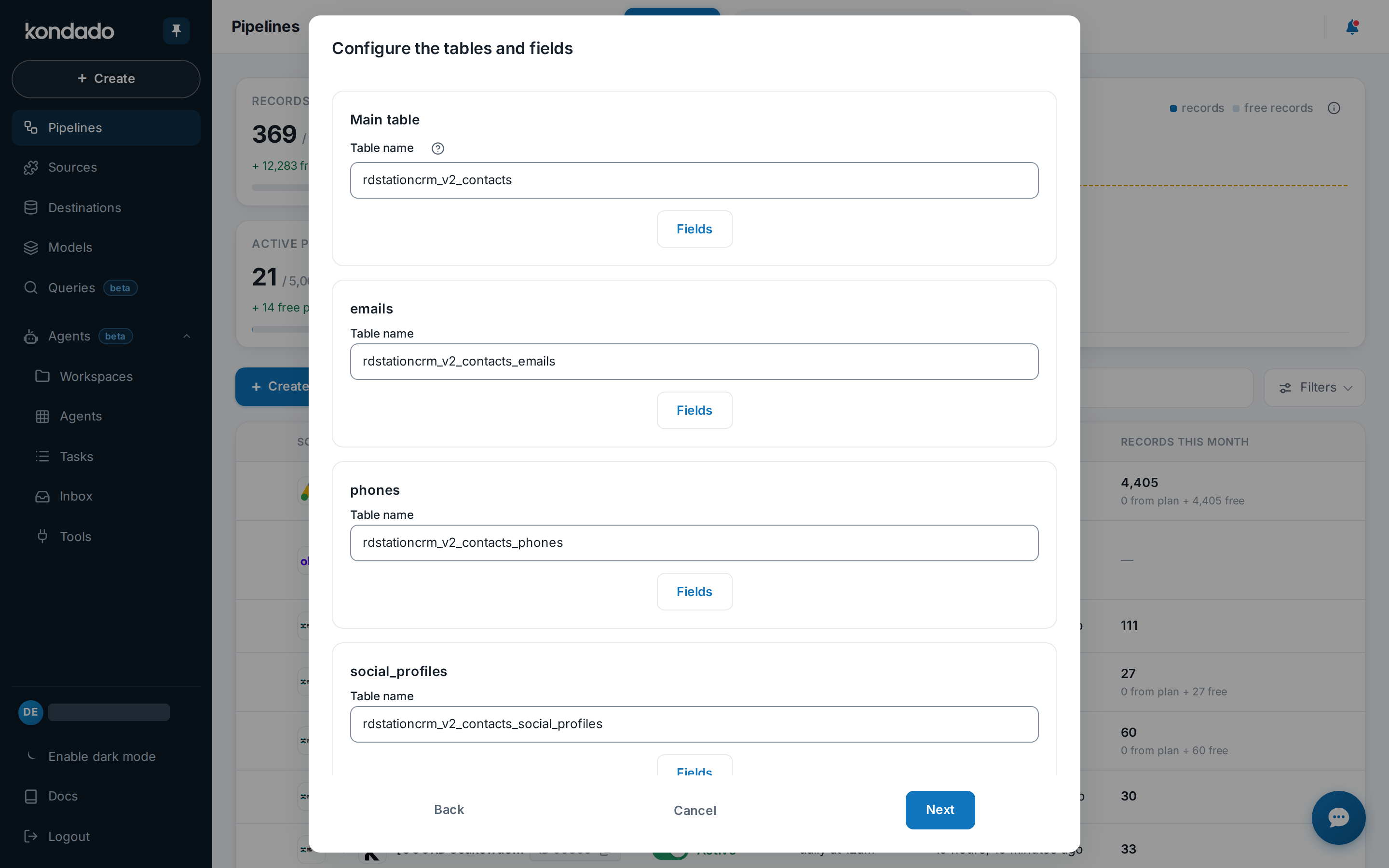
Example of how to locate table paths. In this case, the main tab has the path "", and the second table has the path "statuses".
deltas_tables
- Description: JSON object where table paths are used as keys and new delta table names as values. The paths for each table can be obtained when performing an advanced edit on the Pipeline, at the moment you name the tables. The main table must be informed with an empty string path (
""). If provided, all paths present in the Pipeline must be included. The created Pipeline will not validate or warn if tables with the provided names already exist in the destination — they will simply be recreated with the new configuration. - Required: No
- Format: JSON
execute_immediately
- Description: Indicates whether the Pipeline should be executed immediately after creation. Accepted values:
Yfor yes andNfor no. - Required: Yes
- Format: String (
"Y"or"N")
name
- Description: Name of the new Pipeline.
- Required: No — if not provided, the original Pipeline name will be used.
- Format: String
overwrite_parameters
- Description: JSON object containing parameters to be overridden in the new Pipeline. The parameter must exist in the base Pipeline. Each Pipeline has a distinct set of parameters, so please contact our support team for more information about valid parameter names and formats. The parameter must be filled in the base Pipeline in order to be used in the new Pipeline (even if with a different value).
- Required: No
- Format: JSON
Example Request Body
{
    "pipeline_id": 12345821,
    "dest_collection_id": 678910,
    "src_collection_id": 877291,
    "client_id": 732829,
    "full_tables": {
        "": "new_bling_products_stock",
        "stock_deposits": "new_products_stock_deposits"
    },
    "deltas_tables": {
        "": "new_bling_products_stock",
        "stock_deposits": "new_products_stock_deposits"
    },
    "execute_immediately": "Y",
    "name": "New Pipeline",
    "overwrite_parameters": {
        "__kdd_ad_account": ["act_yyyyyyyyyy", "act_xxxxxxxxxxxxxx"]
    }
}
Response Description
The response will be a JSON object containing the ID of the newly created Pipeline.
Example Response
{
    "success": true,
    "data": {
        "success": true,
        "data": {
            "new_pipeline_id": 123456789
        }
    }
}
Manage Pipelines via the Kondado API
Use the Kondado API to run, monitor status, and duplicate Pipelines programmatically.
Retrieve your pipeline_id
Open the Pipeline in the Kondado app and copy the ID from the URL, which follows the format https://app.kondado.com.br/pipelines/:pipeline_id. You will need this ID for all subsequent API operations.
Run a Pipeline on demand
Send a POST request to /pipelines/:pipeline_id/run to queue the Pipeline for execution. Note that this endpoint is unavailable for customers on Essentials plans with frequency limitations. The response returns a success boolean indicating whether the operation succeeded.
Monitor Pipeline execution status
Send a GET request to /pipelines/:pipeline_id/status to check whether the Pipeline is running, scheduled, active, or blocked. Review the raw_msg field for error details if issues occur, and use is_running, is_active, and is_blocked booleans for quick state checks.
Prepare duplication parameters
Before duplicating, identify the new source and destination collection IDs (same types as the original, both active), and map all table paths from an advanced edit of the base Pipeline. Define full_tables with new table names and optionally deltas_tables, using empty string "" for the main table path.
Duplicate the Pipeline via POST
Send a POST to /pipelines with pipeline_id, dest_collection_id, src_collection_id, full_tables, and execute_immediately ("Y" or "N"). Optionally include name, client_id, deltas_tables, or overwrite_parameters. The response returns the new_pipeline_id.
Frequently asked questions
pipeline_id directly from the Pipeline URL in the Kondado app. The URL format is https://app.kondado.com.br/pipelines/:pipeline_id — the numeric ID at the end is what you need for all endpoints that require it.success is false, the response includes an error key with a description of what happened. Common causes include plan restrictions — the run endpoint is not available for customers on Essentials plans with frequency limitations — or issues with the Pipeline's source or destination connectivity.is_blocked: true) cannot execute. This occurs during brief table creation periods or when the Pipeline was automatically disabled after too_many_consecutive_failed_builds. Check raw_msg for the specific reason and resolve the underlying connection or configuration issue before reactivating.dest_collection_id must be of the same type as the original Pipeline's destination, and both the new source and destination must be active. You can explore available destination types and integrations to understand what is supported.full_tables JSON object mapping every table path (including "" for the main table) to new table names. The duplicated Pipeline will not warn if tables already exist — it will recreate them with the new configuration. Optionally provide deltas_tables using the same path structure.overwrite_parameters field in your duplication request body. The parameter must already exist in the base Pipeline and be filled there (even with a different value). Because valid parameter names and formats vary by Pipeline, contact Kondado support for guidance on your specific use case.