Creating the data source
How to connect
- In Kondado, add a new RD Station CRM data source.
- Click Continue: you will be redirected to RD Station to sign in to your account.
- Sign in with your RD Station CRM user and, if the account has more than one RD product, choose RD Station CRM.
- Authorize Kondado's access. You are sent back to Kondado with the data source saved.
- Done: now create the integrations you need.
Important
- We recommend authorizing with a user that has the administrator profile in RD Station CRM.
- Kondado only reads your data. Nothing is created or changed in your CRM.
- There is no token to generate or copy: Kondado renews the authorization automatically. If it is revoked in RD Station, just edit the data source and authorize again.
Pipelines
Summary
Relationship chart
Click to expand
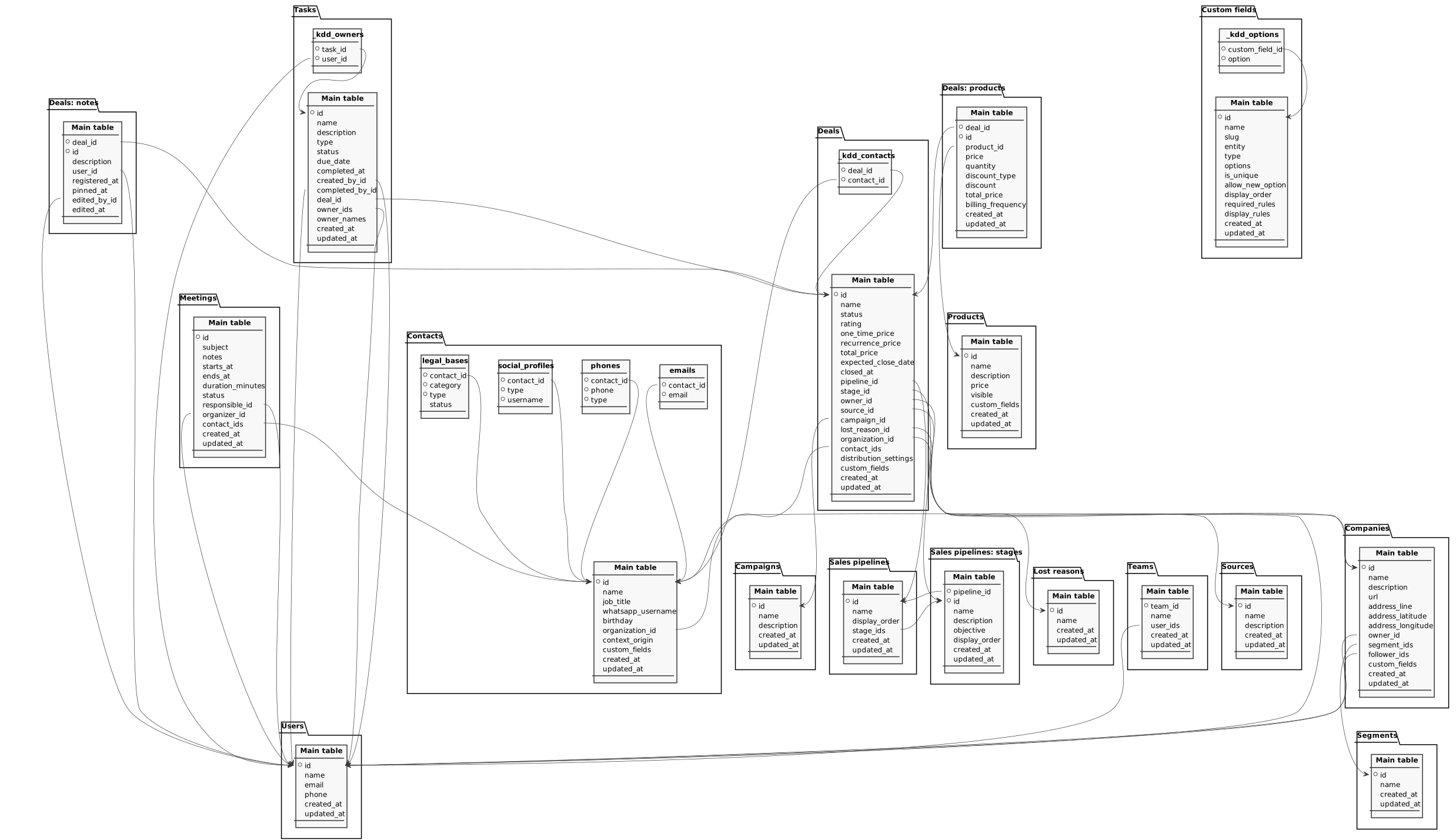
Campaigns
This pipeline is free
Replication type: Full
Companies
Replication type: Incremental or Full (user configurable)
Parameters:
- Read start date (Savepoint): Initial date to replicate data
Relationships:
Companies (organizations) registered in RD Station CRM, with address, owner, segments and custom fields.
| Field | Type | |
|---|---|---|
|
text |
[en] Company identifier. |
|
|
text |
[en] Company name. |
|
|
text |
[en] Company description. |
|
|
text |
[en] Company website. |
|
|
text |
[en] Company address. |
|
|
float |
[en] Latitude of the company address. |
|
|
float |
[en] Longitude of the company address. |
|
|
text |
[en] Identifier of the user who owns the company. |
|
|
text |
[en] Comma-separated identifiers of the company segments. |
|
|
text |
[en] Comma-separated identifiers of the users following the company. |
|
|
text |
[en] All of the company custom fields, as JSON. The following columns bring each custom field separately. |
|
|
timestamp |
[en] Timestamp when the company was created. |
|
|
timestamp |
[en] Timestamp of the last update of the company. |
Contacts
Replication type: Incremental or Full (user configurable)
Parameters:
- Read start date (Savepoint): Initial date to replicate data
Relationships:
Main object
Contacts (people) registered in RD Station CRM. E-mails, phones, social profiles and legal bases live in the related tables.
| Field | Type | |
|---|---|---|
|
text |
[en] Contact identifier. |
|
|
text |
[en] Contact name. |
|
|
text |
[en] Contact job title. |
|
|
text |
[en] Contact WhatsApp username. |
|
|
date |
[en] Contact birthday. |
|
|
text |
[en] Identifier of the company the contact belongs to. |
|
|
text |
[en] Origin of the contact record within RD Station CRM. |
|
|
text |
[en] All of the contact custom fields, as JSON. The following columns bring each custom field separately. |
|
|
timestamp |
[en] Timestamp when the contact was created. |
|
|
timestamp |
[en] Timestamp of the last update of the contact. |
rdstationcrm_v2_contacts_emails
E-mails of RD Station CRM contacts. A contact can have more than one e-mail, and each becomes a row in this table.
| Field | Type | |
|---|---|---|
|
text |
[en] Identifier of the contact who owns the e-mail. |
|
|
text |
[en] Contact e-mail address. |
rdstationcrm_v2_contacts_phones
Phone numbers of RD Station CRM contacts. A contact can have more than one phone, and each becomes a row in this table.
| Field | Type | |
|---|---|---|
|
text |
[en] Identifier of the contact who owns the phone number. |
|
|
text |
[en] Contact phone number. |
|
|
text |
[en] Phone type: work, fax, home or mobile. |
rdstationcrm_v2_contacts_social_profiles
Social network profiles of RD Station CRM contacts.
| Field | Type | |
|---|---|---|
|
text |
[en] Identifier of the contact who owns the social profile. |
|
|
text |
[en] Social network of the profile: facebook, linkedin or skype. |
|
|
text |
[en] Contact username on the social network. |
rdstationcrm_v2_contacts_legal_bases
Legal bases (Brazilian GDPR) recorded for RD Station CRM contacts.
Custom fields
This pipeline is free
Replication type: Full
Main object
Catalog of the custom fields created in the RD Station CRM account. Use the slug column to join with the custom field columns of the deals, contacts, companies and products tables.
| Field | Type | |
|---|---|---|
|
text |
[en] Custom field identifier. |
|
|
text |
[en] Custom field name, as shown in the RD Station CRM screen. |
|
|
text |
[en] Custom field key. It is the key under which the field shows up in the deals, contacts, companies and products tables. |
|
|
text |
[en] Object the custom field belongs to: deal, contact, organization or product. |
|
|
text |
[en] Custom field type: text, date, option, multiple_choice, cpf, cnpj, phone, number or hyperlink. |
|
|
text |
[en] Comma-separated available options of the field. Filled in only for the option and multiple_choice types. |
|
|
boolean |
[en] Indicates whether the field rejects values already used by another record. |
|
|
boolean |
[en] Indicates whether the user can create new options while filling in the field. |
|
|
int |
[en] Position of the field in the RD Station CRM screen. |
|
|
text |
[en] Rules that make the field mandatory, as JSON. |
|
|
text |
[en] Rules controlling when the field is displayed, as JSON. |
|
|
timestamp |
[en] Timestamp when the custom field was created. |
|
|
timestamp |
[en] Timestamp of the last update of the custom field. |
rdstationcrm_v2_custom_fields_options
Available options of each RD Station CRM custom field: one row per option. Equivalent to the options column of the custom fields table, in a shape suitable for joining and counting.
Deals
Replication type: Incremental or Full (user configurable)
Parameters:
- Read start date (Savepoint): Initial date to replicate data
Relationships:
Main object
Deals (sales opportunities) registered in RD Station CRM, with amounts, pipeline, stage, owner and custom fields.
| Field | Type | |
|---|---|---|
|
text |
[en] Deal identifier. |
|
|
text |
[en] Deal name. |
|
|
text |
[en] Deal status: won, lost, ongoing or paused. |
|
|
int |
[en] Deal rating, from 1 to 5 stars. |
|
|
float |
[en] One-time (non-recurring) deal amount. |
|
|
float |
[en] Recurring deal amount. |
|
|
float |
[en] Total deal amount, summing the one-time and the recurring amounts. |
|
|
date |
[en] Date on which the deal is expected to close. |
|
|
timestamp |
[en] Timestamp when the deal was closed (won or lost). |
|
|
text |
[en] Identifier of the sales pipeline the deal belongs to. |
|
|
text |
[en] Identifier of the deal's current stage within the pipeline. |
|
|
text |
[en] Identifier of the user who owns the deal. |
|
|
text |
[en] Identifier of the deal source. |
|
|
text |
[en] Identifier of the campaign associated with the deal. |
|
|
text |
[en] Identifier of the lost reason, filled in when the deal is lost. |
|
|
text |
[en] Identifier of the company linked to the deal. |
|
|
text |
[en] Comma-separated identifiers of the contacts linked to the deal. |
|
|
text |
[en] Deal distribution settings, as JSON. |
|
|
text |
[en] All of the deal custom fields, as JSON. The following columns bring each custom field separately. |
|
|
timestamp |
[en] Timestamp when the deal was created. |
|
|
timestamp |
[en] Timestamp of the last update of the deal. |
rdstationcrm_v2_deals_contacts
Link between RD Station CRM deals and contacts: one row per contact of each deal. Equivalent to the contact identifiers column of the deals table, in a shape suitable for joining with the contacts table.
| Field | Type | |
|---|---|---|
|
text |
[en] Deal identifier. |
|
|
text |
[en] Identifier of the contact linked to the deal. |
Deals: notes
Replication type: Incremental with update window or Full (user configurable)
Parameters:
- Update window (days): How many days previous to the savepoint the records will still be replicated
- Read start date (Savepoint): Initial date to replicate data
Relationships:
Notes recorded on RD Station CRM deals, with the text, who wrote it and when.
| Field | Type | |
|---|---|---|
|
text |
[en] Identifier of the deal the note belongs to. |
|
|
text |
[en] Note identifier. |
|
|
text |
[en] Note text. |
|
|
text |
[en] Identifier of the user who wrote the note. |
|
|
timestamp |
[en] Timestamp when the note was recorded. |
|
|
timestamp |
[en] Timestamp when the note was pinned to the top of the deal. |
|
|
text |
[en] Identifier of the user who last edited the note. |
|
|
timestamp |
[en] Timestamp of the last edit of the note. |
Deals: products
Replication type: Incremental with update window or Full (user configurable)
Parameters:
- Update window (days): How many days previous to the savepoint the records will still be replicated
- Read start date (Savepoint): Initial date to replicate data
Relationships:
Products added to RD Station CRM deals, with price, quantity, discount and billing frequency of each line.
| Field | Type | |
|---|---|---|
|
text |
[en] Identifier of the deal the product was added to. |
|
|
text |
[en] Identifier of the product line within the deal. |
|
|
text |
[en] Identifier of the product in the catalog. |
|
|
float |
[en] Unit price applied in the deal. |
|
|
float |
[en] Quantity of the product in the deal. |
|
|
text |
[en] Discount format: amount or percentage. |
|
|
float |
[en] Discount applied, in the format indicated by discount_type. |
|
|
float |
[en] Total amount of the line, with quantity and discount already applied. |
|
|
text |
[en] Billing frequency: one-time, monthly or annually. |
|
|
timestamp |
[en] Timestamp when the product line was created. |
|
|
timestamp |
[en] Timestamp of the last update of the product line. |
Lost reasons
This pipeline is free
Replication type: Full
Meetings
This pipeline is free
Replication type: Full
Relationships:
Meetings scheduled in RD Station CRM, with time, duration, organizer and guests.
| Field | Type | |
|---|---|---|
|
text |
[en] Meeting identifier. |
|
|
text |
[en] Meeting subject. |
|
|
text |
[en] Notes registered in the meeting. |
|
|
timestamp |
[en] Meeting start date and time. |
|
|
timestamp |
[en] Meeting end date and time. |
|
|
int |
[en] Meeting duration in minutes. |
|
|
text |
[en] Meeting status in RD Station CRM. |
|
|
text |
[en] Identifier of the user responsible for the meeting. Relates to the Users integration. |
|
|
text |
[en] Identifier of the user who organized the meeting. Relates to the Users integration. |
|
|
text |
[en] Identifiers of the contacts invited to the meeting, comma separated. They relate to the Contacts integration. |
|
|
timestamp |
[en] Timestamp when the meeting was created. |
|
|
timestamp |
[en] Timestamp of the last update of the meeting. |
Products
This pipeline is free
Replication type: Full
RD Station CRM product catalog. The products actually sold in each deal are in the Deals: products integration.
| Field | Type | |
|---|---|---|
|
text |
[en] Product identifier. |
|
|
text |
[en] Product name. |
|
|
text |
[en] Product description. |
|
|
float |
[en] List price of the product. |
|
|
boolean |
[en] Indicates whether the product is available to be added to deals. |
|
|
text |
[en] All of the product custom fields, as JSON. The following columns bring each custom field separately. |
|
|
timestamp |
[en] Timestamp when the product was created. |
|
|
timestamp |
[en] Timestamp of the last update of the product. |
Sales pipelines
This pipeline is free
Replication type: Full
Relationships:
Sales pipelines registered in RD Station CRM. The stages of each pipeline are in the Sales pipelines: stages integration.
| Field | Type | |
|---|---|---|
|
text |
[en] Sales pipeline identifier. |
|
|
text |
[en] Sales pipeline name. |
|
|
int |
[en] Position of the pipeline in the RD Station CRM listing. |
|
|
text |
[en] Comma-separated identifiers of the pipeline stages, in order. |
|
|
timestamp |
[en] Timestamp when the pipeline was created. |
|
|
timestamp |
[en] Timestamp of the last update of the pipeline. |
Sales pipelines: stages
Stages of the RD Station CRM sales pipelines, in the order in which they appear in each pipeline.
| Field | Type | |
|---|---|---|
|
text |
[en] Identifier of the sales pipeline the stage belongs to. |
|
|
text |
[en] Stage identifier. |
|
|
text |
[en] Stage name. |
|
|
text |
[en] Stage description. |
|
|
text |
[en] Goal of the stage, that is, what needs to happen for the deal to move forward. |
|
|
int |
[en] Position of the stage within the pipeline. |
|
|
timestamp |
[en] Timestamp when the stage was created. |
|
|
timestamp |
[en] Timestamp of the last update of the stage. |
Segments
This pipeline is free
Replication type: Full
Sources
This pipeline is free
Replication type: Full
Tasks
Replication type: Incremental or Full (user configurable)
Parameters:
- Read start date (Savepoint): Initial date to replicate data
Relationships:
Main object
Tasks and activities recorded in RD Station CRM, with type, status, due date, owners and the related deal.
| Field | Type | |
|---|---|---|
|
text |
[en] Task identifier. |
|
|
text |
[en] Task title. |
|
|
text |
[en] Task description. |
|
|
text |
[en] Task type: call, email, meeting, task, lunch, visit or whatsapp. |
|
|
text |
[en] Task status: open, completed or canceled. |
|
|
timestamp |
[en] Task due date and time. |
|
|
timestamp |
[en] Timestamp when the task was completed. |
|
|
text |
[en] Identifier of the user who created the task. |
|
|
text |
[en] Identifier of the user who completed the task. |
|
|
text |
[en] Identifier of the deal the task is linked to. |
|
|
text |
[en] Comma-separated identifiers of the users responsible for the task. |
|
|
text |
[en] Comma-separated names of the users responsible for the task, in the same order as the owner identifiers. Use it to DISPLAY the owner without joining the users table. Do not use it to GROUP: a task with more than one owner carries the whole list in a single cell, so grouping by this column yields one category per combination of owners instead of one per person -- to count or segment by owner use the task-user link table. |
|
|
timestamp |
[en] Timestamp when the task was created. |
|
|
timestamp |
[en] Timestamp of the last update of the task. |
rdstationcrm_v2_tasks_users
Link between RD Station CRM tasks and their owners: one row per owner of each task. Equivalent to the owner identifiers column of the tasks table, in a shape suitable for joining with the users table. This is the right shape to count or segment tasks BY owner; the owner names column of the tasks table is for display, not for grouping.
| Field | Type | |
|---|---|---|
|
text |
[en] Task identifier. |
|
|
text |
[en] Identifier of the user responsible for the task. |
Teams
Sales teams registered in RD Station CRM and the users belonging to each one.
| Field | Type | |
|---|---|---|
|
text |
[en] Team identifier. |
|
|
text |
[en] Team name. |
|
|
text |
[en] Comma-separated identifiers of the users who belong to the team. |
|
|
timestamp |
[en] Timestamp when the team was created. |
|
|
timestamp |
[en] Timestamp of the last update of the team. |
Users
This pipeline is free
Replication type: Full
Notes
Important notes about RD Station CRM data:
- Full (Integral) or Incremental: on Deals, Contacts, Companies, Tasks, Deals: products and Deals: notes you pick the mode when creating or editing the integration. In Incremental mode (default), each run reads only the records changed since the previous one. In Deals: products and Deals: notes, the deals changed in the last N days (the Update window) are re-read. Deletions only leave the table in Full (Integral) mode, which re-reads everything on every run.
- Registries (pipelines, stages, users, teams, products, campaigns, sources, segments, lost reasons, custom fields) and Meetings are always Full.
- Custom fields on Deals, Contacts, Companies and Products become one column each, named after the field. A field created in the CRM after the integration only shows up when the integration is edited or recreated. The Custom fields integration lists every field of the account; the
slugcolumn is the field key. - Names instead of ids: tables bring the pipeline, stage, owner, source, campaign and lost reason ids. To get the names, join with the registry integrations (Sales pipelines, Sales pipelines: stages, Users, etc.) by id.
- Deal status comes as text:
won,lostandongoing. For lost deals, filterstatus = lost. - Lists come in a comma-separated column. A deal's contacts, a task's owners and a custom field's options also come in a table of their own, one row per item, for joining and counting. Each pipeline's stages are in the Sales pipelines: stages integration.
- Dates and times are in the time zone RD Station CRM displays (Brasília time).
- Texts arrive as they are in the CRM, with accents.
- The on-screen position of pipelines, stages and fields is in the
display_ordercolumn. - Stage history: the RD Station CRM API used by this data source does not provide the history of deal movements between stages, only the current stage. That is why it does not have the Stage history integration of the RD Station CRM (legacy) data source.
- Part of this documentation was automatically generated by AI and may contain errors. We recommend verifying critical information