Creating the data source
Method 1: Dev Dashboard (recommended)
This is the simplest way: no Shopify Partners account, redirect URL or installation link needed. The app is created from your own store admin.
Requirements: be the store owner or a staff member allowed to develop apps.
⚠️ Note: with this method Shopify only returns orders from the last 60 days (the read_all_orders scope is not available to apps created from the store Dev Dashboard). Products, customers, inventory and other objects have no such limit. If you need the full order history, use Method 2: Partner Dashboard.
- In your store admin (admin.shopify.com), go to Settings > Apps > Develop apps and click Build apps in Dev Dashboard.
- In the Dev Dashboard, click Create app and give it a name (e.g., "Kondado").
- In Scopes, paste the list below and click Release (twice, to confirm):
read_all_cart_transforms,read_analytics,read_app_proxy,read_assigned_fulfillment_orders,read_audit_events,read_cart_transforms,read_cash_tracking,read_channels,read_checkout_branding_settings,read_checkouts,read_companies,read_content,read_custom_fulfillment_services,read_custom_pixels,read_customer_data_erasure,read_customer_events,read_customer_merge,read_customers,read_delivery_customizations,read_delivery_option_generators,read_discounts,read_discovery,read_draft_orders,read_fulfillment_constraint_rules,read_fulfillments,read_gift_card_transactions,read_gift_cards,read_inventory,read_inventory_shipments,read_inventory_shipments_received_items,read_inventory_transfers,read_legal_policies,read_locales,read_marketing_events,read_marketing_integrated_campaigns,read_markets,read_markets_home,read_merchant_managed_fulfillment_orders,read_metaobject_definitions,read_metaobjects,read_online_store_navigation,read_online_store_pages,read_order_edits,read_orders,read_packing_slip_templates,read_payment_customizations,read_payment_terms,read_pixels,read_price_rules,read_privacy_settings,read_product_feeds,read_product_listings,read_products,read_publications,read_purchase_options,read_reports,read_resource_feedbacks,read_returns,read_script_tags,read_shipping,read_shopify_payments_accounts,read_shopify_payments_bank_accounts,read_shopify_payments_disputes,read_shopify_payments_payouts,read_shopify_payments_provider_accounts_sensitive,read_store_credit_account_transactions,read_store_credit_accounts,read_themes,read_third_party_fulfillment_orders,read_translations,read_validations - On the app page, click Install app, choose your store and click Install.
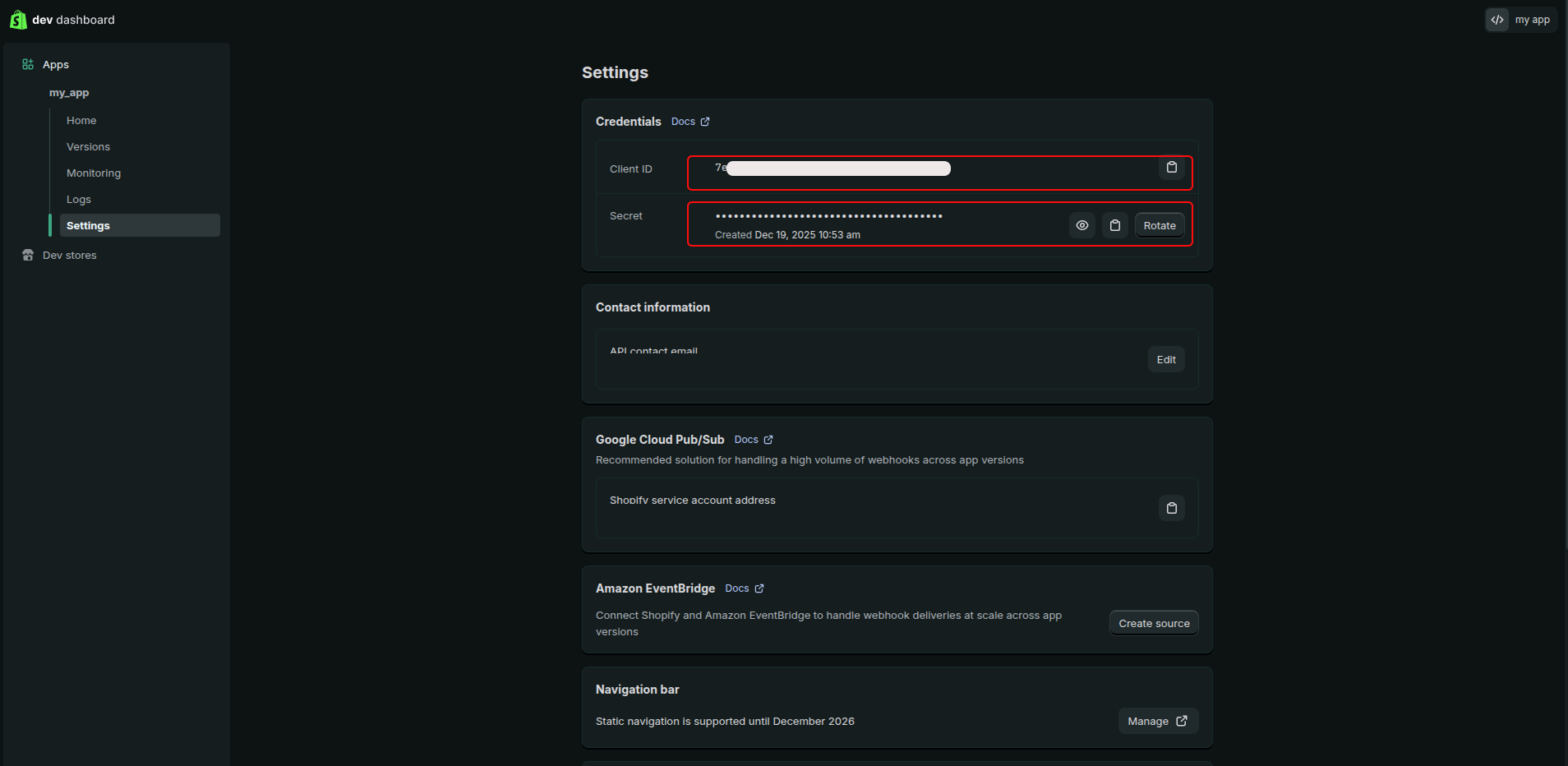
- In Settings, copy the Client ID and the Client secret.
- In Kondado, go to app.kondado.com.br/sources/new/96, choose the Dev Dashboard method, enter the store subdomain (e.g.,
my-store.myshopify.com), the Client ID and the Client secret and click Save.
⚠️ The Client secret is a sensitive credential. Do not share it publicly.
Method 2: Partner Dashboard (full order history)
Use this method if you need orders older than 60 days. It requires a Shopify Partners account and Shopify approval of the read_all_orders scope.
⚠️ Important recommendation before starting
If you have access to more than one Shopify store, we strongly recommend that the entire process below be performed in an incognito / private browser window.
This prevents Shopify from using an already authenticated session and accidentally connecting to the wrong store during app creation or authorization.
Requirements
- A Shopify Partners account (free)
- You must be the store owner of your Shopify store
⚠️ Security: The Client Secret is a sensitive credential. Do not share it publicly.
Instructions
-
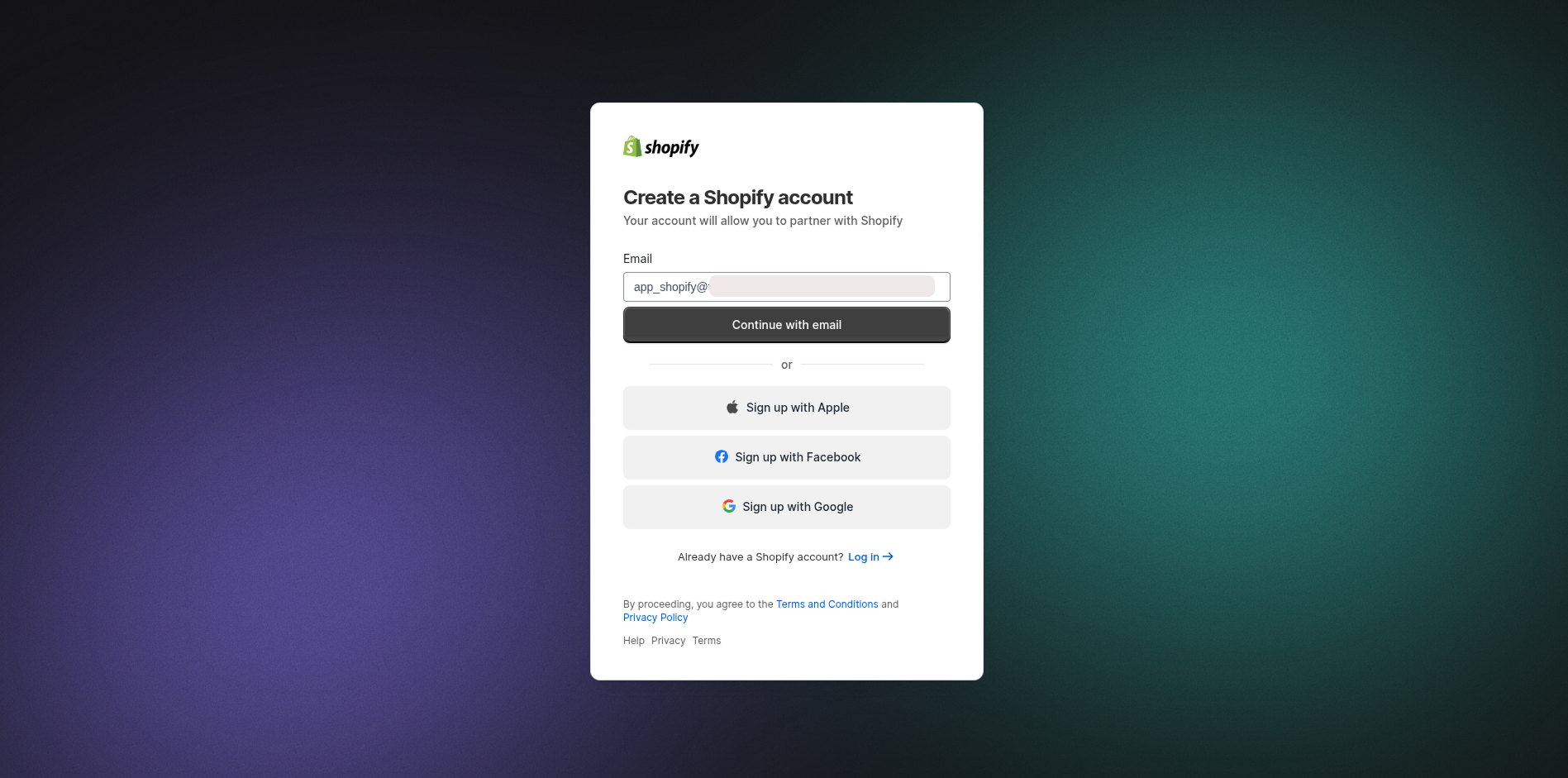
Create a Shopify Partners account
Go to accounts.shopify.com/signup and create your account. During signup:
- Choose "Create new Partner"
- Select the goal "Build Apps"
- Complete the registration with your information
-
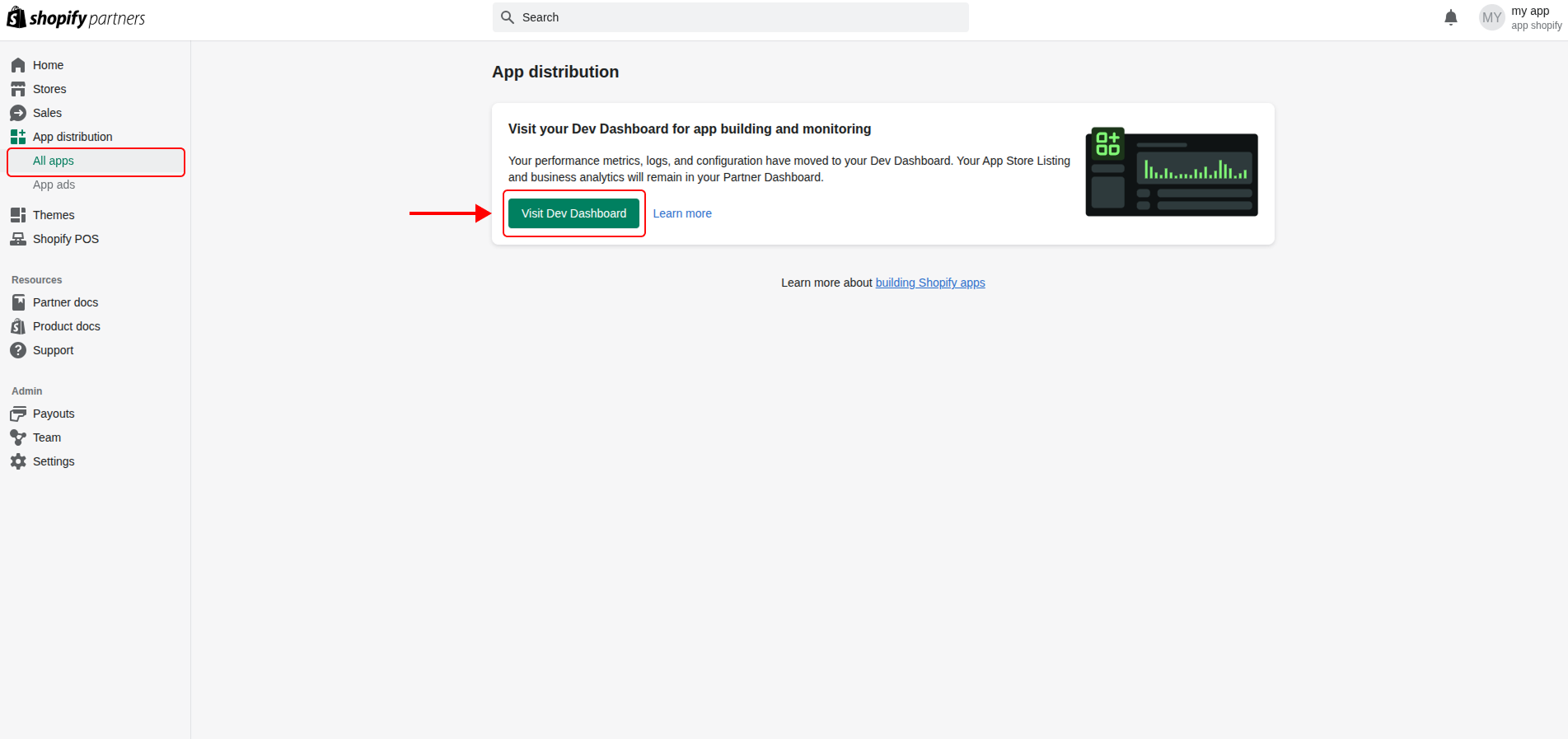
Access the Dev Dashboard
After verifying your email, in the sidebar click App distribution → All apps → View Dev Dashboard.
-
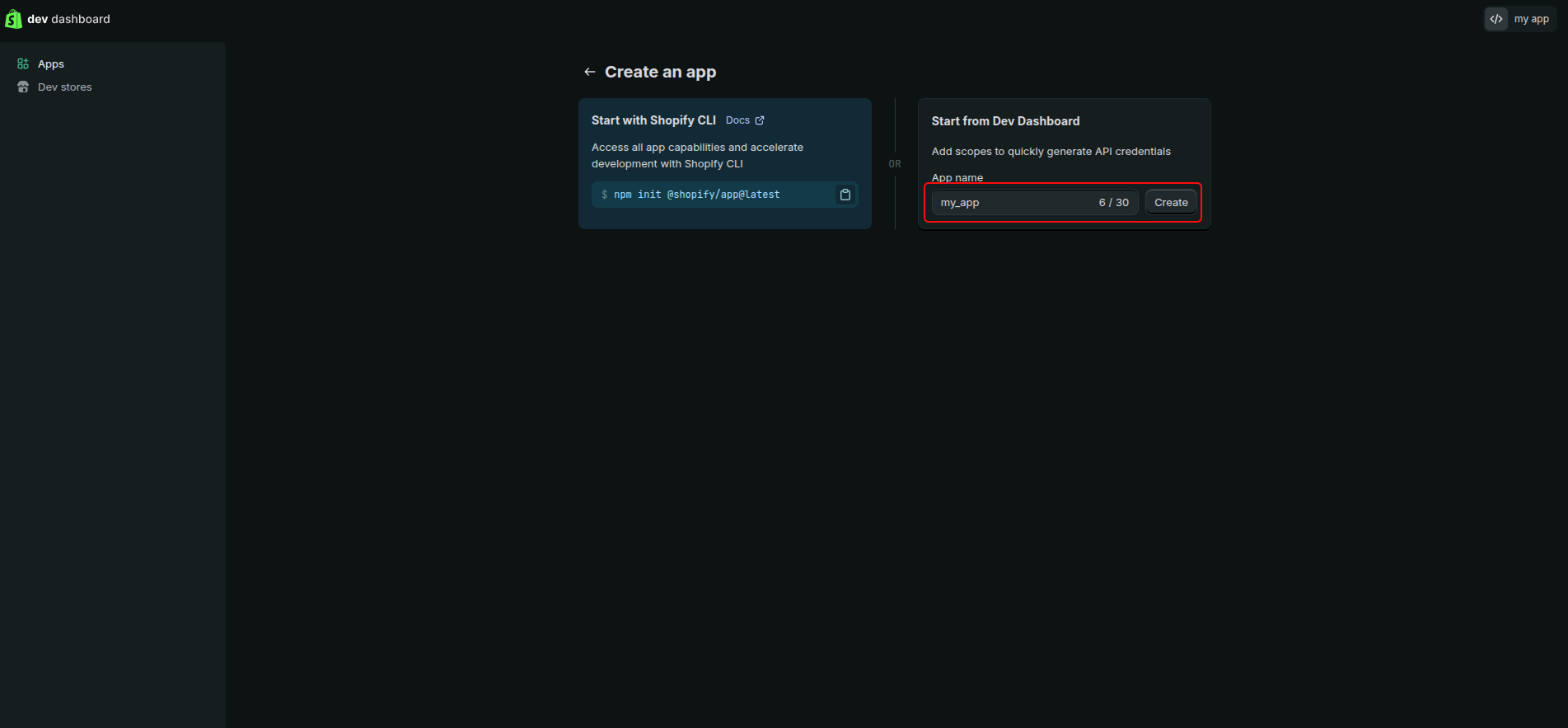
Create a new app
In the Dev Dashboard, click Create app and set a name (e.g., "Kondado Integration").
-
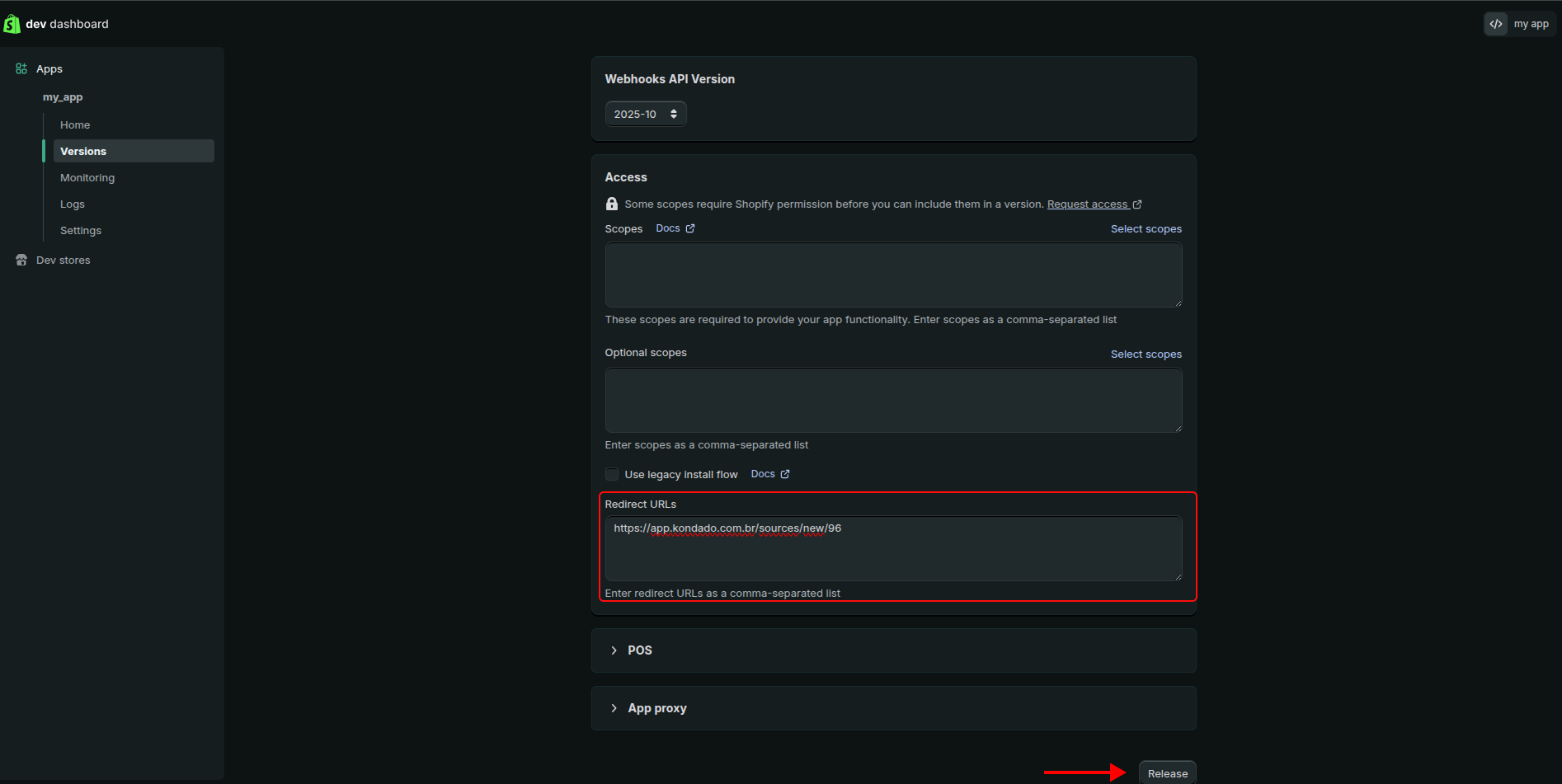
Configure Redirect URL, scopes and publish the app
In the Redirect URLs field, enter:
https://app.kondado.com.br/sources/new/96In Access > Scopes, copy and paste the following scopes:
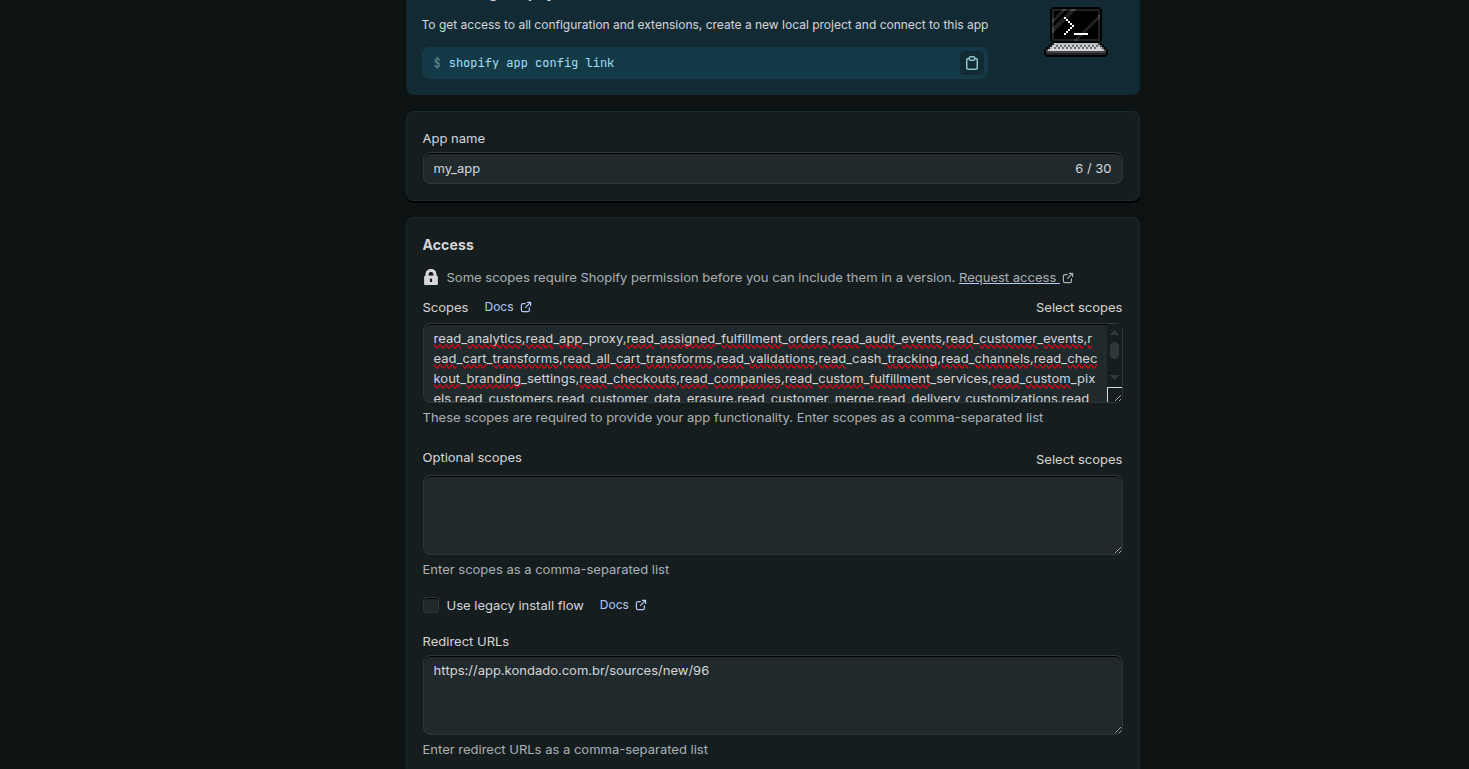
Then click Release to publish the version.
-
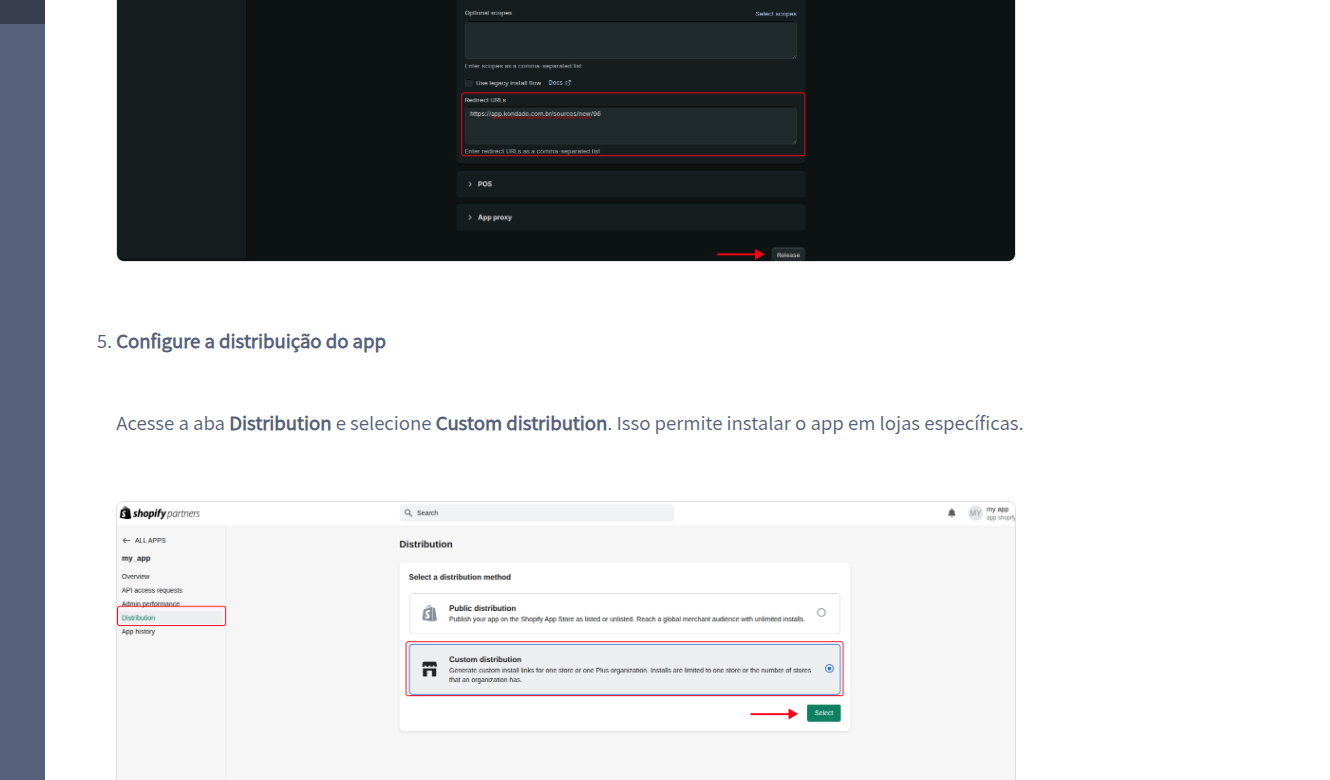
Configure app distribution
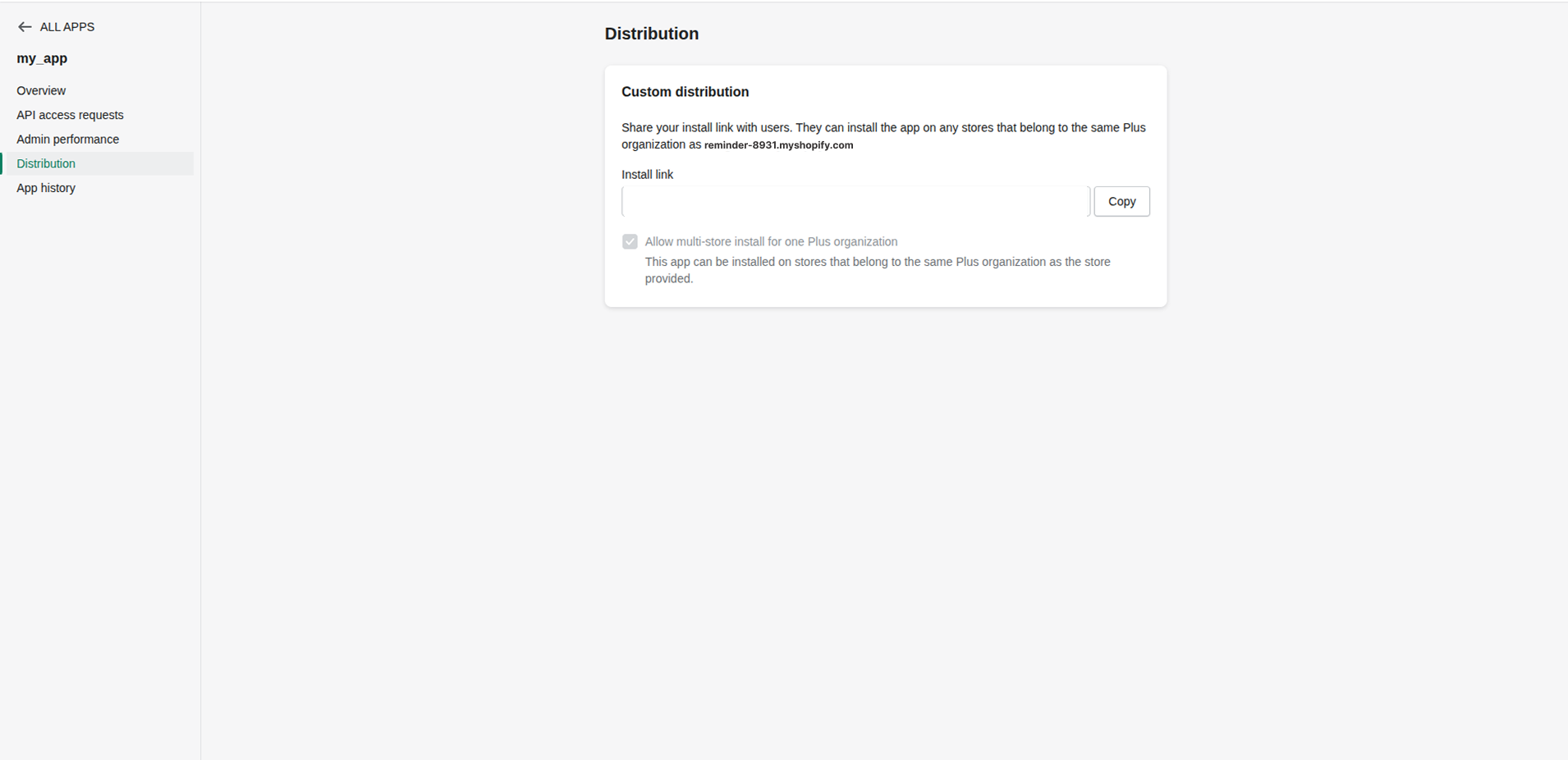
In the left sidebar, go to the Distribution tab and select Custom distribution. This allows installing the app on specific stores.
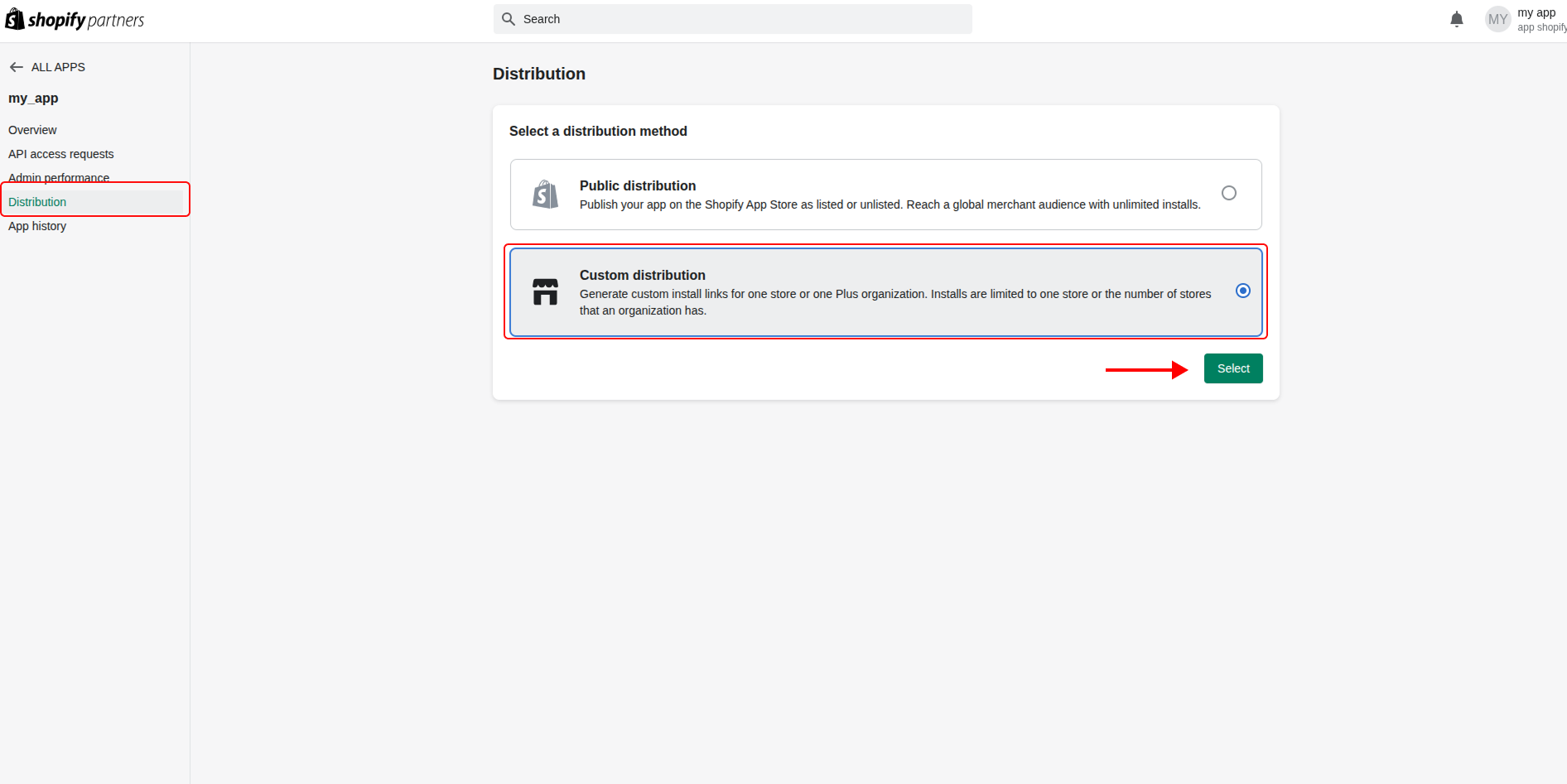
⚠️ Can't see the Distribution tab?
This happens when the app was created with your store account (merchant) instead of a Shopify Partners account. The Distribution tab only exists for apps created within a Partner organization.
How to fix:
- Open an incognito / private browser window
- Create a free account at Shopify Partners (step 1 above)
- Access the Dev Dashboard via: App distribution → All apps → View Dev Dashboard
- Create the app again in this session
Important: The distribution method cannot be changed after selection. If you already chose "Custom distribution", you cannot switch to another method — you must create a new app from scratch if you need to change.
-
Authorize the Shopify app and install on your store
After configuring distribution, you will need to enter your store domain to generate the installation authorization link.
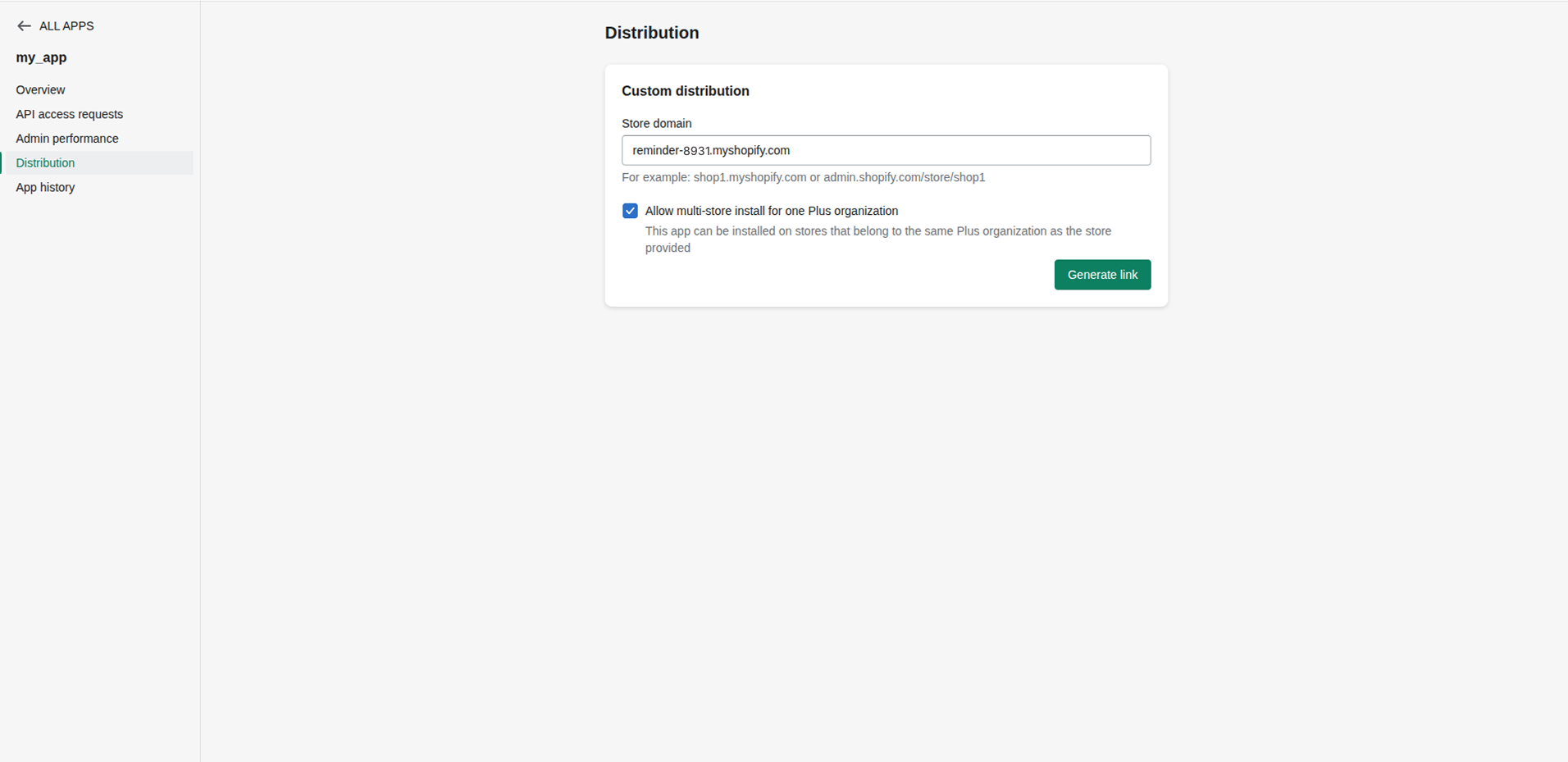
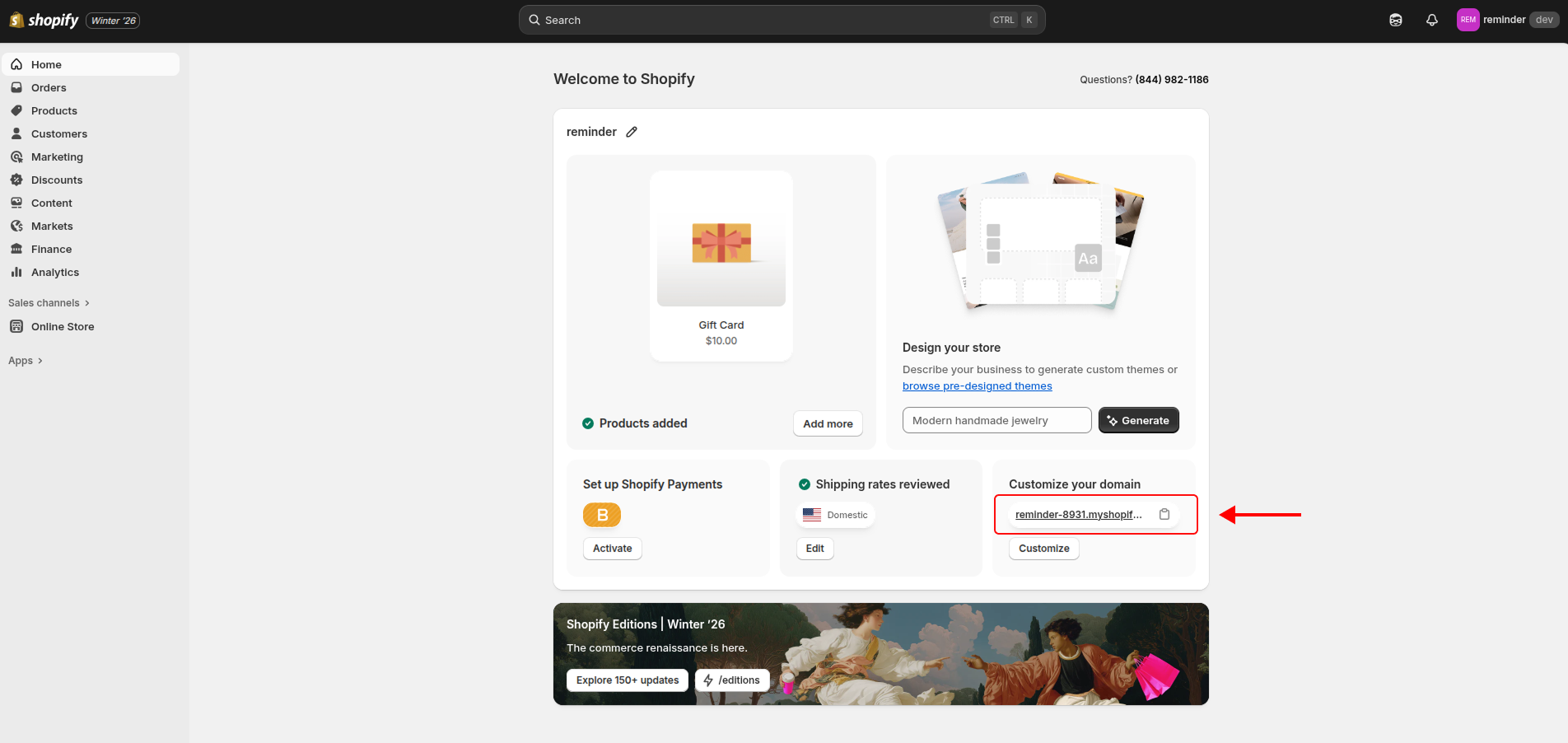
To get your store domain, access the admin panel at admin.shopify.com. After logging in, on the Home page you will see your store domain. Copy this domain.
⚠️ Pay attention to the domain format:
Use only the domain in the format:
example.myshopify.comDo not include:
- Prefixes like
https://orhttp:// - Additional paths or parameters, such as
/new_store,?param=...
Incorrect examples:
https://example.myshopify.comexample.myshopify.com/new_store
With the link generated by Shopify, copy and paste it in your browser to be directed to the installation.
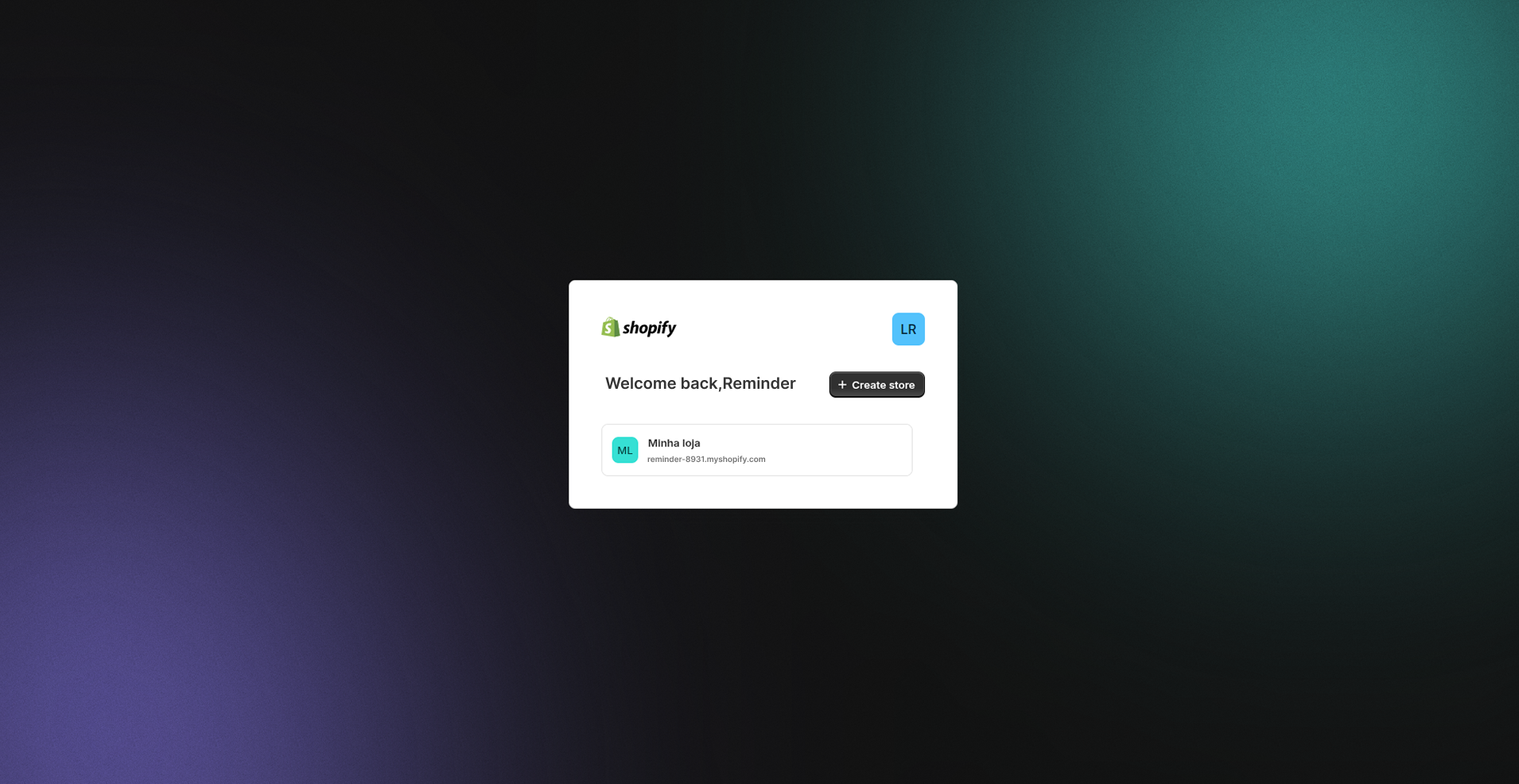
Now choose the store to install your app.
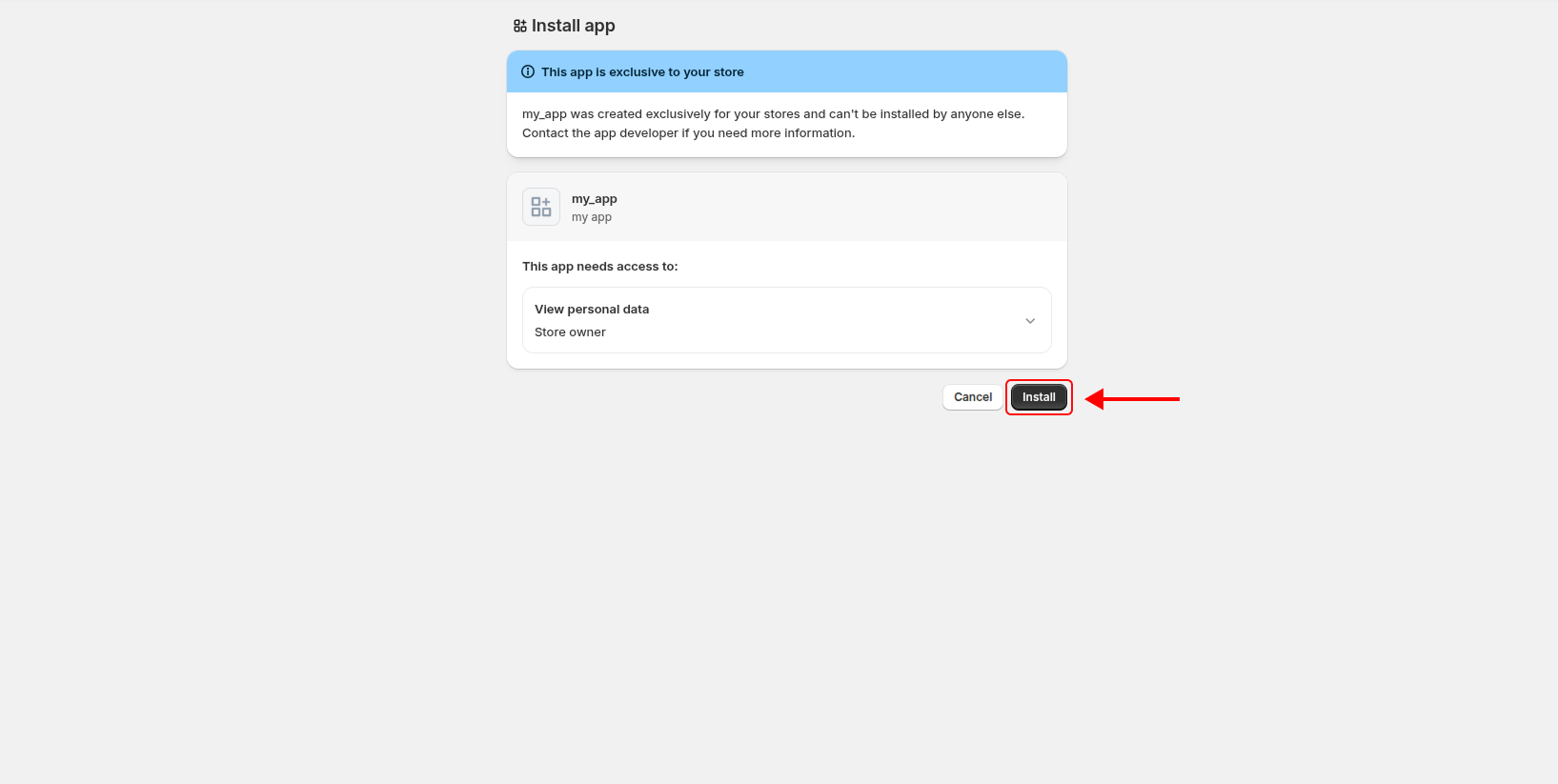
Click Install.
- Prefixes like
-
Copy the app credentials
Return to the Dev Dashboard, open your app and go to Settings. Copy:
- Client ID
- Client Secret
-
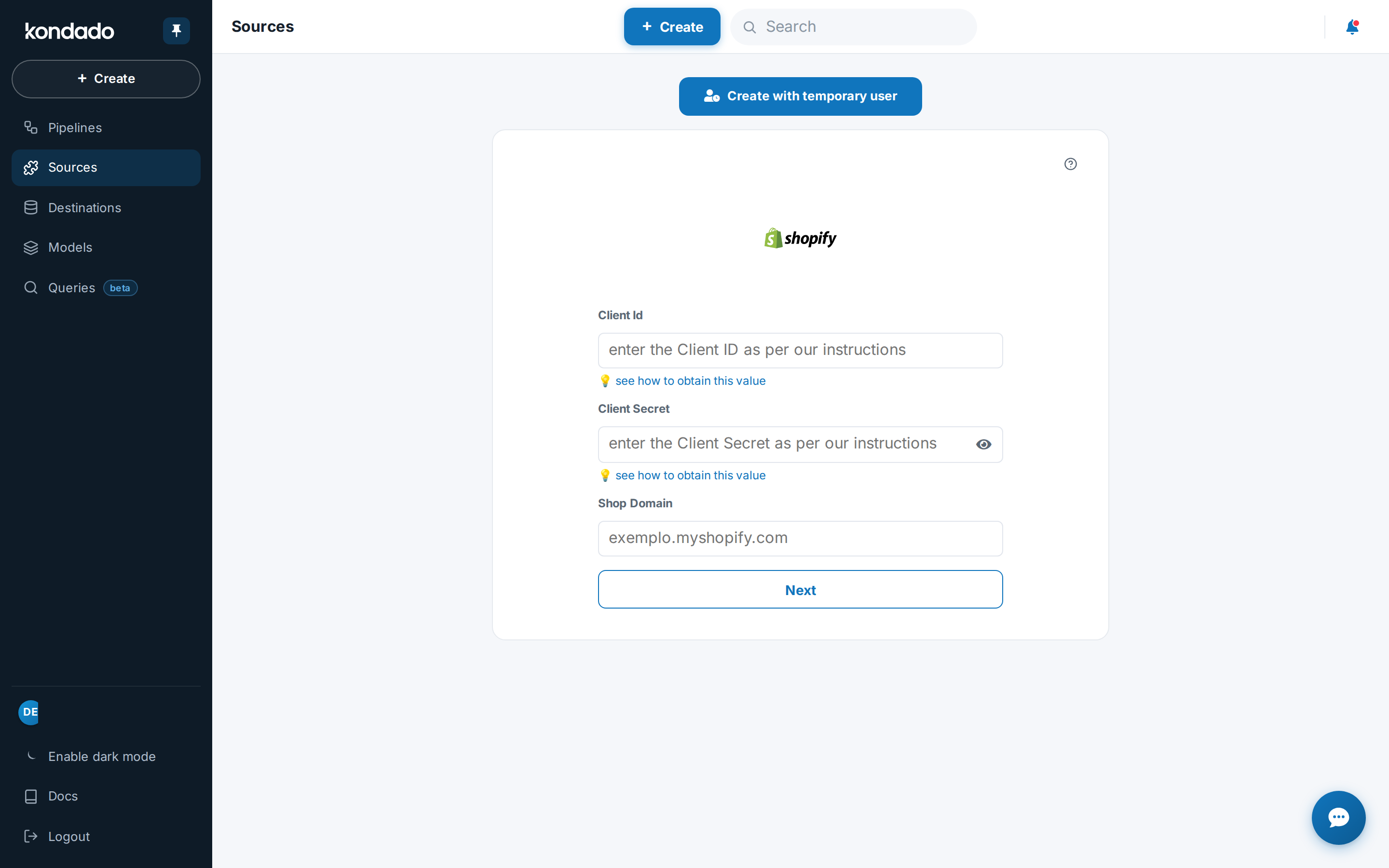
Connect on Kondado
At app.kondado.com.br/sources/new/96, fill in:
- Client ID
- Client Secret
- Store domain
Click Next and then connect with Shopify.
Note: The Shopify authorization screen may appear again at this step. If this happens, click Install to proceed.
-
Save the connection
After authorization, you will be redirected to Kondado. Click Save to finish.
Pipelines
Summary
- Abandoned Checkouts
- Abandoned Checkouts: discount codes
- Abandoned Checkouts: line items
- Abandoned Checkouts: note attributes
- Customers
- Events
- Inventory: items
- Order timeline events
- Orders
- Orders Details
- Orders Discount Applications
- Orders Discount Codes
- Orders Fulfillments
- Orders Line Items
- Orders Line Items: custom properties
- Orders Note Attributes
- Orders Refunds
- Orders Shipping Lines
- Orders Transactions
- Orders Visits UTM Parameters
- Products
- Products: images
- Products: options
- Products: variants
Relationship chart
Click to expand

Abandoned Checkouts
This pipeline requires at least the following scopes:
read_customersread_inventoryread_marketplace_ordersread_ordersread_products
Replication type: Incremental
Parameters:
- Read start date (Savepoint): Start date to replicate data
Relationships:
Abandoned checkouts represent shopping carts that customers started but did not complete, meaning checkouts that were never converted into orders. Each record captures the checkout's contents, totals, currency, customer and address details, and a recovery URL. A checkout stays abandoned while completed_at is null; once the customer finishes the purchase through the recovery URL, completed_at is populated.
| Campo | Tipo | |
|---|---|---|
|
text |
[en] The ID for the checkout. |
|
|
text |
[en] The recovery URL that's sent to a customer so they can recover their checkout. |
|
|
text |
[en] The street address of the billing address. |
|
|
text |
[en] An optional additional field for the street address of the billing address. |
|
|
text |
[en] The city of the billing address. |
|
|
text |
[en] The company of the person associated with the billing address. |
|
|
text |
[en] The name of the country of the billing address. |
|
|
text |
[en] The two-letter code (ISO 3166-1 alpha-2 format) for the country of the billing address. |
|
|
text |
[en] The first name of the person associated with the payment method. |
|
|
text |
[en] The last name of the person associated with the payment method. |
|
|
float |
[en] The latitude of the billing address. |
|
|
float |
[en] The longitude of the billing address. |
|
|
text |
[en] The full name of the person associated with the payment method. |
|
|
text |
[en] The phone number at the billing address. |
|
|
text |
[en] The name of the state or province of the billing address. |
|
|
text |
[en] The two-letter abbreviation of the state or province of the billing address. |
|
|
text |
[en] The zip or postal code of the billing address. |
|
|
text |
[en] The ID for the cart that's attached to the checkout. |
|
|
timestamp |
[en] The date and time (ISO 8601 format) when the checkout was completed. For abandoned checkouts, this value is null until a customer completes the checkout using the recovery URL. |
|
|
timestamp |
[en] The date and time (ISO 8601 format) when the checkout was created. |
|
|
text |
[en] The three-letter code (ISO 4217 format) of the shop's default currency at the time of checkout. For the currency that the customer used at checkout, see presentment_currency. |
|
|
text |
[en] The GraphQL global ID (GID) of the customer. |
|
|
timestamp |
[en] The date and time (ISO 8601 format) when the customer record was created. |
|
|
text |
[en] The name of the state or province of the customer's default address. |
|
|
text |
[en] The street address of the customer's default address. |
|
|
text |
[en] An optional additional field for the street address of the customer's default address. |
|
|
text |
[en] The city of the customer's default address. |
|
|
text |
[en] The company of the customer's default address. |
|
|
text |
[en] The name of the country of the customer's default address. |
|
|
text |
[en] The two-letter code (ISO 3166-1 alpha-2 format) for the country of the customer's default address. |
|
|
text |
[en] The normalized country name of the customer's default address. |
|
|
text |
[en] The ID of the customer that the default address belongs to. |
|
|
text |
[en] The first name of the person associated with the customer's default address. |
|
|
text |
[en] The ID of the customer's default address. |
|
|
text |
[en] The last name of the person associated with the customer's default address. |
|
|
text |
[en] The full name of the person associated with the customer's default address. |
|
|
text |
[en] The phone number at the customer's default address. |
|
|
text |
[en] The two-letter abbreviation of the state or province of the customer's default address. |
|
|
text |
[en] The zip or postal code of the customer's default address. |
|
|
text |
[en] The email address of the customer. |
|
|
text |
[en] The customer's first name. |
|
|
text |
[en] A unique identifier for the customer. |
|
|
text |
[en] The customer's last name. |
|
|
text |
[en] The ID of the customer's last order. |
|
|
text |
[en] The name of the customer's last order. This is directly related to the name field on the Order resource. |
|
|
text |
[en] A unique identifier for the customer that's used with Multipass login. |
|
|
text |
[en] A note about the customer. |
|
|
float |
[en] The number of orders associated with this customer. Test and archived orders aren't counted. |
|
|
text |
[en] The unique phone number (E.164 format) for this customer. |
|
|
text |
[en] The marketing consent information describing when and how the customer consented to receiving marketing material by SMS. |
|
|
text |
[en] The state of the customer's account with the shop. Possible values include: disabled (the customer doesn't have an active account), invited (the customer has received an invite to create an account), enabled (the customer has created an account), and declined (the customer declined the invite to create an account). |
|
|
text |
[en] Tags that the shop owner has attached to the customer, formatted as a string of comma-separated values. |
|
|
boolean |
[en] Whether the customer is exempt from paying taxes on their orders. |
|
|
text |
[en] The list of specific tax exemptions that apply to the customer (Canadian taxes only). |
|
|
float |
[en] The total amount of money that the customer has spent across their order history. |
|
|
timestamp |
[en] The date and time (ISO 8601 format) when the customer information was last updated. |
|
|
boolean |
[en] Whether the customer has verified their email address. |
|
|
text |
[en] The two or three-letter language code, optionally followed by a region modifier. Example values: en, en-CA. |
|
|
text |
[en] A human-readable identifier for the checkout, shown as a number preceded by a # symbol. |
|
|
text |
[en] The text of an optional note that a shop owner can attach to the order. |
|
|
text |
[en] The three-letter code (ISO 4217 format) of the currency that the customer used at checkout. For the shop's default currency, see currency. |
|
|
text |
[en] The street address of the shipping address. |
|
|
text |
[en] An optional additional field for the street address of the shipping address. |
|
|
text |
[en] The city of the shipping address. |
|
|
text |
[en] The company of the person associated with the shipping address. |
|
|
text |
[en] The name of the country of the shipping address. |
|
|
text |
[en] The two-letter code (ISO 3166-1 alpha-2 format) for the country of the shipping address. |
|
|
text |
[en] The first name of the person associated with the shipping address. |
|
|
text |
[en] The last name of the person associated with the shipping address. |
|
|
float |
[en] The latitude of the shipping address. |
|
|
float |
[en] The longitude of the shipping address. |
|
|
text |
[en] The full name of the person associated with the shipping address. |
|
|
text |
[en] The phone number at the shipping address. |
|
|
text |
[en] The name of the state or province of the shipping address. |
|
|
text |
[en] The two-letter abbreviation of the state or province of the shipping address. |
|
|
text |
[en] The zip or postal code of the shipping address. |
|
|
float |
[en] The price of the checkout in the shop's currency, before shipping and taxes. |
|
|
boolean |
[en] Whether taxes are included in the price. |
|
|
float |
[en] The total amount of discounts to be applied, in the shop's currency. |
|
|
text |
[en] The total duties of the checkout, in the shop's currency. |
|
|
float |
[en] The sum of the prices of all line items in the checkout, in the shop's currency. |
|
|
float |
[en] The sum of line item prices, all discounts, shipping costs, and taxes for the checkout, in the shop's currency. |
|
|
float |
[en] The sum of all the taxes applied to the checkout, in the shop's currency. |
|
|
timestamp |
[en] The date and time (ISO 8601 format) when the checkout was last modified. |
Abandoned Checkouts: discount codes
This pipeline requires at least the following scopes:
read_orders
Replication type: Incremental
Parameters:
- Read start date (Savepoint): Start date to replicate data
Relationships:
Discount codes applied on the abandoned checkout.
| Campo | Tipo | |
|---|---|---|
|
text |
[en] The ID of the abandoned checkout to which this discount code belongs. |
|
|
float |
[en] The total discount amount applied to the abandoned checkout, expressed in the presentment currency (the currency shown to the customer at checkout). Monetary value reported as a decimal; when the checkout has more than one discount code, this checkout-level total is repeated on each code row. |
|
|
text |
[en] A discount code applied to the abandoned checkout (the code entered by the customer to claim the discount). When more than one code is applied to the same checkout, each code is reported on its own row. |
Abandoned Checkouts: line items
This pipeline requires at least the following scopes:
read_assigned_fulfillment_ordersread_inventoryread_locationsread_marketplace_fulfillment_ordersread_marketplace_ordersread_markets_homeread_merchant_managed_fulfillment_ordersread_ordersread_productsread_third_party_fulfillment_orders
Replication type: Incremental
Parameters:
- Read start date (Savepoint): Start date to replicate data
Relationships:
Line items of abandoned checkouts: each row is a product/variant added to a checkout that was never completed, with quantity, unit price, compare-at price, SKU, weight and variant details. Grain: one row per item of the abandoned checkout.
| Campo | Tipo | |
|---|---|---|
|
text |
[en] The unique identifier of the abandoned checkout this line item belongs to. |
|
|
float |
[en] The variant compare-at price: the original or reference unit price shown next to the selling price to indicate a discount, expressed in the store base currency. May be empty when no compare-at price is set. |
|
|
boolean |
[en] Whether the product in this line item is a gift card. True for gift card products, false otherwise. |
|
|
float |
[en] The weight of a single unit of the item, expressed in grams. |
|
|
text |
[en] A unique identifier for this line item within the abandoned checkout. |
|
|
float |
[en] The original unit price of the item, expressed in the customer presentment currency. |
|
|
text |
[en] The product title as presented to the customer. |
|
|
text |
[en] The product variant title as presented to the customer. |
|
|
float |
[en] The original unit price of the item, expressed in the store base currency. |
|
|
text |
[en] The unique identifier of the product associated with this line item. |
|
|
float |
[en] The number of units of the item added to the checkout. |
|
|
text |
[en] The stock keeping unit (SKU) of the item: a merchant-defined code that identifies the product variant. |
|
|
boolean |
[en] Whether the item is subject to taxes. True when taxes apply to the item, false otherwise. |
|
|
text |
[en] The title of the product associated with this line item. |
|
|
text |
[en] The unique identifier of the product variant associated with this line item. |
|
|
float |
[en] The variant compare-at price: its original or reference unit price in the store base currency. May be empty when no compare-at price is set. |
|
|
text |
[en] The title of the product variant associated with this line item. |
|
|
text |
[en] The name of the product vendor or supplier. |
Abandoned Checkouts: note attributes
This pipeline requires at least the following scopes:
read_orders
Replication type: Incremental
Parameters:
- Read start date (Savepoint): Start date to replicate data
Relationships:
Abandoned checkout note attributes (name/value pairs).
| Campo | Tipo | |
|---|---|---|
|
float |
[en] The ID of the abandoned checkout that this note attribute belongs to; links each name/value pair back to its checkout. |
|
|
text |
[en] Key (name) of a custom name/value attribute attached to the abandoned checkout. These are free-form fields defined by the store or its apps to store extra information collected during checkout (for example a gift message label, a delivery instruction, or an additional address field). The set of possible names is not fixed and varies by store. |
|
|
text |
[en] Text value associated with the corresponding attribute name for the abandoned checkout. Content is free-form and defined by the store or its apps; it has no fixed format or enumerated set of values. |
Customers
This pipeline requires at least the following scopes:
read_customersread_marketplace_ordersread_orders
Replication type: Incremental
Parameters:
- Read start date (Savepoint): Start date to replicate data
Store customers: contact, addresses, total spent, order count and marketing consent.
| Campo | Tipo | |
|---|---|---|
|
text |
[en] A unique identifier for the customer. |
|
|
boolean |
[en] Whether the customer has consented to receive marketing material by email. |
|
|
timestamp |
[en] The date and time when the customer consented or objected to receiving marketing material by email. |
|
|
timestamp |
[en] The date and time (ISO 8601 format) when the customer was created. |
|
|
text |
[en] The three-letter code (ISO 4217 format) for the currency that the customer used when they paid for their last order. |
|
|
text |
[en] The customer's mailing address. |
|
|
text |
[en] An additional field for the customer's mailing address. |
|
|
text |
[en] The customer's city, town, or village. |
|
|
text |
[en] The customer's company. |
|
|
text |
[en] The customer's country. |
|
|
text |
[en] The two-letter country code corresponding to the customer's country. |
|
|
text |
[en] The customer's normalized country name. |
|
|
text |
[en] A unique identifier for the customer that this address belongs to. |
|
|
boolean |
[en] Whether this address is the default address for the customer. |
|
|
text |
[en] The customer's first name on this address. |
|
|
text |
[en] A unique identifier for the address. |
|
|
text |
[en] The customer's last name on this address. |
|
|
text |
[en] The customer's first and last names. |
|
|
text |
[en] The customer's phone number at this address. |
|
|
text |
[en] The customer's region name. Typically a province, a state, or a prefecture. |
|
|
text |
[en] The code for the region of the address, such as the province, state, or district. |
|
|
text |
[en] The customer's postal code, also known as zip, postcode, Eircode, etc. |
|
|
text |
[en] The unique email address of the customer. Attempting to assign the same email address to multiple customers returns an error. |
|
|
timestamp |
[en] The date and time when the customer consented to receive marketing material by email. |
|
|
text |
[en] The marketing subscription opt-in level, as described in the M3AAWG Sender Best Common Practices, that the customer gave when they consented to receive marketing material by email. Possible values: single_opt_in, confirmed_opt_in, and unknown. |
|
|
text |
[en] The current email marketing state for the customer. Possible values: subscribed, not_subscribed, pending, and unsubscribed. |
|
|
text |
[en] The customer's first name. |
|
|
text |
[en] The customer's last name. |
|
|
text |
[en] The ID of the customer's last order. |
|
|
text |
[en] The name of the customer's last order. This is directly related to the name field on the Order resource. |
|
|
text |
[en] The marketing subscription opt-in level, as described in the M3AAWG Sender Best Common Practices, that the customer gave when they consented to receive marketing material by email. Possible values: single_opt_in, confirmed_opt_in, and unknown. |
|
|
text |
[en] A unique identifier for the customer that's used with Multipass login. |
|
|
text |
[en] A note about the customer. |
|
|
float |
[en] The number of orders associated with this customer. Test and archived orders aren't counted. |
|
|
text |
[en] The state of the customer account with the shop. Possible values: disabled (the account has never been created), invited (the customer has been emailed an invite to create an account), enabled (the customer has created an account), and declined (the customer declined the invite to create an account). |
|
|
text |
[en] Tags that the shop owner has attached to the customer, formatted as a string of comma-separated values. |
|
|
boolean |
[en] Whether the customer is exempt from paying taxes on their order. |
|
|
float |
[en] The total amount of money that the customer has spent across their order history, in the shop currency. |
|
|
timestamp |
[en] The date and time (ISO 8601 format) when the customer information was last updated. |
|
|
boolean |
[en] Whether the customer has verified their email address. |
Events
This pipeline requires at least the following scopes:
read_customersread_productsread_orders
Replication type: Incremental
Parameters:
- Read start date (Savepoint): Start date to replicate data
Relationships:
Store events: log of actions that happened on objects (orders, products, etc.), with type, description and date.
| Campo | Tipo | |
|---|---|---|
|
text |
[en] The unique identifier of the event. |
|
|
text |
[en] Values referenced by the event message, such as an order number, a customer name or a resource title. Provided by the API as a list. |
|
|
text |
[en] Who originated the event: the name of a staff member, the store name, or "Shopify" when the event was generated automatically by the system. |
|
|
timestamp |
[en] The date and time when the event was created. |
|
|
text |
[en] A human readable description of the event. Can contain some HTML formatting, such as links to the related resource. |
|
|
text |
[en] A relative URL to the resource the event refers to, when applicable. May be empty for events without a navigable resource. |
|
|
text |
[en] The ID of the resource that generated the event (for example the related order, product or price rule). |
|
|
text |
[en] The type of resource that generated the event, such as Order, Product, Collection, PriceRule or Article. |
|
|
text |
[en] The action described by the event. Different resources emit different actions, such as create, update, destroy, confirmed, cancelled, closed, placed, published or unpublished. |
Inventory: items
This pipeline requires at least the following scopes:
read_inventoryread_locations
Replication type: Incremental
Parameters:
- Read start date (Savepoint): Start date to replicate data
Relationships:
Inventory items: unit cost, tracked-or-not, and per-SKU data used for per-location stock control.
| Campo | Tipo | |
|---|---|---|
|
text |
[en] The unique identifier of the inventory item. Each inventory item corresponds to a single product variant and is used to track its stock. |
|
|
float |
[en] The available (sellable) quantity of the inventory item. Returns null when the item is not set to track inventory. |
|
|
text |
[en] The ID of the location associated with this inventory record. Each row represents one inventory item at a single stock location. |
|
|
timestamp |
[en] The date and time (ISO 8601 format) when the inventory level at this location was last modified. |
Order timeline events
Limitation: Shopify API limits order access to the last 60 days by default. For full history, request the read_all_orders scope in Partner Dashboard. See instructions.
This pipeline requires at least the following scopes:
read_orders
Data source created with the Dev Dashboard method: Shopify only returns orders created in the last 60 days. Older orders are not brought. For the full history, create the data source with the Partner Dashboard method (read_all_orders scope).
Replication type: Incremental
Parameters:
- Read start date (Savepoint): Start date to replicate data
Relationships:
Store events: log of actions that happened on objects (orders, products, etc.), with type, description and date.
| Campo | Tipo | |
|---|---|---|
|
text |
[en] The ID of the event. |
|
|
text |
[en] The ID of the order that generated the event. |
|
|
text |
[en] Values referencing the resources involved in the event (such as the names of items or collections), presented as a single text. |
|
|
text |
[en] Who generated the event. Can be the platform itself for automated/system events, or the name of the staff member or app responsible for the action. |
|
|
timestamp |
[en] The date and time when the event was created. |
|
|
text |
[en] A human readable description of the event. |
|
|
text |
[en] A human readable description of the event. Can contain some HTML formatting. |
|
|
text |
[en] A relative URL to the resource the event is for, if applicable. |
|
|
text |
[en] The type of action represented by the event. Covers the order lifecycle (e.g. placed, confirmed, closed, cancelled), payments (e.g. sale, paid, paid externally), fulfillment (e.g. fulfilled, shipping label purchased, items restocked), returns (e.g. goods returned, return approved) and manual notes (comment), among others. Different resources generate different types of event. |
Orders
Limitation: Shopify API limits order access to the last 60 days by default. For full history, request the read_all_orders scope in Partner Dashboard. See instructions.
This pipeline requires at least the following scopes:
read_ordersread_customersread_appsread_locations
Data source created with the Dev Dashboard method: Shopify only returns orders created in the last 60 days. Older orders are not brought. For the full history, create the data source with the Partner Dashboard method (read_all_orders scope).
Replication type: Incremental
Parameters:
- Read start date (Savepoint): Start date to replicate data
Store orders (completed checkout): customer, totals, financial and fulfillment status, discounts, currency and order attributes. Grain: one row per order.
| Campo | Tipo | |
|---|---|---|
|
text |
[en] The ID of the order, used for API purposes. This is different from the order_number property, which is the ID used by the shop owner and customer |
|
|
text |
[en] The ID of the app that created the order. |
|
|
text |
[en] The IP address of the browser used by the customer when they placed the order |
|
|
boolean |
[en] Whether the customer consented to receive email updates from the shop |
|
|
text |
[en] The reason why the order was canceled. Valid values:customer: The customer canceled the order. fraud: The order was fraudulent. inventory: Items in the order were not in inventory. declined: The payment was declined. other: A reason not in this list. |
|
|
timestamp |
[en] The date and time when the order was canceled - in order's timezone |
|
|
timestamp |
[en] The date and time when the order was closed - in order's timezone |
|
|
boolean |
[en] Whether the order has been confirmed |
|
|
text |
[en] The customer's contact email address used for the order |
|
|
timestamp |
[en] The autogenerated date and time when the order was created in Shopify - in order's timezone |
|
|
text |
[en] The three-letter code (ISO 4217 format) for the shop currency. |
|
|
float |
[en] The current subtotal of the order (reflecting order edits, returns, and refunds), expressed in the presentment currency shown to the customer at checkout |
|
|
text |
[en] The three-letter ISO 4217 currency code of the presentment currency for the current subtotal |
|
|
float |
[en] The current subtotal of the order (reflecting order edits, returns, and refunds), expressed in the shop's default currency |
|
|
text |
[en] The three-letter ISO 4217 currency code of the shop currency for the current subtotal |
|
|
float |
[en] The current total discounts on the order in the shop currency. The value of this field reflects order edits, returns, and refunds |
|
|
float |
[en] The current total discounts of the order (reflecting order edits, returns, and refunds), expressed in the presentment currency shown to the customer at checkout |
|
|
text |
[en] The three-letter ISO 4217 currency code of the presentment currency for the current total discounts |
|
|
float |
[en] The current total discounts of the order (reflecting order edits, returns, and refunds), expressed in the shop's default currency |
|
|
text |
[en] The three-letter ISO 4217 currency code of the shop currency for the current total discounts |
|
|
float |
[en] The current total duties (import taxes) of the order (reflecting order edits, returns, and refunds), expressed in the presentment currency shown to the customer at checkout |
|
|
text |
[en] The three-letter ISO 4217 currency code of the presentment currency for the current total duties |
|
|
float |
[en] The current total duties (import taxes) of the order (reflecting order edits, returns, and refunds), expressed in the shop's default currency |
|
|
text |
[en] The three-letter ISO 4217 currency code of the shop currency for the current total duties |
|
|
float |
[en] The current total price of the order in the shop currency. The value of this field reflects order edits, returns, and refunds |
|
|
float |
[en] The current total price of the order (reflecting order edits, returns, and refunds), expressed in the presentment currency shown to the customer at checkout |
|
|
text |
[en] The three-letter ISO 4217 currency code of the presentment currency for the current total price |
|
|
float |
[en] The current total price of the order (reflecting order edits, returns, and refunds), expressed in the shop's default currency |
|
|
text |
[en] The three-letter ISO 4217 currency code of the shop currency for the current total price |
|
|
float |
[en] The current total taxes charged on the order in the shop currency. The value of this field reflects order edits, returns, or refunds |
|
|
float |
[en] The current total tax of the order (reflecting order edits, returns, and refunds), expressed in the presentment currency shown to the customer at checkout |
|
|
text |
[en] The three-letter ISO 4217 currency code of the presentment currency for the current total tax |
|
|
float |
[en] The current total tax of the order (reflecting order edits, returns, and refunds), expressed in the shop's default currency |
|
|
text |
[en] The three-letter ISO 4217 currency code of the shop currency for the current total tax |
|
|
text |
[en] The two or three-letter language code, optionally followed by a region modifier |
|
|
text |
[en] The customer's email address |
|
|
text |
[en] The status of payments associated with the order. Can only be set when the order is created. Valid values: pending: The payments are pending. Payment might fail in this state. Check again to confirm whether the payments have been paid successfully; authorized: The payments have been authorized; partially_paid: The order have been partially paid; paid: The payments have been paid; partially_refunded: The payments have been partially refunded; refunded: The payments have been refunded; voided: The payments have been voided |
|
|
text |
[en] The order's status in terms of fulfilled line items. Valid values:fulfilled: Every line item in the order has been fulfilled.; empty: None of the line items in the order have been fulfilled.; partial: At least one line item in the order has been fulfilled.; restocked: Every line item in the order has been restocked and the order canceled. |
|
|
text |
[en] The payment gateway used |
|
|
text |
[en] The URL for the page where the buyer landed when they entered the shop. |
|
|
text |
[en] The URL of the webpage where the customer clicked a link that sent them to your online store |
|
|
text |
[en] The ID of the physical location where the order was processed. This property refers to the POS location. location_id will always be set to empty for online orders |
|
|
text |
[en] The order name, generated by combining the order_number property with the order prefix and suffix that are set in the merchant's general settings. This is different from the id property, which is the ID of the order used by the API. |
|
|
text |
[en] An optional note that a shop owner can attach to the order. |
|
|
text |
[en] The order 's position in the shop's count of orders starting at 1001. Order numbers are sequential and start at 1001 |
|
|
text |
[en] The URL where the customer can check the order`s current status. |
|
|
float |
[en] The original total duties (import taxes) of the order at the time it was created, expressed in the presentment currency shown to the customer at checkout |
|
|
text |
[en] The three-letter ISO 4217 currency code of the presentment currency for the original total duties |
|
|
float |
[en] The original total duties (import taxes) of the order at the time it was created, expressed in the shop's default currency |
|
|
text |
[en] The three-letter ISO 4217 currency code of the shop currency for the original total duties |
|
|
text |
[en] The customer's phone number for receiving SMS notifications |
|
|
text |
[en] The presentment currency that was used to display prices to the customer |
|
|
timestamp |
[en] The date and time when an order was processed. This value is the date that appears on your orders and that's used in the analytic reports. By default, it matches the created_at value. If you're importing orders from an app or another platform, then you can set processed_at to a date and time in the past to match when the original order was created - in order's timezone |
|
|
text |
[en] The website where the customer clicked a link to the shop |
|
|
text |
[en] The ID of the order placed on the originating platform or channel. This value does not correspond to the Shopify ID that is generated from a completed draft order |
|
|
text |
[en] Where the order originated. Can be set only during order creation, and is not writeable afterwards. Values for Shopify channels are protected and cannot be assigned by other API clients: web, pos, shopify_draft_order, iphone, and android. Orders created via the API can be assigned any other string of your choice. If unspecified, then new orders are assigned the value of your app's ID |
|
|
text |
[en] The URL of the source that the order originated from, if found in the domain registry. |
|
|
float |
[en] The price of the order in the shop currency after discounts but before shipping, taxes, and tips |
|
|
float |
[en] The order subtotal (after discounts, before shipping, taxes, and tips), expressed in the presentment currency shown to the customer at checkout |
|
|
text |
[en] The three-letter ISO 4217 currency code of the presentment currency for the subtotal |
|
|
float |
[en] The order subtotal (after discounts, before shipping, taxes, and tips), expressed in the shop's default currency |
|
|
text |
[en] The three-letter ISO 4217 currency code of the shop currency for the subtotal |
|
|
text |
[en] Tags attached to the order, formatted as a string of comma-separated values. Tags are additional short descriptors, commonly used for filtering and searching. Each individual tag is limited to 40 characters in length |
|
|
boolean |
[en] Whether taxes are included in the order subtotal |
|
|
boolean |
[en] Whether this is a test order |
|
|
float |
[en] The total discounts applied to the price of the order in the shop currency |
|
|
float |
[en] The total discounts applied to the order, expressed in the presentment currency shown to the customer at checkout |
|
|
text |
[en] The three-letter ISO 4217 currency code of the presentment currency for the total discounts |
|
|
float |
[en] The total discounts applied to the order, expressed in the shop's default currency |
|
|
text |
[en] The three-letter ISO 4217 currency code of the shop currency for the total discounts |
|
|
float |
[en] The sum of all line item prices in the shop currency |
|
|
float |
[en] The sum of all line item prices in the order, expressed in the presentment currency shown to the customer at checkout |
|
|
text |
[en] The three-letter ISO 4217 currency code of the presentment currency for the total line items price |
|
|
float |
[en] The sum of all line item prices in the order, expressed in the shop's default currency |
|
|
text |
[en] The three-letter ISO 4217 currency code of the shop currency for the total line items price |
|
|
float |
[en] The total outstanding amount of the order in the shop currency |
|
|
float |
[en] The sum of all line item prices, discounts, shipping, taxes, and tips in the shop currency. Must be positive |
|
|
float |
[en] The total price of the order (line items, discounts, shipping, taxes, and tips), expressed in the presentment currency shown to the customer at checkout |
|
|
text |
[en] The three-letter ISO 4217 currency code of the presentment currency for the total price |
|
|
float |
[en] The total price of the order (line items, discounts, shipping, taxes, and tips), expressed in the shop's default currency |
|
|
text |
[en] The three-letter ISO 4217 currency code of the shop currency for the total price |
|
|
float |
[en] The total shipping cost of the order, expressed in the presentment currency shown to the customer at checkout |
|
|
text |
[en] The three-letter ISO 4217 currency code of the presentment currency for the total shipping price |
|
|
float |
[en] The total shipping cost of the order, expressed in the shop's default currency |
|
|
text |
[en] The three-letter ISO 4217 currency code of the shop currency for the total shipping price |
|
|
float |
[en] The sum of all the taxes applied to the order in the shop currency. Must be positive |
|
|
float |
[en] The total tax applied to the order, expressed in the presentment currency shown to the customer at checkout |
|
|
text |
[en] The three-letter ISO 4217 currency code of the presentment currency for the total tax |
|
|
float |
[en] The total tax applied to the order, expressed in the shop's default currency |
|
|
text |
[en] The three-letter ISO 4217 currency code of the shop currency for the total tax |
|
|
float |
[en] The sum of all the tips in the order in the shop currency |
|
|
float |
[en] The sum of all line item weights in grams |
|
|
timestamp |
[en] The date and time when the order was last modified. This value can change when no visible fields of an order have been updated |
Orders Details
Limitation: Shopify API limits order access to the last 60 days by default. For full history, request the read_all_orders scope in Partner Dashboard. See instructions.
This pipeline requires at least the following scopes:
read_ordersread_customersread_appsread_locationsread_marketing_events
Data source created with the Dev Dashboard method: Shopify only returns orders created in the last 60 days. Older orders are not brought. For the full history, create the data source with the Partner Dashboard method (read_all_orders scope).
Replication type: Incremental
Parameters:
- Read start date (Savepoint): Start date to replicate data
Relationships:
Customer data attached to the order (snapshot captured at purchase time).
| Campo | Tipo | |
|---|---|---|
|
text |
[en] The order's unique numeric identifier assigned by Shopify. |
|
|
text |
[en] The street address of the billing address associated with the order's payment method. |
|
|
text |
[en] An additional line of the billing address, such as an apartment, suite, or unit. |
|
|
text |
[en] The city, town, or village of the billing address. |
|
|
text |
[en] The company or organization name of the billing address. |
|
|
text |
[en] The full country name of the billing address. |
|
|
text |
[en] The two-letter country code of the billing address, in ISO 3166-1 alpha-2 format (e.g. BR, US). |
|
|
text |
[en] The first name of the person associated with the billing address. |
|
|
text |
[en] The last name of the person associated with the billing address. |
|
|
text |
[en] The latitude coordinate of the billing address. |
|
|
text |
[en] The longitude coordinate of the billing address. |
|
|
text |
[en] The full name (first and last) of the person associated with the billing address. |
|
|
text |
[en] The phone number of the billing address. |
|
|
text |
[en] The name of the region (such as a state, province, or prefecture) of the billing address. |
|
|
text |
[en] The abbreviated code of the region (such as a state or province) of the billing address (e.g. SP). |
|
|
text |
[en] The postal or ZIP code of the billing address. |
|
|
boolean |
[en] Whether the customer has consented to receive marketing material by email. |
|
|
timestamp |
[en] The date and time (ISO 8601 format) when the customer's marketing consent was last updated. |
|
|
timestamp |
[en] The date and time (ISO 8601 format) when the customer was created. |
|
|
text |
[en] The street address of the customer's default address. |
|
|
text |
[en] An additional line of the customer's default address, such as an apartment, suite, or unit. |
|
|
text |
[en] The city, town, or village of the customer's default address. |
|
|
text |
[en] The company or organization name of the customer's default address. |
|
|
text |
[en] The full country name of the customer's default address. |
|
|
text |
[en] The two-letter country code of the customer's default address, in ISO 3166-1 alpha-2 format (e.g. BR, US). |
|
|
text |
[en] The normalized full country name of the customer's default address. |
|
|
text |
[en] The unique identifier of the customer that this default address belongs to. |
|
|
boolean |
[en] Whether this address is the customer's default address. |
|
|
text |
[en] The first name of the person at the customer's default address. |
|
|
text |
[en] The unique identifier of the customer's default address. |
|
|
text |
[en] The last name of the person at the customer's default address. |
|
|
text |
[en] The full name (first and last) of the person at the customer's default address. |
|
|
text |
[en] The phone number of the customer's default address. |
|
|
text |
[en] The name of the region (such as a state, province, or prefecture) of the customer's default address. |
|
|
text |
[en] The abbreviated code of the region (such as a state or province) of the customer's default address (e.g. RJ). |
|
|
text |
[en] The postal or ZIP code of the customer's default address. |
|
|
text |
[en] The email address of the customer. |
|
|
text |
[en] The first name of the customer. |
|
|
text |
[en] The unique identifier of the customer. |
|
|
text |
[en] The last name of the customer. |
|
|
text |
[en] The unique identifier of the customer's most recent order. |
|
|
text |
[en] The name (order number, such as #1001) of the customer's most recent order. |
|
|
text |
[en] The unique identifier used by the customer to log in with Multipass. |
|
|
text |
[en] A free-form note that the merchant has attached to the customer. |
|
|
float |
[en] The number of orders associated with this customer. Test and archived orders aren't counted. |
|
|
text |
[en] The phone number of the customer, in E.164 format. |
|
|
text |
[en] The state of the customer's account with the shop. Possible values include: 'disabled', 'invited', 'enabled', and 'declined'. |
|
|
text |
[en] A comma-separated list of tags applied to the customer for categorization and filtering. |
|
|
boolean |
[en] Whether the customer is exempt from paying taxes on their orders. |
|
|
text |
[en] A list of tax exemption codes applied to the customer (for example, regional or status-based exemptions). |
|
|
float |
[en] The total amount of money that the customer has spent across their order history. |
|
|
timestamp |
[en] The date and time (ISO 8601 format) when the customer information was last updated. |
|
|
boolean |
[en] Whether the customer has verified their email address. |
|
|
text |
[en] The list of payment gateways used to process the order's transactions. |
|
|
text |
[en] The street address of the shipping address where the order is delivered. |
|
|
text |
[en] An additional line of the shipping address, such as an apartment, suite, or unit. |
|
|
text |
[en] The city, town, or village of the shipping address. |
|
|
text |
[en] The company or organization name of the shipping address. |
|
|
text |
[en] The full country name of the shipping address. |
|
|
text |
[en] The two-letter country code of the shipping address, in ISO 3166-1 alpha-2 format (e.g. BR, US). |
|
|
text |
[en] The first name of the person associated with the shipping address. |
|
|
text |
[en] The last name of the person associated with the shipping address. |
|
|
float |
[en] The latitude coordinate of the shipping address. |
|
|
float |
[en] The longitude coordinate of the shipping address. |
|
|
text |
[en] The full name (first and last) of the person associated with the shipping address. |
|
|
text |
[en] The phone number of the shipping address. |
|
|
text |
[en] The name of the region (such as a state, province, or prefecture) of the shipping address. |
|
|
text |
[en] The abbreviated code of the region (such as a state or province) of the shipping address (e.g. SP). |
|
|
text |
[en] The postal or ZIP code of the shipping address. |
Orders Discount Applications
Limitation: Shopify API limits order access to the last 60 days by default. For full history, request the read_all_orders scope in Partner Dashboard. See instructions.
This pipeline requires at least the following scopes:
read_orders
Data source created with the Dev Dashboard method: Shopify only returns orders created in the last 60 days. Older orders are not brought. For the full history, create the data source with the Partner Dashboard method (read_all_orders scope).
Replication type: Incremental
Parameters:
- Read start date (Savepoint): Start date to replicate data
Relationships:
Discounts applied to the order (by code, automatic or manual) with type, target and granted value.
| Campo | Tipo | |
|---|---|---|
|
text |
[en] The ID of the order to which this discount application belongs. |
|
|
text |
[en] How the discount amount is distributed across the lines it applies to. Possible values include ACROSS (the amount is spread proportionally across all entitled lines), EACH (the amount is applied to each entitled line individually) and ONE (the amount is applied a single time). |
|
|
text |
[en] Identifier of the discount applied to the order. For code-based discounts this is the discount code entered at checkout; for manual, script-based or automatic discounts it carries the name/title of the discount instead. Empty when the discount has no associated code or title. |
|
|
text |
[en] Which lines of the order the discount applies to. Possible values include ALL (every line is eligible), ENTITLED (only the lines that meet the discount conditions) and EXPLICIT (only specific lines explicitly chosen for the discount). |
|
|
text |
[en] Whether the discount targets the products or the shipping of the order. Possible values include LINE_ITEM (the discount applies to product line items) and SHIPPING_LINE (the discount applies to shipping). |
|
|
text |
[en] The kind/origin of the discount application. Possible values include DiscountCodeApplication (a discount triggered by a code entered at checkout), ManualDiscountApplication (a discount applied manually by the merchant), ScriptDiscountApplication (a discount applied by a Shopify Script) and AutomaticDiscountApplication (a discount applied automatically by a store rule). |
|
|
float |
[en] The magnitude of the discount. When value_type is fixed_amount this is a monetary amount in the shop currency; when value_type is percentage this is the percentage of the price that is discounted. |
|
|
text |
[en] Indicates how the value field should be interpreted. Possible values are fixed_amount (the discount is a monetary amount in the shop currency) and percentage (the discount is a percentage of the price). |
Orders Discount Codes
Limitation: Shopify API limits order access to the last 60 days by default. For full history, request the read_all_orders scope in Partner Dashboard. See instructions.
This pipeline requires at least the following scopes:
read_orders
Data source created with the Dev Dashboard method: Shopify only returns orders created in the last 60 days. Older orders are not brought. For the full history, create the data source with the Partner Dashboard method (read_all_orders scope).
Replication type: Incremental
Parameters:
- Read start date (Savepoint): Start date to replicate data
Relationships:
Discount codes used on the order, with the amount granted by each code.
| Campo | Tipo | |
|---|---|---|
|
text |
[en] The ID of the order to which this discount code belongs. |
|
|
float |
[en] The magnitude of the discount applied through this code. When type is fixed_amount this is a monetary value in the shop currency that is deducted from the order; when type is percentage this is the percentage of the order that is discounted. |
|
|
text |
[en] The discount identifier applied to the order. For code-based discounts this is the discount code entered at checkout; for manual or script-based discounts it carries the discount title instead. May be empty for automatic discounts that have no associated code or title. |
|
|
text |
[en] How the discount amount should be interpreted. Possible values are fixed_amount (amount is a monetary value in the shop currency that is deducted from the order) and percentage (amount is the percentage of the order that is discounted). |
Orders Fulfillments
Limitation: Shopify API limits order access to the last 60 days by default. For full history, request the read_all_orders scope in Partner Dashboard. See instructions.
This pipeline requires at least the following scopes:
read_ordersread_fulfillmentsread_locations
Data source created with the Dev Dashboard method: Shopify only returns orders created in the last 60 days. Older orders are not brought. For the full history, create the data source with the Partner Dashboard method (read_all_orders scope).
Replication type: Incremental
Parameters:
- Read start date (Savepoint): Start date to replicate data
Relationships:
Order fulfillments (shipments): shipped items, tracking number, carrier and delivery status.
| Campo | Tipo | |
|---|---|---|
|
text |
[en] Identifier of the order that this fulfillment belongs to. |
|
|
text |
[en] Unique identifier of the fulfillment, assigned by the platform. |
|
|
timestamp |
[en] Date and time when the fulfillment was created (ISO 8601 format, with time zone offset). |
|
|
text |
[en] Identifier of the location from which the items are fulfilled (e.g. the warehouse or store). |
|
|
text |
[en] Human-readable name of the fulfillment, derived from the order number (e.g. the order name followed by a fulfillment sequence). |
|
|
text |
[en] Fulfillment service handling the shipment (e.g. manual or a third-party logistics provider). |
|
|
text |
[en] Current status of the fulfillment. Possible values include: pending, open, success, cancelled, error and failure. |
|
|
text |
[en] Name of the shipping carrier responsible for transporting the shipment (e.g. the postal or courier service). |
|
|
text |
[en] Tracking number provided by the carrier for the shipment. |
|
|
text |
[en] URL where the shipment can be tracked on the carrier site. |
|
|
timestamp |
[en] Date and time when the fulfillment was last updated (ISO 8601 format, with time zone offset). |
Orders Line Items
Limitation: Shopify API limits order access to the last 60 days by default. For full history, request the read_all_orders scope in Partner Dashboard. See instructions.
This pipeline requires at least the following scopes:
read_ordersread_fulfillmentsread_locationsread_productsread_inventory
Data source created with the Dev Dashboard method: Shopify only returns orders created in the last 60 days. Older orders are not brought. For the full history, create the data source with the Partner Dashboard method (read_all_orders scope).
Replication type: Incremental
Parameters:
- Read start date (Savepoint): Start date to replicate data
Relationships:
Order line items: each purchased product/variant, with quantity, unit price, discounts and taxes. Grain: one row per item of the order.
| Campo | Tipo | |
|---|---|---|
|
text |
[en] ID of the parent order this line item belongs to. |
|
|
text |
[en] The ID of the line item (unique identifier of the item within the order). |
|
|
text |
[en] The line item's fulfillment status. One of: 'fulfilled' (the whole quantity has been fulfilled/shipped), 'partial' (only part of the quantity has been fulfilled), or null/empty (nothing fulfilled yet). |
|
|
boolean |
[en] Returns true if the product associated with the line item is a gift card. |
|
|
float |
[en] The weight of a single unit of the line item, in grams. |
|
|
text |
[en] The name of the product, including the variant, as it appears on the order — a combination of the product title and the variant title, separated by a hyphen. |
|
|
text |
[en] First address line of the destination location: where the line item is shipped to. |
|
|
text |
[en] Second/complementary address line of the destination location (where the line item is shipped to). |
|
|
text |
[en] City of the destination location (where the line item is shipped to). |
|
|
text |
[en] Two-letter ISO 3166-1 alpha-2 country code of the destination location. |
|
|
text |
[en] Identifier of the destination location (where the line item is shipped to). |
|
|
text |
[en] Name of the destination location (where the line item is shipped to). |
|
|
text |
[en] State/province (name or code) of the destination location. |
|
|
text |
[en] Postal/ZIP code of the destination location. |
|
|
text |
[en] First address line of the origin location: where the line item is shipped from. |
|
|
text |
[en] Second/complementary address line of the origin location (where the line item is shipped from). |
|
|
text |
[en] City of the origin location (where the line item is shipped from). |
|
|
text |
[en] Two-letter ISO 3166-1 alpha-2 country code of the origin location. |
|
|
text |
[en] Identifier of the origin location (where the line item is shipped from). |
|
|
text |
[en] Name of the origin location (where the line item is shipped from). |
|
|
text |
[en] State/province (name or code) of the origin location. |
|
|
text |
[en] Postal/ZIP code of the origin location. |
|
|
float |
[en] The price of the line item per unit, in the shop currency, before discounts and taxes. |
|
|
text |
[en] Currency code (ISO 4217) of the unit price expressed in the presentment currency (the currency shown to the customer). |
|
|
float |
[en] Unit price amount expressed in the presentment currency (the currency shown to the customer). |
|
|
text |
[en] Currency code (ISO 4217) of the unit price expressed in the shop currency. |
|
|
text |
[en] Unit price amount expressed in the shop currency. |
|
|
boolean |
[en] Returns true if the product associated with the line item still exists in the store; false if it has been deleted. |
|
|
text |
[en] The ID of the line item's product. |
|
|
float |
[en] The number of units of this line item that were ordered. |
|
|
boolean |
[en] Returns true if the variant associated with the line item requires shipping. Returns false if not. |
|
|
text |
[en] The SKU (stock keeping unit) of the variant associated with the line item. |
|
|
boolean |
[en] Returns true if taxes should be charged on the line item. Returns false if not. |
|
|
text |
[en] The title of the line item, a combination of the product title and the variant title, separated by a hyphen. |
|
|
float |
[en] The total amount of discounts allocated to this line item, in the shop currency. |
|
|
text |
[en] Currency code (ISO 4217) of the total line item discount expressed in the presentment currency. |
|
|
float |
[en] Total line item discount amount expressed in the presentment currency. |
|
|
text |
[en] Currency code (ISO 4217) of the total line item discount expressed in the shop currency. |
|
|
float |
[en] Total line item discount amount expressed in the shop currency. |
|
|
text |
[en] The ID of the line item's product variant. |
|
|
text |
[en] The title of the product variant associated with the line item (for example, the size or color). |
|
|
text |
[en] The vendor of the product/variant associated with the line item. |
Orders Line Items: custom properties
Limitation: Shopify API limits order access to the last 60 days by default. For full history, request the read_all_orders scope in Partner Dashboard. See instructions.
This pipeline requires at least the following scopes:
read_orders
Data source created with the Dev Dashboard method: Shopify only returns orders created in the last 60 days. Older orders are not brought. For the full history, create the data source with the Partner Dashboard method (read_all_orders scope).
Replication type: Incremental
Parameters:
- Read start date (Savepoint): Start date to replicate data
Relationships:
Custom properties per line item (shop-defined name/value pairs, e.g., engraving, note).
| Campo | Tipo | |
|---|---|---|
|
text |
[en] Identifier of the order that contains the line item this custom property belongs to |
|
|
text |
[en] Identifier of the line item (product/variant entry within the order) that carries this custom property |
|
|
text |
[en] Name/key of a custom property attached to the line item, defined by the store or theme (e.g. engraving text, gift message, custom color, bundle component or subscription detail) |
|
|
text |
[en] Value paired with the corresponding name/key of the custom property attached to the line item |
Orders Note Attributes
Limitation: Shopify API limits order access to the last 60 days by default. For full history, request the read_all_orders scope in Partner Dashboard. See instructions.
This pipeline requires at least the following scopes:
read_orders
Data source created with the Dev Dashboard method: Shopify only returns orders created in the last 60 days. Older orders are not brought. For the full history, create the data source with the Partner Dashboard method (read_all_orders scope).
Replication type: Incremental
Parameters:
- Read start date (Savepoint): Start date to replicate data
Relationships:
Additional order note attributes (name/value pairs defined by the shop or checkout).
| Campo | Tipo | |
|---|---|---|
|
text |
[en] Identifier of the order this custom attribute belongs to |
|
|
text |
[en] Name/key of a custom name/value attribute attached to the order by the store or theme (e.g. gift message, delivery date, custom checkout field) |
|
|
text |
[en] Value paired with the corresponding name/key of the custom attribute attached to the order |
Orders Refunds
Limitation: Shopify API limits order access to the last 60 days by default. For full history, request the read_all_orders scope in Partner Dashboard. See instructions.
This pipeline requires at least the following scopes:
read_orders
Data source created with the Dev Dashboard method: Shopify only returns orders created in the last 60 days. Older orders are not brought. For the full history, create the data source with the Partner Dashboard method (read_all_orders scope).
Replication type: Incremental
Parameters:
- Read start date (Savepoint): Start date to replicate data
Relationships:
Order refunds: total or partial reversals, with refunded items, amounts and reason. Grain: one row per refund.
| Campo | Tipo | |
|---|---|---|
|
text |
[en] The ID of the order that the refund belongs to. |
|
|
text |
[en] The unique identifier of the refund. |
|
|
timestamp |
[en] The date and time when the refund was created. |
|
|
text |
[en] An optional note attached to the refund, typically describing the reason for or details of the refund. |
|
|
timestamp |
[en] The date and time when the refund was processed. This is the timestamp used as the effective date of the refund in reports. |
Orders Shipping Lines
Limitation: Shopify API limits order access to the last 60 days by default. For full history, request the read_all_orders scope in Partner Dashboard. See instructions.
This pipeline requires at least the following scopes:
read_orders
Data source created with the Dev Dashboard method: Shopify only returns orders created in the last 60 days. Older orders are not brought. For the full history, create the data source with the Partner Dashboard method (read_all_orders scope).
Replication type: Incremental
Parameters:
- Read start date (Savepoint): Start date to replicate data
Relationships:
Order shipping lines: shipping method, charged price and shipping taxes.
| Campo | Tipo | |
|---|---|---|
|
text |
[en] The id of the order that this shipping line belongs to. |
|
|
text |
[en] A unique identifier for this shipping line. |
|
|
text |
[en] A reference to the carrier service that provided the rate. Present when the rate was computed by a third-party carrier service; otherwise it may be empty. |
|
|
text |
[en] A reference code identifying the shipping rate, as defined by the shipping service or carrier. |
|
|
text |
[en] The general classification of the delivery method for this shipping line, for example a standard shipment versus a local delivery. Often empty. |
|
|
float |
[en] The price of this shipping line after line-level discounts have been applied, in the shop currency. |
|
|
float |
[en] The discounted price of this shipping line in the presentment currency (the currency shown to the customer at checkout). |
|
|
text |
[en] The ISO 4217 currency code of the presentment money for the discounted shipping price (the currency shown to the customer at checkout). |
|
|
text |
[en] The ISO 4217 currency code of the shop money for the discounted shipping price (the default currency of the store). |
|
|
float |
[en] The discounted price of this shipping line in the shop currency (the default currency of the store). |
|
|
text |
[en] The phone number associated with this shipping line, when provided, used by some carriers as a delivery contact. Often empty. |
|
|
float |
[en] The price of this shipping line before discounts, in the shop currency. Cannot be negative. |
|
|
float |
[en] The price of this shipping line before discounts, in the presentment currency (the currency shown to the customer at checkout). |
|
|
text |
[en] The ISO 4217 currency code of the presentment money for the shipping price (the currency shown to the customer at checkout). |
|
|
float |
[en] The price of this shipping line before discounts, in the shop currency (the default currency of the store). |
|
|
text |
[en] The ISO 4217 currency code of the shop money for the shipping price (the default currency of the store). |
|
|
text |
[en] A reference to the fulfillment service requested for this shipping method. |
|
|
text |
[en] The source of the shipping rate, i.e. the channel or application that generated it (such as the online store at checkout or a third-party shipping app). |
|
|
text |
[en] The title of the shipping method as shown to the customer at checkout (for example, the carrier or rate name). |
Orders Transactions
Limitation: Shopify API limits order access to the last 60 days by default. For full history, request the read_all_orders scope in Partner Dashboard. See instructions.
This pipeline requires at least the following scopes:
read_ordersread_customersread_locationsread_payment_terms
Data source created with the Dev Dashboard method: Shopify only returns orders created in the last 60 days. Older orders are not brought. For the full history, create the data source with the Partner Dashboard method (read_all_orders scope).
Replication type: Incremental
Parameters:
- Read start date (Savepoint): Start date to replicate data
Relationships:
Order financial transactions (authorization, capture, refund, void) with amount, gateway, payment method and status.
| Campo | Tipo | |
|---|---|---|
|
float |
[en] The ID for the order that the transaction is associated with. |
|
|
float |
[en] The unique identifier of the transaction. |
|
|
float |
[en] The amount of money included in the transaction, in the shop currency. |
|
|
text |
[en] The authorization code returned by the payment provider for the transaction. |
|
|
timestamp |
[en] The date and time when the transaction was created. |
|
|
text |
[en] The three-letter ISO 4217 code for the currency used in the transaction. |
|
|
text |
[en] A standardized error code, present when the transaction fails (e.g. incorrect_number, card_declined, expired_card, processing_error). |
|
|
text |
[en] The name of the payment gateway the transaction was processed through. |
|
|
text |
[en] The transaction type. One of: authorization (reserves the amount), sale (authorization plus capture), capture (collects an amount previously authorized), void (cancels an authorization) and refund (reverses a previously captured amount). |
|
|
text |
[en] The ID of the physical location where the transaction was processed, when applicable (e.g. point of sale). |
|
|
text |
[en] The ID of an associated transaction — for example, the authorization that a capture, void or refund relates to. |
|
|
timestamp |
[en] The date and time when the transaction was processed by the gateway. |
|
|
text |
[en] Gateway-specific receipt field: the payment account identifier reported by the gateway. The contents of the receipt vary depending on which gateway processed the transaction. |
|
|
float |
[en] Gateway-specific receipt field: the transaction amount as reported by the payment gateway. |
|
|
text |
[en] Gateway-specific receipt field: the three-letter currency code reported by the gateway. |
|
|
text |
[en] Gateway-specific receipt field: the gateway's own reference identifier for the transaction. |
|
|
float |
[en] Gateway-specific receipt field: the reference identifier the gateway associates with the transaction. |
|
|
text |
[en] Gateway-specific receipt field: the result reported by the gateway for the transaction (e.g. 'completed', 'pending'). |
|
|
text |
[en] Gateway-specific receipt field: the signature/hash returned by the gateway to validate the receipt authenticity. |
|
|
text |
[en] Gateway-specific receipt field: indicates whether the gateway processed the transaction in test mode. |
|
|
text |
[en] Gateway-specific receipt field: the timestamp the gateway recorded for the transaction. |
|
|
text |
[en] The origin/sales channel of the transaction (e.g. 'web' for the online store, 'pos' for point of sale, or an identifier of the app/sales channel). |
|
|
text |
[en] The status of the transaction. One of: success, failure, pending and error. |
|
|
boolean |
[en] Whether the transaction is a test transaction. |
Orders Visits UTM Parameters
Limitation: Shopify API limits order access to the last 60 days by default. For full history, request the read_all_orders scope in Partner Dashboard. See instructions.
This pipeline requires at least the following scopes:
read_ordersread_customersread_marketing_events
Data source created with the Dev Dashboard method: Shopify only returns orders created in the last 60 days. Older orders are not brought. For the full history, create the data source with the Partner Dashboard method (read_all_orders scope).
Replication type: Incremental
Parameters:
- Read start date (Savepoint): Start date to replicate data
Relationships:
Order UTM source parameters (campaign, source, medium, term, content) extracted from the session landing site.
| Campo | Tipo | |
|---|---|---|
|
float |
[en] The unique identifier of the order these UTM parameters are associated with |
|
|
text |
[en] The name of the marketing campaign that drove the visit (utm_campaign parameter), such as a seasonal promotion or product launch |
|
|
text |
[en] Identifies specific content in a marketing campaign (utm_content parameter). Used to differentiate between similar content or links within the same campaign to determine which is the most effective |
|
|
text |
[en] The medium through which the visit reached the store (utm_medium parameter), such as a banner, email newsletter, cost-per-click (cpc) or social network |
|
|
text |
[en] The source of the traffic that brought the visitor to the merchant's store (utm_source parameter), such as a search engine, a social network or an email newsletter |
|
|
float |
[en] The paid search terms associated with the marketing campaign (utm_term parameter), typically the keywords of a paid search ad |
|
|
timestamp |
[en] The date and time when the customer's session that generated these UTM parameters occurred |
Products
This pipeline requires at least the following scopes:
read_products
Replication type: Incremental
Parameters:
- Read start date (Savepoint): Start date to replicate data
Store catalog products: title, type, vendor, tags, status and publishing data.
| Campo | Tipo | |
|---|---|---|
|
text |
[en] An unsigned 64-bit integer that's used as a unique identifier for the product. |
|
|
text |
[en] A description of the product. Supports HTML formatting. |
|
|
timestamp |
[en] The date and time (ISO 8601 format) when the product was created. |
|
|
text |
[en] A unique human-friendly string for the product. Automatically generated from the product's title. Used by the Liquid templating language to refer to objects. |
|
|
text |
[en] Alternative text describing the product's featured (first) image, used for accessibility and SEO. Can be empty. |
|
|
timestamp |
[en] The date and time (ISO 8601 format) when the product's featured (first) image was created. |
|
|
float |
[en] Height of the product's featured (first) image, in pixels. |
|
|
text |
[en] Unique identifier of the product's featured (first) image. |
|
|
float |
[en] Position of this image in the product's image gallery, starting at 1 (position 1 is the featured image). |
|
|
text |
[en] Public URL of the product's featured (first) image. |
|
|
timestamp |
[en] The date and time (ISO 8601 format) when the product's featured (first) image was last modified. |
|
|
float |
[en] Width of the product's featured (first) image, in pixels. |
|
|
text |
[en] A categorization for the product used for filtering and searching products. |
|
|
timestamp |
[en] The date and time (ISO 8601 format) when the product was published. Can be set to null to unpublish the product from the Online Store channel. |
|
|
boolean |
[en] Indicates whether the product is published to the Point of Sale (POS) channel in addition to the online store. |
|
|
text |
[en] The status of the product. Common values: active, archived, draft. |
|
|
text |
[en] A string of comma-separated tags that are used for filtering and search. A product can have up to 250 tags. |
|
|
text |
[en] The suffix of the Liquid template used for the product page. If this property is specified, then the product page uses a template called 'product.suffix.liquid', where 'suffix' is the value of this property. If this property is or null, then the product page uses the default template 'product.liquid'. (default: null) |
|
|
text |
[en] The name of the product. |
|
|
timestamp |
[en] The date and time (ISO 8601 format) when the product was last modified. |
|
|
text |
[en] The name of the product's vendor. |
Products: images
This pipeline requires at least the following scopes:
read_productsread_product_listings
Replication type: Incremental
Parameters:
- Read start date (Savepoint): Start date to replicate data
Relationships:
Product images: URL, gallery position and variants associated with each image.
| Campo | Tipo | |
|---|---|---|
|
text |
[en] Unique identifier of the product this image belongs to. |
|
|
text |
[en] Alternative text describing the image, used for accessibility and SEO. Can be empty. |
|
|
timestamp |
[en] The date and time (ISO 8601 format) when the image was added to the product. |
|
|
float |
[en] Height of the image, in pixels. |
|
|
text |
[en] Unique identifier of the product image. |
|
|
float |
[en] Position of this image within the product's image gallery, starting at 1 (position 1 is the featured image). |
|
|
text |
[en] Public URL where the product image is hosted. |
|
|
timestamp |
[en] The date and time (ISO 8601 format) when the image was last updated. |
|
|
float |
[en] Width of the image, in pixels. |
Products: options
This pipeline requires at least the following scopes:
read_products
Replication type: Incremental
Parameters:
- Read start date (Savepoint): Start date to replicate data
Relationships:
Product options (e.g., size, color) and their possible values.
| Campo | Tipo | |
|---|---|---|
|
text |
[en] Identifier of the product this option belongs to. |
|
|
text |
[en] Unique identifier of the product option. |
|
|
text |
[en] Name/label of the product option, such as Size, Color or Material. Products that do not have configured options carry a single default option named "Title" whose value is "Default Title". |
|
|
float |
[en] Ordinal position of this option within the product, starting at 1. A product can have up to three options, so this value ranges from 1 to 3 and defines the order in which the options are presented. |
|
|
text |
[en] List of the possible values this option can take (e.g. for a Size option: P, M, G; for a Color option: Black, Brown), serialized as text. Each combination of option values across the product's options corresponds to one product variant. |
Products: variants
This pipeline requires at least the following scopes:
read_productsread_inventoryread_locations
Replication type: Incremental
Parameters:
- Read start date (Savepoint): Start date to replicate data
Relationships:
Product variants: SKU, price, compare-at price, barcode, weight, inventory and selected options.
| Campo | Tipo | |
|---|---|---|
|
text |
[en] The unique numeric identifier of the parent product that this variant belongs to |
|
|
text |
[en] The unique numeric identifier for the product variant |
|
|
text |
[en] The unique numeric identifier of the inventory item associated with the variant, used to track stock |
|
|
text |
[en] The stock keeping unit (SKU): a code that identifies the product variant in the shop's inventory. Can be empty |
|
|
text |
[en] The barcode, UPC, or ISBN number of the product variant. Can be empty |
|
|
float |
[en] The original (reference) price of the variant before a discount or sale, in the shop's currency. Empty when there is no comparison price |
|
|
timestamp |
[en] The date and time when the product variant was created |
|
|
float |
[en] The weight of the product variant in grams |
|
|
text |
[en] The unique numeric identifier of the product image associated with the variant. Empty when no image is assigned |
|
|
text |
[en] Whether customers can place an order for the variant when it is out of stock. One of: 'deny' (block ordering) or 'continue' (allow ordering) |
|
|
float |
[en] The total quantity of the variant in stock, aggregated across all locations |
|
|
text |
[en] The value of the product's first option (for example a size or color) for this variant. Defaults to 'Default Title' when the product has no options |
|
|
text |
[en] The value of the product's second option for this variant. Empty when the product has fewer than two options |
|
|
text |
[en] The value of the product's third option for this variant. Empty when the product has fewer than three options |
|
|
float |
[en] The position of the variant in the product's list of variants, starting at 1 |
|
|
float |
[en] The selling price of the product variant, in the shop's currency |
|
|
boolean |
[en] Whether a tax is charged when the product variant is sold |
|
|
text |
[en] The title of the product variant, formed by concatenating the option1, option2, and option3 values |
|
|
timestamp |
[en] The date and time when the product variant was last modified |
|
|
float |
[en] The weight of the product variant in the unit defined by weight_unit |
|
|
text |
[en] The unit of measurement for the variant's weight. One of: 'g', 'kg', 'oz', or 'lb' |
Notes
Scopes
Some of the scopes required for each pipeline were identified with the help of artificial intelligence. Let us know if you find any inconsistencies
🔗⚠️ Warning: Protected Customer Data (PII)
Billing address (billing_address_*) and shipping address (shipping_address_*) fields are considered Protected Customer Data (PII - Level 2) by Shopify.
Availability by Shopify plan:
- ❌ Basic and Starter: Not available - fields will return
NULL - ✅ Grow, Shopify, Advanced, and Plus: Available
If you are on a Basic/Starter plan and need this data, you will need to upgrade your Shopify plan.
Requesting Full Order History Access
By default, Shopify API limits order access to the last 60 days. For full history, request the read_all_orders scope.
Steps:
- Go to partners.shopify.com
- Apps → [your app] → API access
- Under "Access requests", click "Request access" on the "Read all orders scope" card
- Describe your justification (e.g., "I need access to full order history for data integration")
- Wait for Shopify approval (may take a few days)
- Once approved, re-authorize the app in the Shopify store
- Re-create integrations in Kondado
Note: This request must be made by the Partner app creator.
- Part of this documentation was automatically generated by AI and may contain errors. We recommend verifying critical information
