Creating the data source
Toggl is a time tracking tool that lets you record and analyze the hours spent on projects and tasks. The Toggl data integration to the Data Warehouse built by Kondado gives you access to your time tracking data in your analytics cloud.
Adding the data source
Requirements
- Follow the instructions below with a user who is a Workspace Administrator
Instructions
1) Log into your Toggl account, access your profile page at https://track.toggl.com/profile and copy your API Token

2) Log into your Kondado account, click to create a new Toggl data source and paste the API Token you obtained in step 1
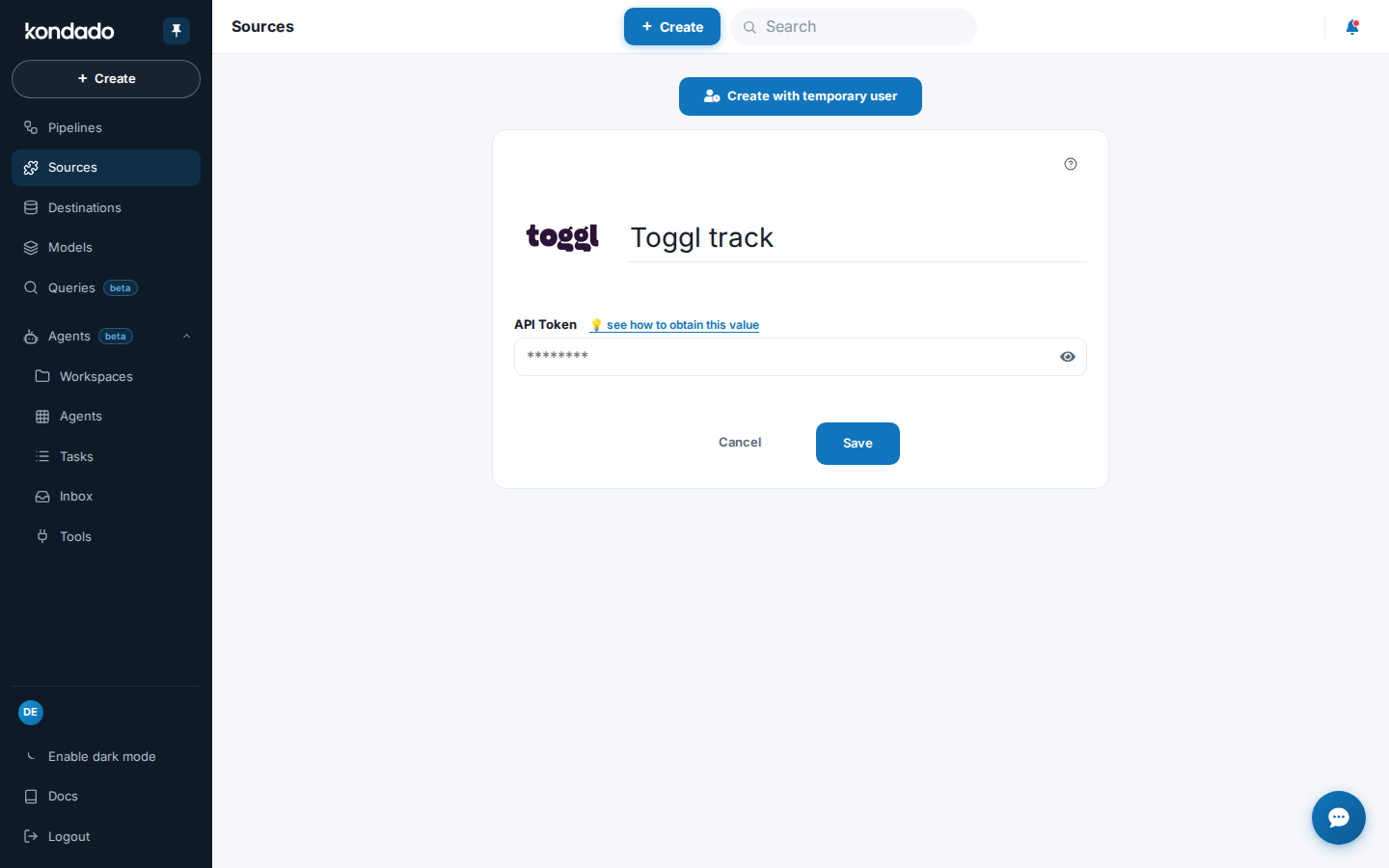
Now just click SAVE and create your integrations to start receiving Toggl data in your Data Warehouse, Data Lake or spreadsheet
Pipelines
Summary
Relationship chart
Click to expand
Clients
Groups
Replication type: Full
Main object
Toggl user groups, one row per group, with name, the workspaces it belongs to and last-change date. Used to organize team members into sets.
| Campo | Tipo | |
|---|---|---|
|
text |
[en] Numeric ID of the group. |
|
|
timestamp |
[en] When was created/last modified |
|
|
text |
[en] Group name |
|
|
text |
[en] List of group workspaces |
toggl_groups_users
Users that make up each Toggl group; one row per group member, with identifier, name, avatar and join date. Related to the parent group by its identifier.
Projects
Replication type: Incremental
Parameters:
- Read start date (Savepoint): Start date to replicate data
Relationships:
Main object
Toggl projects, one row per project, with name, associated client and workspace, status (active/private), color, billing, rate and currency, estimated and actual hours, dates and recurrence settings. It is the parent table of the recurring parameters.
| Campo | Tipo | |
|---|---|---|
|
text |
[en] Project ID |
|
|
boolean |
[en] Indicates if the project is active |
|
|
float |
[en] Actual hours spent on the project |
|
|
float |
[en] Actual seconds spent on the project |
|
|
timestamp |
[en] Timestamp of last update |
|
|
boolean |
[en] Indicates if auto estimates are enabled for the project |
|
|
boolean |
[en] Indicates if the project is billable |
|
|
text |
[en] ID of the client associated with the project |
|
|
text |
[en] Color associated with the project |
|
|
timestamp |
[en] Project creation timestamp |
|
|
text |
[en] Currency used for billing |
|
|
float |
[en] Estimated hours for the project |
|
|
float |
[en] Estimated seconds for the project |
|
|
float |
[en] Fixed fee for the project |
|
|
boolean |
[en] Indicates if the project is private |
|
|
text |
[en] Project name |
|
|
float |
[en] Hourly rate for the project |
|
|
timestamp |
[en] Timestamp of the last update to the rate |
|
|
boolean |
[en] Indicates if the project is recurring |
|
|
text |
[en] Timestamp of when the project was deleted on the server |
|
|
date |
[en] Start date of the project |
|
|
text |
[en] Current status of the project |
|
|
boolean |
[en] Indicates if the project is a template |
|
|
text |
[en] Template ID of the project |
|
|
text |
[en] Project workspace ID |
toggl_projects_recurring_parameters
Recurrence parameters of Toggl projects; one row per recurrence setting, with period, custom period, estimated seconds and start/end dates. Related to the parent project by its identifier.
| Campo | Tipo | |
|---|---|---|
|
text |
[en] Project ID |
|
|
text |
[en] Custom recurring period |
|
|
float |
[en] Estimated seconds for recurring parameters |
|
|
text |
[en] End date for recurring parameters |
|
|
date |
[en] Start date for recurring parameters |
|
|
text |
[en] Recurring period type |
|
|
date |
[en] Project start date for recurring parameters |
Projects: groups
Replication type: Full
Relationships:
Associations between projects and groups in Toggl, one row per link, relating the project, group and workspace identifiers. Indicates which groups have access to each project.
| Campo | Tipo | |
|---|---|---|
|
text |
[en] Refers to the unique identifier of the specific record. |
|
|
text |
[en] It's a unique identifier for the group. |
|
|
text |
[en] It's the unique identifier of the project to which the group belongs. |
|
|
text |
[en] Represents the unique identifier of the workspace where the project and the group are located. |
Projects: users
Replication type: Full
Relationships:
Assignments of users to projects in Toggl, one row per user on a project, with user, project, group and workspace identifiers, manager flag, hourly rate, labour cost and last-change date.
| Campo | Tipo | |
|---|---|---|
|
text |
[en] Unique identifier of the project user |
|
|
text |
[en] Identifier of the user associated with this project |
|
|
text |
[en] Identifier of the associated project |
|
|
text |
[en] Identifier of the group this project user belongs to, if applicable |
|
|
timestamp |
[en] Timestamp of the last update to the project user |
|
|
float |
[en] Total labour cost for the user on this project |
|
|
boolean |
[en] Indicates whether the user is a manager of the project |
|
|
float |
[en] Hourly rate of the user for this project |
|
|
timestamp |
[en] Timestamp of the last update to the user's rate |
|
|
text |
[en] Identifier of the workspace this project user belongs to |
Tags
Tasks
Replication type: Incremental
Parameters:
- Read start date (Savepoint): Start date to replicate data
Relationships:
Toggl tasks, one row per task, with name, associated project and workspace, assigned user, status (active/recurring), estimated seconds and already tracked seconds, plus last-change date.
| Campo | Tipo | |
|---|---|---|
|
text |
[en] Unique identifier of the task |
|
|
boolean |
[en] Indicates whether the task is active |
|
|
timestamp |
[en] Timestamp of the last update to the task |
|
|
float |
[en] Estimated seconds for the task |
|
|
text |
[en] Name of the task |
|
|
text |
[en] Identifier of the project this task is associated with |
|
|
boolean |
[en] Indicates whether the task is recurring |
|
|
float |
[en] Total tracked seconds for the task |
|
|
text |
[en] Identifier of the user associated with this task |
|
|
text |
[en] Identifier of the workspace this task belongs to |
Time entries
Replication type: Incremental with update window
Parameters:
- Update window (days): How many days prior to the time entry start should records keep being updated
- Read start date (Savepoint): Initial date to filter results (based on time entry start time)
Relationships:
Toggl time entries, one row per tracked time record, with description, start, stop and duration in seconds, associated user, project, task, workspace and tags, billable flag, billable amount and hourly rate in cents. It is the core of tracked working hours in Toggl.
| Campo | Tipo | |
|---|---|---|
|
text |
[en] Unique identifier of the time entry |
|
|
timestamp |
[en] Timestamp indicating the last time the entry was updated |
|
|
boolean |
[en] Indicates if the time entry is billable |
|
|
float |
[en] The billable amount for the time entry in cents |
|
|
text |
[en] Currency used for billing |
|
|
text |
[en] Description of the time entry |
|
|
float |
[en] Hourly rate for the time entry in cents |
|
|
text |
[en] Identifier of the project to which the time entry is associated |
|
|
float |
[en] Duration of the time entry in seconds |
|
|
timestamp |
[en] Start time of the time entry |
|
|
timestamp |
[en] Stop time of the time entry |
|
|
text |
[en] List of tag identifiers associated with the time entry |
|
|
text |
[en] Identifier of the task to which the time entry is associated |
|
|
text |
[en] Unique identifier of the user |
|
|
text |
[en] Name of the user |
|
|
text |
[en] Indicates the associated workspace for the given entry. |
Workspaces
Replication type: Full
Toggl workspaces, one row per workspace, with name, organization, default currency and hourly rate, plan and subscription data, profile/premium, rounding rules and admin permissions. The workspace is the container of projects, clients, tasks and time entries.
| Campo | Tipo | |
|---|---|---|
|
text |
[en] Workspace ID |
|
|
boolean |
[en] List of admins |
|
|
timestamp |
[en] Creation time |
|
|
boolean |
||
|
text |
||
|
text |
[en] Default currency, premium feature, optional, only for existing WS, will be 'USD' initially |
|
|
float |
[en] The default hourly rate, premium feature, optional, only for existing WS, will be 0.0 initially |
|
|
boolean |
||
|
text |
||
|
timestamp |
||
|
text |
||
|
text |
[en] Workspace name |
|
|
boolean |
[en] Only admins will be able to create projects, optional, only for existing WS, will be false initially |
|
|
boolean |
[en] Only admins will be able to create tags, optional, only for existing WS, will be false initially |
|
|
boolean |
[en] Whether only admins will be able to see billable rates, premium feature, optional, only for existing WS. Will be false initially |
|
|
boolean |
[en] Only admins will be able to see the team dashboard, optional, only for existing WS, will be false initially |
|
|
text |
[en] Numeric ID of the organization |
|
|
boolean |
||
|
float |
||
|
boolean |
[en] Whether projects will be set as billable by default, premium feature, optional, only for existing WS. Will be true initially |
|
|
timestamp |
[en] Date of last update in the 'rate' field |
|
|
boolean |
[en] Whether reports should be collapsed by default, optional, only for existing WS, will be true initially |
|
|
text |
[en] A user's level of access and permissions in a workspace. |
|
|
float |
[en] Default rounding, premium feature, optional, only for existing WS |
|
|
float |
[en] Default rounding in minutes, premium feature, optional, only for existing WS |
|
|
timestamp |
||
|
boolean |
||
|
text |
||
|
text |
||
|
text |
||
|
timestamp |
||
|
text |
||
|
text |
||
|
text |
||
|
text |
||
|
text |
||
|
text |
||
|
text |
||
|
timestamp |
||
|
text |
||
|
text |
||
|
float |
||
|
text |
||
|
timestamp |
Workspaces: users
Members of each Toggl workspace, one row per user in a workspace, with user and workspace identifiers, full name, email and admin/active/inactive flags.
| Campo | Tipo | |
|---|---|---|
|
text |
[en] User ID |
|
|
text |
[en] User's email |
|
|
text |
[en] User's full name |
|
|
boolean |
||
|
boolean |
[en] If 'True', user with invitation accepted in Workspace. |
|
|
boolean |
[en] If 'True', user has admin permissions on the workspace. |
|
|
text |
[en] Project workspace ID |
Notes
This data source is in beta mode
- Part of this documentation was automatically generated by AI and may contain errors. We recommend verifying critical information
Add Toggl as a Data Source on Kondado
Connect your Toggl time-tracking data to Kondado by generating an API token and configuring the beta connector.
Generate your Toggl API token
Log into your Toggl account as a Workspace Administrator, go to your profile page at https://track.toggl.com/profile, and copy your API Token.
Add Toggl as a source in Kondado
Log into your Kondado account, add Toggl as a data source, paste the API token you copied, then save the connector. Learn more about data integration on our platform.
Select the data entities to sync
Choose which Toggl entities to extract — such as Clients, Projects, Time entries, Tasks, Tags, Workspaces, and Workspaces: users — based on your reporting needs.
Send Toggl data to your destination
Route the extracted data to a BI tool, data warehouse, or spreadsheet for analysis. Explore all supported destinations to find the best fit for your workflow.
