Creating the data source
Already connected HubSpot to Kondado? Nothing changes: the token you have already saved keeps working and there is nothing for you to do. The instructions below are for setting up a new connection.
Requirements
- Follow the steps with a Super admin user, or with a user who has the Developer tools access permission in the HubSpot account
- The minimum scope required for the connector to work is
crm.objects.contacts.read
Instructions
- Log in to your HubSpot account with a Super admin user (or with a user who has the Developer tools access permission)
- In the left sidebar menu, go to Development > Keys > Service keys
- In the top right, click Create service key
- Enter a name for the key — for example, Kondado
- Click Add new scope. In the panel that opens on the right, select the read scopes the connector will use:
- we recommend selecting the read permission for every CRM scope you want to replicate — the write permission is not needed;
- if you also plan to replicate marketing data (lists, form submissions, marketing emails and feedback surveys), select the matching read scopes as well, including the
contentscope; - use the Find a scope search bar to look up a scope by name.
- Review the list of selected scopes and, in the top right, click Create. Confirm your choice in the dialog box
- Still under Development > Keys > Service keys, click the name of the key you just created. The key is partially hidden by default: click Show to reveal it, then click Copy
- Log in to the Kondado platform, go to the add a data source section and select the HubSpot data source
- Give your data source a name, paste the key you copied in step 7 into the Service Key field (if your screen still shows Private App Token, it is the same field) and click Save
Need more scopes later — to replicate a new object, for example? You can edit the key in HubSpot and add the missing scopes, with no need to create a new key or to change anything in Kondado.
Still seeing the Settings > Integrations > Private Apps menu? HubSpot will turn off private app creation on September 28, 2026 for accounts created on or after that date, and on October 26, 2026 for accounts created before it. Until then the old path is still available — and a Private App Token you have already created remains valid, even if you have not connected it to Kondado yet. After those dates, the Service Key above is the path for new connections.
You're ready to go to the pipelines page, select the pipelines you want to build and start replicating your Hubspot data to your destination!
Pipelines
Summary
- Archived companies
- Archived contacts
- Archived deals
- Archived leads
- Archived line items
- Archived tickets
- Associations
- Communications (WhatsApp/SMS/LinkedIn)
- Companies
- Companies: related contacts
- Companies: related deals
- Companies: related tickets
- Contact lists
- Contacts
- Contacts: form submissions
- Contacts: lists membership
- Contacts: related companies
- Contacts: related deals
- Contacts: related tickets
- Conversations Inbox: Inboxes and channel accounts
- Conversations Inbox: Threads and messages
- Custom object
- Deals
- Deals: related companies
- Deals: related contacts
- Deals: related tickets
- Email events
- Engagements: Calls
- Engagements: Calls: Dispositions
- Engagements: Calls: related objects
- Engagements: Emails
- Engagements: Emails: related objects
- Engagements: Meetings
- Engagements: Meetings: related objects
- Engagements: Notes
- Engagements: Notes: related objects
- Engagements: Tasks
- Engagements: Tasks: related objects
- Feedback Submissions
- Leads
- Line Items
- Line Items: related deals
- Marketing Emails
- Owners
- Payments
- Pipelines
- Products
- Properties Metadata
- Property history
- Tickets
- Tickets: related companies
- Tickets: related contacts
- Tickets: related deals
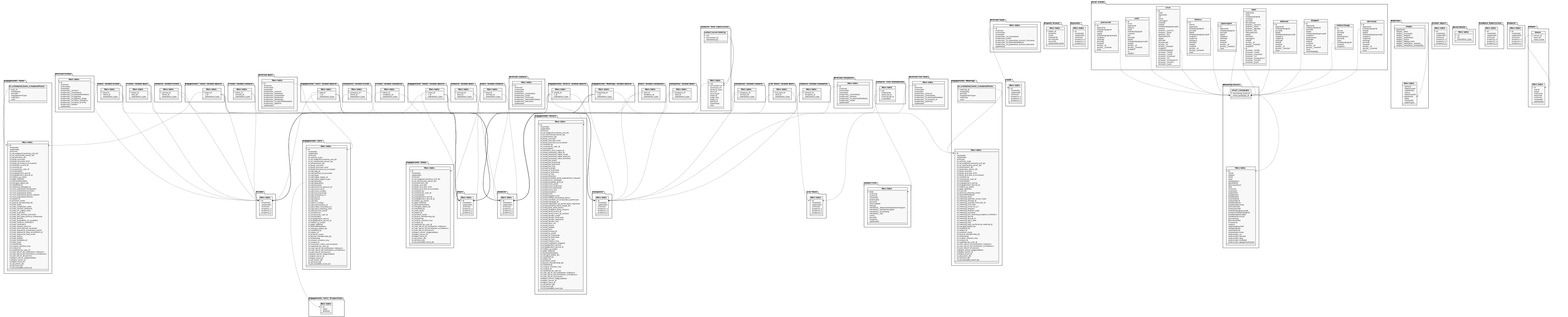
Relationship chart
Click to expand
Archived companies
HubSpot Deleted Companies - IDs of companies that were archived/deleted in HubSpot (soft-delete tracking)
| Campo | Tipo | |
|---|---|---|
|
text |
[en] Record ID - The unique HubSpot identifier of the record |
|
|
boolean |
[en] Archived - Indicates whether the record is archived (soft-deleted) in HubSpot |
|
|
timestamp |
[en] Archived at - Date and time the record was archived in HubSpot |
|
|
timestamp |
[en] Created at - Date and time the record was created in HubSpot |
|
|
timestamp |
[en] Property createdate - The CRM object property "createdate" value |
|
|
text |
[en] Property domain - The CRM object property "domain" value |
|
|
timestamp |
[en] Property hs_lastmodifieddate - The CRM object property "hs_lastmodifieddate" value |
|
|
text |
[en] Property name - The CRM object property "name" value |
|
|
timestamp |
[en] Updated at - Date and time the record was last updated in HubSpot |
Archived contacts
HubSpot Deleted Contacts - IDs of contacts that were archived/deleted in HubSpot (soft-delete tracking)
| Campo | Tipo | |
|---|---|---|
|
text |
[en] Record ID - The unique HubSpot identifier of the record |
|
|
boolean |
[en] Archived - Indicates whether the record is archived (soft-deleted) in HubSpot |
|
|
timestamp |
[en] Archived at - Date and time the record was archived in HubSpot |
|
|
timestamp |
[en] Created at - Date and time the record was created in HubSpot |
|
|
timestamp |
[en] Property createdate - The CRM object property "createdate" value |
|
|
text |
[en] Property email - The CRM object property "email" value |
|
|
text |
[en] Property firstname - The CRM object property "firstname" value |
|
|
timestamp |
[en] Property lastmodifieddate - The CRM object property "lastmodifieddate" value |
|
|
text |
[en] Property lastname - The CRM object property "lastname" value |
|
|
timestamp |
[en] Updated at - Date and time the record was last updated in HubSpot |
Archived deals
HubSpot Deleted Deals - IDs of deals that were archived/deleted in HubSpot (soft-delete tracking)
| Campo | Tipo | |
|---|---|---|
|
text |
[en] Record ID - The unique HubSpot identifier of the record |
|
|
boolean |
[en] Archived - Indicates whether the record is archived (soft-deleted) in HubSpot |
|
|
timestamp |
[en] Archived at - Date and time the record was archived in HubSpot |
|
|
timestamp |
[en] Created at - Date and time the record was created in HubSpot |
|
|
float |
[en] Property amount - The CRM object property "amount" value |
|
|
timestamp |
[en] Property closedate - The CRM object property "closedate" value |
|
|
timestamp |
[en] Property createdate - The CRM object property "createdate" value |
|
|
text |
[en] Property dealname - The CRM object property "dealname" value |
|
|
text |
[en] Property dealstage - The CRM object property "dealstage" value |
|
|
timestamp |
[en] Property hs_lastmodifieddate - The CRM object property "hs_lastmodifieddate" value |
|
|
text |
[en] Property pipeline - The CRM object property "pipeline" value |
|
|
timestamp |
[en] Updated at - Date and time the record was last updated in HubSpot |
Archived line items
HubSpot Deleted Line Items - IDs of line items that were archived/deleted in HubSpot (soft-delete tracking)
| Campo | Tipo | |
|---|---|---|
|
text |
[en] Record ID - The unique HubSpot identifier of the record |
|
|
boolean |
[en] Archived - Indicates whether the record is archived (soft-deleted) in HubSpot |
|
|
timestamp |
[en] Archived at - Date and time the record was archived in HubSpot |
|
|
timestamp |
[en] Created at - Date and time the record was created in HubSpot |
|
|
float |
[en] Property amount - The CRM object property "amount" value |
|
|
timestamp |
[en] Property createdate - The CRM object property "createdate" value |
|
|
timestamp |
[en] Property hs_lastmodifieddate - The CRM object property "hs_lastmodifieddate" value |
|
|
text |
[en] Property hs_product_id - The CRM object property "hs_product_id" value |
|
|
float |
[en] Property quantity - The CRM object property "quantity" value |
|
|
timestamp |
[en] Updated at - Date and time the record was last updated in HubSpot |
Archived tickets
HubSpot Deleted Tickets - IDs of tickets that were archived/deleted in HubSpot (soft-delete tracking)
| Campo | Tipo | |
|---|---|---|
|
text |
[en] Record ID - The unique HubSpot identifier of the record |
|
|
boolean |
[en] Archived - Indicates whether the record is archived (soft-deleted) in HubSpot |
|
|
timestamp |
[en] Archived at - Date and time the record was archived in HubSpot |
|
|
timestamp |
[en] Created at - Date and time the record was created in HubSpot |
|
|
text |
[en] Property content - The CRM object property "content" value |
|
|
timestamp |
[en] Property createdate - The CRM object property "createdate" value |
|
|
timestamp |
[en] Property hs_lastmodifieddate - The CRM object property "hs_lastmodifieddate" value |
|
|
text |
[en] Property hs_pipeline - The CRM object property "hs_pipeline" value |
|
|
text |
[en] Property hs_pipeline_stage - The CRM object property "hs_pipeline_stage" value |
|
|
text |
[en] Property hs_ticket_category - The CRM object property "hs_ticket_category" value |
|
|
text |
[en] Property hs_ticket_priority - The CRM object property "hs_ticket_priority" value |
|
|
text |
[en] Property subject - The CRM object property "subject" value |
|
|
timestamp |
[en] Updated at - Date and time the record was last updated in HubSpot |
Associations
Replication type: Incremental
Parameters:
- To: Select the object from which to get associations
- From: Select the object to which to get associations
HubSpot Custom Object Associations - Relationships between custom objects
| Campo | Tipo | |
|---|---|---|
|
text |
[en] Source object ID - The HubSpot ID of the object on the source side of the association |
|
|
text |
[en] Target object ID - The HubSpot ID of the object on the target side of the association |
|
|
text |
[en] Association type - The type/label of the association between the two objects |
|
|
int |
[en] Association type ID - HubSpot associationTypeId (e.g. 175 for "Indicado") |
|
|
text |
[en] Association label - Human-readable label of the association as defined in HubSpot (null when no user-defined label exists) |
|
|
text |
[en] Association category - HUBSPOT_DEFINED, USER_DEFINED or INTEGRATOR_DEFINED |
Companies
- This pipeline will bring companies and all their properties in a columnar format, according to your account settings, in a format similar to the one below.
- This pipeline does not capture deletions and archiving: if a record is removed by archiving or deletion, it will not be reflected in your pipeline.
- A specific pipeline for archived records is available to remove archived data from your view or model. Deleted data cannot be recovered
- By default, all custom properties existing in your account will be included. However, using many properties may impact data reading speed.
- It is recommended to use only necessary properties by selecting them on the pipeline creation/edit screen. When naming the tables, click on FIELDS and uncheck/check the desired properties/columns
- If more than 10,000 updated records are found within a 100-millisecond period during an execution, or if the initial savepoint is more than 3 days from the current date, a full execution will be performed.
Replication type: Incremental
HubSpot Deals - Sales opportunities (deals) and their properties
| Campo | Tipo | |
|---|---|---|
|
text |
[en] Record ID - The unique HubSpot identifier of the record |
|
|
timestamp |
[en] Created at - Date and time the record was created in HubSpot |
|
|
timestamp |
[en] Updated at - Date and time the record was last updated in HubSpot |
|
|
boolean |
[en] Archived - Indicates whether the record is archived (soft-deleted) in HubSpot |
|
|
text |
[en] Custom property placeholder - A user-defined property selected for this pipeline |
|
|
text |
[en] Custom property placeholder - A user-defined property selected for this pipeline |
|
|
text |
[en] Custom property placeholder - A user-defined property selected for this pipeline |
Companies: related contacts
HubSpot Company-Contact Associations - Relationships between companies and contacts
| Campo | Tipo | |
|---|---|---|
|
text |
[en] Source object ID - The HubSpot ID of the object on the source side of the association |
|
|
text |
[en] Target object ID - The HubSpot ID of the object on the target side of the association |
|
|
text |
[en] Association type - The type/label of the association between the two objects |
Companies: related deals
HubSpot Company-Deal Associations - Relationships between companies and deals
| Campo | Tipo | |
|---|---|---|
|
text |
[en] Source object ID - The HubSpot ID of the object on the source side of the association |
|
|
text |
[en] Deal ID - The HubSpot ID of the associated deal |
|
|
text |
[en] Association type - The type/label of the association between the two objects |
Companies: related tickets
HubSpot Company-Ticket Associations - Relationships between companies and tickets
| Campo | Tipo | |
|---|---|---|
|
text |
[en] Source object ID - The HubSpot ID of the object on the source side of the association |
|
|
text |
[en] Target object ID - The HubSpot ID of the object on the target side of the association |
|
|
text |
[en] Association type - The type/label of the association between the two objects |
Contact lists
Replication type: Full
HubSpot Contact Lists - Definitions of contact lists (static and dynamic) and their metadata
| Campo | Tipo | |
|---|---|---|
|
text |
[en] List ID - The ID of the contact list |
|
|
boolean |
[en] Archived - Indicates whether the record is archived (soft-deleted) in HubSpot |
|
|
text |
[en] Author ID - The ID of the author of the record |
|
|
timestamp |
[en] Created at - Date and time the record was created in HubSpot |
|
|
boolean |
[en] Deleteable - Indicates whether the property can be deleted |
|
|
boolean |
[en] Dynamic - Indicates whether the property is dynamic |
|
|
text |
[en] Internal list ID - The internal HubSpot ID of the contact list |
|
|
text |
[en] List type - The type of the contact list (static or dynamic) |
|
|
timestamp |
[en] Last processing state change - When the list processing state last changed |
|
|
timestamp |
[en] Last size change - When the list size last changed |
|
|
text |
[en] Processing status - The processing status of the list |
|
|
float |
[en] List size - The number of contacts currently in the list |
|
|
text |
[en] Property name - The internal name of the property |
|
|
text |
[en] Portal ID - The numeric ID of the HubSpot account (portal) the record belongs to |
|
|
boolean |
[en] Read-only - Whether the value is read-only |
|
|
timestamp |
[en] Updated at - Date and time the record was last updated in HubSpot |
Contacts
- This pipeline will bring contacts and all their properties in a columnar format, according to your account settings, in a format similar to the one below
- This pipeline does not capture deletions and archiving: if a record is removed by archiving or deletion, it will not be reflected in your pipeline. Therefore, we have created a specific pipeline for archived records that you can use to remove archived data from your view or model. Deleted data cannot be recovered.
- By default, all custom properties existing in your account will be included. However, using many properties may impact data reading speed. We recommend using only the necessary properties by selecting them on the pipeline creation/edit screen. When naming the tables, simply click on FIELDS and uncheck/check the desired properties/columns.
- If more than 10,000 updated records are found within a 100-millisecond period during an execution, or if the initial savepoint is more than 3 days from the current date, a full execution will be performed
Replication type: Incremental
HubSpot Contacts - Individual people and their contact information
| Campo | Tipo | |
|---|---|---|
|
text |
[en] Record ID - The unique HubSpot identifier of the record |
|
|
timestamp |
[en] Created at - Date and time the record was created in HubSpot |
|
|
timestamp |
[en] Updated at - Date and time the record was last updated in HubSpot |
|
|
boolean |
[en] Archived - Indicates whether the record is archived (soft-deleted) in HubSpot |
|
|
text |
[en] Custom property placeholder - A user-defined property selected for this pipeline |
|
|
text |
[en] Custom property placeholder - A user-defined property selected for this pipeline |
|
|
text |
[en] Custom property placeholder - A user-defined property selected for this pipeline |
Contacts: form submissions
- This pipeline is based on the Contacts pipeline from the previous version of the API, and its update depends on the change in the contact's lastmodifieddate property. Additionally, learn more about the savepoint calculation in this changelog
Main object
HubSpot Contact Form Submissions - Form submissions associated with contacts
| Campo | Tipo | |
|---|---|---|
|
text |
[en] Visitor ID (vid) - The legacy HubSpot contact identifier |
|
|
text |
[en] Conversion ID - The ID of the form conversion |
|
|
text |
[en] Canonical URL - The canonical profile URL of the contact |
|
|
text |
[en] Content type - The type of content associated with the submission |
|
|
text |
[en] Form ID - The ID of the form |
|
|
text |
[en] Form type - The type of the form |
|
|
text |
[en] Page ID - The ID of the page |
|
|
text |
[en] Page title - The title of the page |
|
|
text |
[en] Page URL - The URL of the page |
|
|
text |
[en] Portal ID - The HubSpot account (portal) ID |
|
|
timestamp |
[en] Timestamp - The date and time associated with the record/event |
|
|
text |
[en] Title - The title text |
contacts_form_submissions__contact_associated_by
HubSpot Contact Form Submissions (associated by) - How each form submission was associated to a contact
Contacts: lists membership
- This pipeline is based on the Contacts pipeline from the previous version of the API, and its update depends on the change in the contact's lastmodifieddate property. Additionally, learn more about the savepoint calculation in this changelog.
Replication type: Incremental
Relationships:
HubSpot Contact List Memberships - Which contacts belong to which contact lists
| Campo | Tipo | |
|---|---|---|
|
text |
[en] Visitor ID (vid) - The legacy HubSpot contact identifier |
|
|
timestamp |
[en] Timestamp - The date and time associated with the record/event |
|
|
text |
[en] Static list ID - The static list ID |
|
|
text |
[en] Internal list ID - The internal HubSpot ID of the list |
|
|
boolean |
[en] Is member - Whether the contact is a member of the list |
Contacts: related companies
HubSpot Contact-Ticket Associations - Relationships between contacts and tickets
| Campo | Tipo | |
|---|---|---|
|
text |
[en] Source object ID - The HubSpot ID of the object on the source side of the association |
|
|
text |
[en] Target object ID - The HubSpot ID of the object on the target side of the association |
|
|
text |
[en] Association type - The type/label of the association between the two objects |
Contacts: related deals
HubSpot Contact-Ticket Associations - Relationships between contacts and tickets
| Campo | Tipo | |
|---|---|---|
|
text |
[en] Source object ID - The HubSpot ID of the object on the source side of the association |
|
|
text |
[en] Deal ID - The HubSpot ID of the associated deal |
|
|
text |
[en] Association type - The type/label of the association between the two objects |
Contacts: related tickets
HubSpot Contact-Ticket Associations - Relationships between contacts and tickets
| Campo | Tipo | |
|---|---|---|
|
text |
[en] Source object ID - The HubSpot ID of the object on the source side of the association |
|
|
text |
[en] Target object ID - The HubSpot ID of the object on the target side of the association |
|
|
text |
[en] Association type - The type/label of the association between the two objects |
Custom object
By default, all custom properties existing in your account will be included. However, using many properties may impact data reading speed. We recommend using only the necessary properties by selecting them on the pipeline creation/edit screen. When naming the tables, simply click on FIELDS and uncheck/check the desired properties/columns.
If more than 10,000 updated records are found within a 100-millisecond period during an execution, or if the initial savepoint is more than 3 days from the current date, a full execution will be performed.
Replication type: Incremental
Parameters:
- Object: Select the custom object
HubSpot Custom Objects - User-defined custom objects and their properties
| Campo | Tipo | |
|---|---|---|
|
text |
[en] Record ID - The unique HubSpot identifier of the record |
|
|
timestamp |
[en] Created at - Date and time the record was created in HubSpot |
|
|
timestamp |
[en] Updated at - Date and time the record was last updated in HubSpot |
|
|
boolean |
[en] Archived - Indicates whether the record is archived (soft-deleted) in HubSpot |
|
|
text |
[en] Custom property placeholder - A user-defined property selected for this pipeline |
|
|
text |
[en] Custom property placeholder - A user-defined property selected for this pipeline |
|
|
text |
[en] Custom property placeholder - A user-defined property selected for this pipeline |
Deals
This pipeline will bring deals and all their properties in a columnar format, according to your account settings, in a format similar to the one below.
This pipeline does not capture deletions and archiving: if a record is removed by archiving or deletion, it will not be reflected in your pipeline. Therefore, we have created a specific pipeline for archived records that you can use to remove archived data from your view or model. Deleted data cannot be recovered.
By default, all custom properties existing in your account will be included. However, using many properties may impact data reading speed. We recommend using only the necessary properties by selecting them on the pipeline creation/edit screen. When naming the tables, simply click on FIELDS and uncheck/check the desired properties/columns.
If more than 10,000 updated records are found within a 100-millisecond period during an execution, or if the initial savepoint is more than 3 days from the current date, a full execution will be performed.
Replication type: Incremental
HubSpot Deals - Sales opportunities (deals) and their properties
| Campo | Tipo | |
|---|---|---|
|
text |
[en] Record ID - The unique HubSpot identifier of the record |
|
|
timestamp |
[en] Created at - Date and time the record was created in HubSpot |
|
|
timestamp |
[en] Updated at - Date and time the record was last updated in HubSpot |
|
|
boolean |
[en] Archived - Indicates whether the record is archived (soft-deleted) in HubSpot |
|
|
text |
[en] Custom property placeholder - A user-defined property selected for this pipeline |
|
|
text |
[en] Custom property placeholder - A user-defined property selected for this pipeline |
|
|
text |
[en] Custom property placeholder - A user-defined property selected for this pipeline |
Deals: related companies
HubSpot Deal-Contact Associations - Relationships between deals and contacts
| Campo | Tipo | |
|---|---|---|
|
text |
[en] Source object ID - The HubSpot ID of the object on the source side of the association |
|
|
text |
[en] Target object ID - The HubSpot ID of the object on the target side of the association |
|
|
text |
[en] Association type - The type/label of the association between the two objects |
Deals: related contacts
HubSpot Deal-Contact Associations - Relationships between deals and contacts
| Campo | Tipo | |
|---|---|---|
|
text |
[en] Source object ID - The HubSpot ID of the object on the source side of the association |
|
|
text |
[en] Target object ID - The HubSpot ID of the object on the target side of the association |
|
|
text |
[en] Association type - The type/label of the association between the two objects |
Deals: related tickets
HubSpot Deal-Contact Associations - Relationships between deals and contacts
| Campo | Tipo | |
|---|---|---|
|
text |
[en] Source object ID - The HubSpot ID of the object on the source side of the association |
|
|
text |
[en] Target object ID - The HubSpot ID of the object on the target side of the association |
|
|
text |
[en] Association type - The type/label of the association between the two objects |
Email events
Replication type: Incremental
Parameters:
- Read start date (Savepoint): Initial replication date
- Evento: Select the event to be replicated
Relationships:
- emailcampaignid > delivered → Marketing Emails > email_campaigns > email_campaign_id
- emailcampaignid > statuschange → Marketing Emails > email_campaigns > email_campaign_id
- emailcampaignid > dropped → Marketing Emails > email_campaigns > email_campaign_id
- emailcampaignid > deferred → Marketing Emails > email_campaigns > email_campaign_id
- emailcampaignid > open → Marketing Emails > email_campaigns > email_campaign_id
- emailcampaignid > spamreport → Marketing Emails > email_campaigns > email_campaign_id
- emailcampaignid > bounce → Marketing Emails > email_campaigns > email_campaign_id
- emailcampaignid > click → Marketing Emails > email_campaigns > email_campaign_id
- emailcampaignid > sent → Marketing Emails > email_campaigns > email_campaign_id
- emailcampaignid > processed → Marketing Emails > email_campaigns > email_campaign_id
hubspot_email_events_sent
HubSpot Email Events: Sent - Sent events of marketing email campaigns
| Campo | Tipo | |
|---|---|---|
|
text |
[en] Record ID - The unique HubSpot identifier of the record |
|
|
text |
[en] App name - The name of the HubSpot application that generated the event |
|
|
text |
[en] Email campaign ID - The ID of the marketing email campaign the event belongs to |
|
|
text |
[en] SMTP ID - The SMTP message identifier associated with the email event |
|
|
float |
[en] App ID - The ID of the HubSpot application that generated the event |
|
|
float |
[en] Email campaign group ID - The ID grouping related email campaign versions |
|
|
text |
[en] Recipient - The email address of the message recipient |
|
|
text |
[en] Response - The server response message for the email event |
|
|
float |
[en] Attempt - The delivery attempt number for the email |
|
|
float |
[en] Portal ID - The numeric ID of the HubSpot account (portal) the record belongs to |
|
|
float |
[en] Created - Timestamp (epoch milliseconds) when the event was created |
|
|
text |
[en] Sent by - ID of the originating email event that this event references |
|
|
float |
[en] Sent by (created) - Timestamp of the originating email event |
|
|
text |
[en] Association type - The type/label of the association between the two objects |
hubspot_email_events_sent
HubSpot Email Events: Sent - Sent events of marketing email campaigns
| Campo | Tipo | |
|---|---|---|
|
text |
[en] Record ID - The unique HubSpot identifier of the record |
|
|
text |
[en] Source - The source that originated the record/event |
|
|
float |
[en] Portal ID - The numeric ID of the HubSpot account (portal) the record belongs to |
|
|
float |
[en] App ID - The ID of the HubSpot application that generated the event |
|
|
text |
[en] Subscriptions - The list of subscriptions associated with the record |
|
|
text |
[en] Source ID - The identifier of the source that originated the record |
|
|
text |
[en] Association type - The type/label of the association between the two objects |
|
|
text |
[en] Email campaign ID - The ID of the marketing email campaign the event belongs to |
|
|
float |
[en] Created - Timestamp (epoch milliseconds) when the event was created |
|
|
text |
[en] Recipient - The email address of the message recipient |
hubspot_email_events_sent
HubSpot Email Events: Sent - Sent events of marketing email campaigns
| Campo | Tipo | |
|---|---|---|
|
text |
[en] Record ID - The unique HubSpot identifier of the record |
|
|
text |
[en] App name - The name of the HubSpot application that generated the event |
|
|
text |
[en] Email campaign ID - The ID of the marketing email campaign the event belongs to |
|
|
float |
[en] Portal ID - The numeric ID of the HubSpot account (portal) the record belongs to |
|
|
float |
[en] App ID - The ID of the HubSpot application that generated the event |
|
|
float |
[en] Email campaign group ID - The ID grouping related email campaign versions |
|
|
text |
[en] Recipient - The email address of the message recipient |
|
|
text |
[en] Drop reason - The reason code for why the email was dropped |
|
|
float |
[en] Attempt - The delivery attempt number for the email |
|
|
text |
[en] SMTP ID - The SMTP message identifier associated with the email event |
|
|
float |
[en] Created - Timestamp (epoch milliseconds) when the event was created |
|
|
text |
[en] Sent by - ID of the originating email event that this event references |
|
|
float |
[en] Sent by (created) - Timestamp of the originating email event |
|
|
text |
[en] Association type - The type/label of the association between the two objects |
|
|
text |
[en] Drop message - The message describing why the email was dropped |
hubspot_email_events_sent
HubSpot Email Events: Sent - Sent events of marketing email campaigns
| Campo | Tipo | |
|---|---|---|
|
text |
[en] Record ID - The unique HubSpot identifier of the record |
|
|
text |
[en] App name - The name of the HubSpot application that generated the event |
|
|
text |
[en] Email campaign ID - The ID of the marketing email campaign the event belongs to |
|
|
float |
[en] Portal ID - The numeric ID of the HubSpot account (portal) the record belongs to |
|
|
float |
[en] App ID - The ID of the HubSpot application that generated the event |
|
|
float |
[en] Email campaign group ID - The ID grouping related email campaign versions |
|
|
text |
[en] Recipient - The email address of the message recipient |
|
|
text |
[en] Response - The server response message for the email event |
|
|
float |
[en] Attempt - The delivery attempt number for the email |
|
|
text |
[en] SMTP ID - The SMTP message identifier associated with the email event |
|
|
float |
[en] Created - Timestamp (epoch milliseconds) when the event was created |
|
|
text |
[en] Sent by - ID of the originating email event that this event references |
|
|
float |
[en] Sent by (created) - Timestamp of the originating email event |
|
|
text |
[en] Association type - The type/label of the association between the two objects |
hubspot_email_events_sent
HubSpot Email Events: Sent - Sent events of marketing email campaigns
| Campo | Tipo | |
|---|---|---|
|
text |
[en] App name - The name of the HubSpot application that generated the event |
|
|
text |
[en] Association type - The type/label of the association between the two objects |
|
|
text |
[en] Email campaign ID - The ID of the marketing email campaign the event belongs to |
|
|
float |
[en] Created - Timestamp (epoch milliseconds) when the event was created |
|
|
float |
[en] Portal ID - The numeric ID of the HubSpot account (portal) the record belongs to |
|
|
text |
[en] Device type - The type of device used by the recipient |
|
|
text |
[en] Location country - The country derived from the recipient IP |
|
|
text |
[en] Location state - The state/region derived from the recipient IP |
|
|
text |
[en] Location zipcode - The postal code derived from the recipient IP |
|
|
text |
[en] Location city - The city derived from the recipient IP |
|
|
boolean |
[en] Filtered event - Indicates whether the event was filtered out |
|
|
float |
[en] App ID - The ID of the HubSpot application that generated the event |
|
|
float |
[en] Duration - The duration value associated with the event |
|
|
text |
[en] User agent - The user-agent string of the recipient device/browser |
|
|
text |
[en] SMTP ID - The SMTP message identifier associated with the email event |
|
|
text |
[en] Sent by - ID of the originating email event that this event references |
|
|
float |
[en] Sent by (created) - Timestamp of the originating email event |
|
|
text |
[en] Recipient - The email address of the message recipient |
|
|
text |
[en] Record ID - The unique HubSpot identifier of the record |
|
|
text |
[en] Browser family - The browser family of the recipient |
|
|
text |
[en] Browser name - The name of the recipient browser |
|
|
text |
[en] Browser producer - The producer/vendor of the recipient browser |
|
|
text |
[en] Browser URL - The URL associated with the browser |
|
|
text |
[en] Browser producer URL - The URL of the browser producer |
|
|
text |
[en] Browser version - The version of the recipient browser |
|
|
text |
[en] Browser type - The type/category of the recipient browser |
hubspot_email_events_sent
HubSpot Email Events: Sent - Sent events of marketing email campaigns
| Campo | Tipo | |
|---|---|---|
|
text |
[en] Record ID - The unique HubSpot identifier of the record |
|
|
text |
[en] App name - The name of the HubSpot application that generated the event |
|
|
text |
[en] Email campaign ID - The ID of the marketing email campaign the event belongs to |
|
|
float |
[en] Portal ID - The numeric ID of the HubSpot account (portal) the record belongs to |
|
|
float |
[en] App ID - The ID of the HubSpot application that generated the event |
|
|
text |
[en] Recipient - The email address of the message recipient |
|
|
text |
[en] Attempt - The delivery attempt number for the email |
|
|
text |
[en] SMTP ID - The SMTP message identifier associated with the email event |
|
|
float |
[en] Created - Timestamp (epoch milliseconds) when the event was created |
|
|
text |
[en] Sent by - ID of the originating email event that this event references |
|
|
float |
[en] Sent by (created) - Timestamp of the originating email event |
|
|
text |
[en] Association type - The type/label of the association between the two objects |
hubspot_email_events_sent
HubSpot Email Events: Sent - Sent events of marketing email campaigns
| Campo | Tipo | |
|---|---|---|
|
text |
[en] Record ID - The unique HubSpot identifier of the record |
|
|
text |
[en] Status - The status of the record |
|
|
text |
[en] App name - The name of the HubSpot application that generated the event |
|
|
text |
[en] Email campaign ID - The ID of the marketing email campaign the event belongs to |
|
|
float |
[en] Portal ID - The numeric ID of the HubSpot account (portal) the record belongs to |
|
|
float |
[en] App ID - The ID of the HubSpot application that generated the event |
|
|
float |
[en] Email campaign group ID - The ID grouping related email campaign versions |
|
|
text |
[en] Recipient - The email address of the message recipient |
|
|
text |
[en] Response - The server response message for the email event |
|
|
text |
[en] Category - The category classification of the email event |
|
|
float |
[en] Attempt - The delivery attempt number for the email |
|
|
text |
[en] SMTP ID - The SMTP message identifier associated with the email event |
|
|
float |
[en] Created - Timestamp (epoch milliseconds) when the event was created |
|
|
text |
[en] Sent by - ID of the originating email event that this event references |
|
|
float |
[en] Sent by (created) - Timestamp of the originating email event |
|
|
text |
[en] Association type - The type/label of the association between the two objects |
hubspot_email_events_sent
HubSpot Email Events: Sent - Sent events of marketing email campaigns
| Campo | Tipo | |
|---|---|---|
|
text |
[en] Record ID - The unique HubSpot identifier of the record |
|
|
text |
[en] Association type - The type/label of the association between the two objects |
|
|
text |
[en] App name - The name of the HubSpot application that generated the event |
|
|
text |
[en] URL - The URL associated with the event (e.g. the clicked link) |
|
|
float |
[en] Link ID - The ID of the link associated with the click event |
|
|
text |
[en] User agent - The user-agent string of the recipient device/browser |
|
|
float |
[en] Created - Timestamp (epoch milliseconds) when the event was created |
|
|
text |
[en] SMTP ID - The SMTP message identifier associated with the email event |
|
|
float |
[en] Email campaign group ID - The ID grouping related email campaign versions |
|
|
text |
[en] Referer - The referring URL associated with the email event |
|
|
text |
[en] Location country - The country derived from the recipient IP |
|
|
text |
[en] Location state - The state/region derived from the recipient IP |
|
|
text |
[en] Location city - The city derived from the recipient IP |
|
|
boolean |
[en] Filtered event - Indicates whether the event was filtered out |
|
|
float |
[en] App ID - The ID of the HubSpot application that generated the event |
|
|
float |
[en] Portal ID - The numeric ID of the HubSpot account (portal) the record belongs to |
|
|
text |
[en] Device type - The type of device used by the recipient |
|
|
text |
[en] Sent by - ID of the originating email event that this event references |
|
|
float |
[en] Sent by (created) - Timestamp of the originating email event |
|
|
text |
[en] Recipient - The email address of the message recipient |
|
|
text |
[en] Email campaign ID - The ID of the marketing email campaign the event belongs to |
|
|
text |
[en] Browser family - The browser family of the recipient |
|
|
text |
[en] Browser name - The name of the recipient browser |
|
|
text |
[en] Browser producer - The producer/vendor of the recipient browser |
|
|
text |
[en] Browser URL - The URL associated with the browser |
|
|
text |
[en] Browser producer URL - The URL of the browser producer |
|
|
text |
[en] Browser version - The version of the recipient browser |
|
|
text |
[en] Browser type - The type/category of the recipient browser |
hubspot_email_events_sent
HubSpot Email Events: Sent - Sent events of marketing email campaigns
| Campo | Tipo | |
|---|---|---|
|
text |
[en] Record ID - The unique HubSpot identifier of the record |
|
|
text |
[en] Source object ID - The HubSpot ID of the object on the source side of the association |
|
|
text |
[en] App name - The name of the HubSpot application that generated the event |
|
|
text |
[en] Reply-to - The reply-to address of the email |
|
|
text |
[en] Association type - The type/label of the association between the two objects |
|
|
text |
[en] Email campaign ID - The ID of the marketing email campaign the event belongs to |
|
|
float |
[en] Created - Timestamp (epoch milliseconds) when the event was created |
|
|
text |
[en] BCC - The blind carbon copy recipients of the email |
|
|
float |
[en] Portal ID - The numeric ID of the HubSpot account (portal) the record belongs to |
|
|
float |
[en] App ID - The ID of the HubSpot application that generated the event |
|
|
float |
[en] Email campaign group ID - The ID grouping related email campaign versions |
|
|
text |
[en] SMTP ID - The SMTP message identifier associated with the email event |
|
|
text |
[en] Sent by - ID of the originating email event that this event references |
|
|
float |
[en] Sent by (created) - Timestamp of the originating email event |
|
|
text |
[en] Recipient - The email address of the message recipient |
|
|
text |
[en] CC - The carbon copy recipients of the email |
|
|
text |
[en] Subject - The subject text |
hubspot_email_events_sent
HubSpot Email Events: Sent - Sent events of marketing email campaigns
| Campo | Tipo | |
|---|---|---|
|
text |
[en] Record ID - The unique HubSpot identifier of the record |
|
|
text |
[en] App name - The name of the HubSpot application that generated the event |
|
|
text |
[en] Email campaign ID - The ID of the marketing email campaign the event belongs to |
|
|
text |
[en] SMTP ID - The SMTP message identifier associated with the email event |
|
|
float |
[en] App ID - The ID of the HubSpot application that generated the event |
|
|
float |
[en] Email campaign group ID - The ID grouping related email campaign versions |
|
|
text |
[en] Recipient - The email address of the message recipient |
|
|
float |
[en] Attempt - The delivery attempt number for the email |
|
|
float |
[en] Portal ID - The numeric ID of the HubSpot account (portal) the record belongs to |
|
|
float |
[en] Created - Timestamp (epoch milliseconds) when the event was created |
|
|
text |
[en] Sent by - ID of the originating email event that this event references |
|
|
float |
[en] Sent by (created) - Timestamp of the originating email event |
|
|
text |
[en] Association type - The type/label of the association between the two objects |
Engagements: Calls
This pipeline does not capture deletions and archiving: if a record is removed by archiving or deletion, it will not be reflected in your pipeline. Therefore, we will create a specific pipeline for archived records that you can use to remove archived data from your view or model. We are currently awaiting the release of this functionality for this endpoint by HubSpot. Deleted data cannot be recovered.
If more than 10,000 updated records are found within a 100-millisecond period during an execution, or if the initial savepoint is more than 3 days from the current date, a full execution will be performed.
Replication type: Incremental
Relationships:
HubSpot Calls - Call engagements represent logged phone calls with contacts
| Campo | Tipo | |
|---|---|---|
|
text |
[en] Record ID - The unique HubSpot identifier of the record |
|
|
timestamp |
[en] Created at - Date and time the record was created in HubSpot |
|
|
timestamp |
[en] Updated at - Date and time the record was last updated in HubSpot |
|
|
boolean |
[en] Archived - Indicates whether the record is archived (soft-deleted) in HubSpot |
|
|
text |
[en] Call and meeting type - The activity type of the engagement |
|
|
text |
[en] Business units - The business units this record is assigned to. |
|
|
text |
[en] At-Mentioned Owner Ids - The owners that have been at-mentioned on the engagement |
|
|
text |
[en] Attached file IDs - The IDs of the files that are attached to the engagement |
|
|
text |
[en] Call notes preview - A truncated preview of the call notes |
|
|
text |
[en] HTML Body Preview - The HTML representation of the engagement body preview |
|
|
boolean |
[en] Body Preview Truncated - Indicates if the engagement body was truncated for the preview |
|
|
float |
[en] Integrating App ID - The App ID associated with the integrating app |
|
|
text |
[en] Authenticated recording files url provider - URL which returns Authenticated audio/video URL of the recording |
|
|
text |
[en] Call notes - The body of the call |
|
|
float |
[en] Callee object id - The id of the callee |
|
|
text |
[en] Callee object type - The type of callee |
|
|
text |
[en] Call direction - The direction of a call |
|
|
text |
[en] Call outcome - The outcome of the call |
|
|
float |
[en] Call duration - The duration of the call, in milliseconds |
|
|
text |
[en] External Account ID - External Account ID |
|
|
text |
[en] External ID - The external ID of the call |
|
|
text |
[en] From Number - The phone number of the person that initiated the call |
|
|
boolean |
[en] Transcript Available - Flag to indicate if the call has an associated transcript |
|
|
text |
[en] Recording URL - The URL of the recorded call audio |
|
|
text |
[en] Call Source - The source of the call to differentiate VoIP vs Video Conferencing Apps |
|
|
text |
[en] Call status - The status of the call |
|
|
text |
[en] Call Title - The title of the call |
|
|
text |
[en] To Number - The phone number of the person that was called |
|
|
float |
[en] Call transcription id - The id of the transcription |
|
|
text |
[en] Video url - Video URL of the recording |
|
|
text |
[en] Unique Zoom Meeting ID - The Zoom meeting unique identifier of the call |
|
|
float |
[en] Calls Service Call ID - The Calls Service specific global unique identifier for a call |
|
|
float |
[en] Activity created by - The user who created the engagement |
|
|
float |
[en] Created by user ID - The user that created this object. This value is automatically set by HubSpot and may not be modified. |
|
|
timestamp |
[en] Create date - The date that an engagement was created |
|
|
text |
[en] Engagement Source - The source that created this engagement |
|
|
text |
[en] Engagement Source ID - The specific ID of the process that created this engagement |
|
|
text |
[en] Follow up action - What action should be performed during follow up |
|
|
boolean |
[en] GDPR deleted - Indicates the body of this engagement has been cleared because of a GDPR delete request |
|
|
timestamp |
[en] Last modified date - The date any property on this engagement was modified |
|
|
text |
[en] Merged object IDs - The list of object IDs that have been merged into this object. This value is automatically set by HubSpot and may not be modified. |
|
|
float |
[en] Updated by - The user who last updated the engagement |
|
|
float |
[en] Object ID - The unique ID for this object. This value is automatically set by HubSpot and may not be modified. |
|
|
text |
[en] Product name - The name of the product associated with this engagement |
|
|
text |
[en] Queue Memberships - The list of queues that contain this engagement |
|
|
timestamp |
[en] Activity date - The date that an engagement occurred |
|
|
text |
[en] Unique creation key - Unique property used for idempotent creates |
|
|
text |
[en] Unique ID - The unique ID of the engagement |
|
|
boolean |
[en] Unknown Visitor Conversation - Whether or not this communication was made with an unknown visitor |
|
|
float |
[en] Updated by user ID - The user that last updated this object. This value is automatically set by HubSpot and may not be modified. |
|
|
text |
[en] User IDs of all notification followers - The user IDs of all users that have clicked follow within the object to opt-in to getting follow notifications |
|
|
text |
[en] User IDs of all notification unfollowers - The user IDs of all object owners that have clicked unfollow within the object to opt-out of getting follow notifications |
|
|
text |
[en] User IDs of all owners - The user IDs of all owners of this object |
|
|
timestamp |
[en] Owner Assigned Date - The timestamp when an owner was assigned to this engagement |
|
|
text |
[en] Activity assigned to - The user that the activity is assigned to in HubSpot. This can be any HubSpot user or Salesforce integration user, and can be set manually or via Workflows. |
|
|
text |
[en] HubSpot Team - The team of the owner of an engagement. |
|
|
text |
[en] All owner ids - The value of all owner referencing properties for this object, both default and custom |
|
|
text |
[en] All team ids - The team ids corresponding to all owner referencing properties for this object, both default and custom |
|
|
text |
[en] All accessible team ids - The team ids, including up the team hierarchy, corresponding to all owner referencing properties for this object, both default and custom |
Engagements: Calls: Dispositions
This is a free pipeline
This pipeline is free
Replication type: Full
Engagements: Calls: related objects
Replication type: Incremental
Parameters:
- Related object: Select the related object to replicate
Relationships:
HubSpot Object Associations - Relationships between standard HubSpot objects
| Campo | Tipo | |
|---|---|---|
|
text |
[en] Source object ID - The HubSpot ID of the object on the source side of the association |
|
|
text |
[en] Target object ID - The HubSpot ID of the object on the target side of the association |
|
|
text |
[en] Association type - The type/label of the association between the two objects |
Engagements: Emails
This pipeline does not capture deletions and archiving: if a record is removed by archiving or deletion, it will not be reflected in your pipeline. Therefore, we will create a specific pipeline for archived records that you can use to remove archived data from your view or model. We are currently awaiting the release of this functionality for this endpoint by HubSpot. Deleted data cannot be recovered.
If more than 10,000 updated records are found within a 100-millisecond period during an execution, or if the initial savepoint is more than 3 days from the current date, a full execution will be performed.
Replication type: Incremental
HubSpot Calls - Call engagements represent logged phone calls with contacts
| Campo | Tipo | |
|---|---|---|
|
text |
[en] Record ID - The unique HubSpot identifier of the record |
|
|
timestamp |
[en] Created at - Date and time the record was created in HubSpot |
|
|
timestamp |
[en] Updated at - Date and time the record was last updated in HubSpot |
|
|
boolean |
[en] Archived - Indicates whether the record is archived (soft-deleted) in HubSpot |
|
|
text |
[en] Business units - The business units this record is assigned to. |
|
|
text |
[en] At-Mentioned Owner Ids - The owners that have been at-mentioned on the engagement |
|
|
text |
[en] Attached file IDs - The IDs of the files that are attached to the engagement |
|
|
text |
[en] Body preview - A truncated preview of the engagegement body |
|
|
text |
[en] HTML Body Preview - The HTML representation of the engagement body preview |
|
|
boolean |
[en] Body Preview Truncated - Indicates if the engagement body was truncated for the preview |
|
|
text |
[en] Activity created by - The user who created the engagement |
|
|
float |
[en] Created by user ID - The user that created this object. This value is automatically set by HubSpot and may not be modified. |
|
|
timestamp |
[en] Create date - The date that an engagement was created |
|
|
text |
[en] Email direction and unique ID - The direction and unique ID of the email concatenated by : |
|
|
text |
[en] Attached Video - The ID of a video optionally attached to an email |
|
|
text |
[en] Attached Video Name - The name of a video optionally attached to an email |
|
|
boolean |
[en] Attached Video Opened - Has the video attachment been opened |
|
|
boolean |
[en] Attached Video Watched - Has the video attachement been watched |
|
|
text |
[en] Email BCC Address - Email addresses of the email's BCC recipients |
|
|
text |
[en] Email BCC First Name - First names of the email's BCC recipients |
|
|
text |
[en] Email BCC Last Name - Last names of the email's BCC recipients |
|
|
text |
[en] Email BCC - Raw header values of the email's BCC recipients |
|
|
text |
[en] Email CC Address - Email addresses of the email's CC recipients |
|
|
text |
[en] Email CC First Name - First names of the email's CC recipients |
|
|
text |
[en] Email CC Last Name - Last names of the email's CC recipients |
|
|
text |
[en] Email CC - Raw header values of the email's CC recipients |
|
|
text |
[en] Email Direction - The direction the email was sent in |
|
|
text |
[en] Encoded Email Associations Request - Encoded email associations request |
|
|
text |
[en] Error Message - The error that occurred while sending the email |
|
|
text |
[en] Email Send Id - The ID of the email send event sent through Facsimile |
|
|
text |
[en] Email From Address - Email address of the email's sender |
|
|
text |
[en] Email From First Name - First name of the email's sender |
|
|
text |
[en] Email From Last Name - Last name of the email's sender |
|
|
text |
[en] Email From - Raw header value of the email's sender |
|
|
text |
[en] Email Headers - The sender and receivers of the email |
|
|
text |
[en] Email body - This is the body of any email sent from a record. It doesn't include emails received from contacts. |
|
|
text |
[en] Logged From - Where the email was logged |
|
|
text |
[en] Media Processing Status - Processing status for this email's images and attachments |
|
|
boolean |
[en] Email is member of forwarded subthread - Whether this email is a member of a forwarded subthread |
|
|
text |
[en] Message ID - The ID of the message |
|
|
boolean |
[en] email_migrated_via_portal_data_migration - Indicates that the email was migrated from another portal using DataMigration tool |
|
|
text |
[en] Email pending inline image file IDs - File IDs of pending inline images in the email's HTML |
|
|
text |
[en] Post-Send Status - A description of what happened to the email (successful send, bounced, dropped) and why |
|
|
text |
[en] Recipient-Drop Reasons - A list of the dropped recipients paired with the reason each was dropped |
|
|
text |
[en] Email Send Event Id - The ID of the email send event |
|
|
timestamp |
[en] Email Send Event Id Created - The date when the email send event ID was created |
|
|
text |
[en] Email Sender Address - Email address of the email's sender |
|
|
text |
[en] Email Sender First Name - First name of the email's sender |
|
|
text |
[en] Email Sender Last Name - Last name of the email's sender |
|
|
text |
[en] Email Sender - Raw header value of the email's sender |
|
|
text |
[en] Sent Via - How the email was sent |
|
|
text |
[en] Email send status - The send status of the email |
|
|
text |
[en] Email subject - The subject of the email |
|
|
text |
[en] Text - The plaintext of the email |
|
|
text |
[en] Thread ID - The thread that the email belongs to |
|
|
text |
[en] Email To Address - Email addresses of the email's recipients |
|
|
text |
[en] Email To First Name - First names of the email's recipients |
|
|
text |
[en] Email To Last Name - Last names of the email's recipients |
|
|
text |
[en] Email To - Raw header values of the email's recipients |
|
|
text |
[en] Tracker Key - The tracker key of the email |
|
|
text |
[en] Validation Skipped - Validation skipped that would have otherwise rejected logging |
|
|
text |
[en] Engagement Source - The source that created this engagement |
|
|
text |
[en] Engagement Source ID - The specific ID of the process that created this engagement |
|
|
text |
[en] Follow up action - What action should be performed during follow up |
|
|
boolean |
[en] GDPR deleted - Indicates the body of this engagement has been cleared because of a GDPR delete request |
|
|
timestamp |
[en] Last modified date - The date any property on this engagement was modified |
|
|
text |
[en] Merged object IDs - The list of object IDs that have been merged into this object. This value is automatically set by HubSpot and may not be modified. |
|
|
text |
[en] Updated by - The user who last updated the engagement |
|
|
float |
[en] Object ID - The unique ID for this object. This value is automatically set by HubSpot and may not be modified. |
|
|
text |
[en] Product name - The name of the product associated with this engagement |
|
|
text |
[en] Queue Memberships - The list of queues that contain this engagement |
|
|
timestamp |
[en] Activity date - The date that an engagement occurred |
|
|
text |
[en] Unique creation key - Unique property used for idempotent creates |
|
|
text |
[en] Unique ID - The unique ID of the engagement |
|
|
float |
[en] Updated by user ID - The user that last updated this object. This value is automatically set by HubSpot and may not be modified. |
|
|
text |
[en] User IDs of all notification followers - The user IDs of all users that have clicked follow within the object to opt-in to getting follow notifications |
|
|
text |
[en] User IDs of all notification unfollowers - The user IDs of all object owners that have clicked unfollow within the object to opt-out of getting follow notifications |
|
|
text |
[en] User IDs of all owners - The user IDs of all owners of this object |
|
|
timestamp |
[en] Owner Assigned Date - The timestamp when an owner was assigned to this engagement |
|
|
text |
[en] Activity assigned to - The user that the activity is assigned to in HubSpot. This can be any HubSpot user or Salesforce integration user, and can be set manually or via Workflows. |
|
|
text |
[en] HubSpot Team - The team of the owner of an engagement. |
|
|
text |
[en] All owner ids - The value of all owner referencing properties for this object, both default and custom |
|
|
text |
[en] All team ids - The team ids corresponding to all owner referencing properties for this object, both default and custom |
|
|
text |
[en] All accessible team ids - The team ids, including up the team hierarchy, corresponding to all owner referencing properties for this object, both default and custom |
Engagements: Emails: related objects
Replication type: Incremental
Parameters:
- Related object: Select the related object to replicate
Relationships:
HubSpot Object Associations - Relationships between standard HubSpot objects
| Campo | Tipo | |
|---|---|---|
|
text |
[en] Source object ID - The HubSpot ID of the object on the source side of the association |
|
|
text |
[en] Target object ID - The HubSpot ID of the object on the target side of the association |
|
|
text |
[en] Association type - The type/label of the association between the two objects |
Engagements: Meetings
This pipeline does not capture deletions and archiving: if a record is removed by archiving or deletion, it will not be reflected in your pipeline. Therefore, we will create a specific pipeline for archived records that you can use to remove archived data from your view or model. We are currently awaiting the release of this functionality for this endpoint by HubSpot. Deleted data cannot be recovered.
If more than 10,000 updated records are found within a 100-millisecond period during an execution, or if the initial savepoint is more than 3 days from the current date, a full execution will be performed.
Replication type: Incremental
Main object
HubSpot Meetings - Meeting engagements represent scheduled meetings with contacts
| Campo | Tipo | |
|---|---|---|
|
text |
[en] Record ID - The unique HubSpot identifier of the record |
|
|
timestamp |
[en] Created at - Date and time the record was created in HubSpot |
|
|
timestamp |
[en] Updated at - Date and time the record was last updated in HubSpot |
|
|
boolean |
[en] Archived - Indicates whether the record is archived (soft-deleted) in HubSpot |
|
|
text |
[en] Call and meeting type - The activity type of the engagement |
|
|
text |
[en] Business units - The business units this record is assigned to. |
|
|
text |
[en] At-Mentioned Owner Ids - The owners that have been at-mentioned on the engagement |
|
|
text |
[en] Attached file IDs - The IDs of the files that are attached to the engagement |
|
|
text |
[en] HubSpot attendee owner IDs - List of HubSpot owner IDs for additional attendees |
|
|
text |
[en] Body preview - A truncated preview of the engagegement body |
|
|
text |
[en] HTML Body Preview - The HTML representation of the engagement body preview |
|
|
boolean |
[en] Body Preview Truncated - Indicates if the engagement body was truncated for the preview |
|
|
float |
[en] Activity created by - The user who created the engagement |
|
|
float |
[en] Created by user ID - The user that created this object. This value is automatically set by HubSpot and may not be modified. |
|
|
timestamp |
[en] Create date - The date that an engagement was created |
|
|
text |
[en] Engagement Source - The source that created this engagement |
|
|
text |
[en] Engagement Source ID - The specific ID of the process that created this engagement |
|
|
text |
[en] Follow up action - What action should be performed during follow up |
|
|
boolean |
[en] GDPR deleted - Indicates the body of this engagement has been cleared because of a GDPR delete request |
|
|
text |
[en] iCalUid - The iCalUid of the synced event |
|
|
text |
[en] Internal Meeting Notes - |
|
|
timestamp |
[en] Last modified date - The date any property on this engagement was modified |
|
|
text |
[en] Meeting description - The text description of the meeting |
|
|
text |
[en] Meeting calendar event hash - The unique hash for the meeting |
|
|
text |
[en] Meeting change id - The unique change id for the meeting |
|
|
text |
[en] Created From Link ID - Created From Link ID |
|
|
timestamp |
[en] Meeting end time - The date when the meeting ends |
|
|
text |
[en] External URL - The external URL for the meeting |
|
|
text |
[en] Meeting location - Where the meeting takes place |
|
|
text |
[en] Location type - The type of location for the meeting event |
|
|
text |
[en] Meeting outcome - The outcome of this meeting |
|
|
text |
[en] Pre-meeting prospect reminders - A list of dates when meeting reminders should be sent to prospects |
|
|
text |
[en] Meeting source - The source where the meeting was booked |
|
|
text |
[en] Source ID - The source ID of the meeting |
|
|
timestamp |
[en] Meeting start time - The date when the meeting starts |
|
|
text |
[en] Meeting name - The title of the meeting |
|
|
text |
[en] Web conference meeting ID - The meeting ID of the web conference |
|
|
text |
[en] Merged object IDs - The list of object IDs that have been merged into this object. This value is automatically set by HubSpot and may not be modified. |
|
|
float |
[en] Updated by - The user who last updated the engagement |
|
|
float |
[en] Object ID - The unique ID for this object. This value is automatically set by HubSpot and may not be modified. |
|
|
text |
[en] Product name - The name of the product associated with this engagement |
|
|
text |
[en] Queue Memberships - The list of queues that contain this engagement |
|
|
timestamp |
[en] Activity date - The date that an engagement occurred |
|
|
text |
[en] Unique creation key - Unique property used for idempotent creates |
|
|
text |
[en] Unique ID - The unique ID of the engagement |
|
|
float |
[en] Updated by user ID - The user that last updated this object. This value is automatically set by HubSpot and may not be modified. |
|
|
text |
[en] User IDs of all notification followers - The user IDs of all users that have clicked follow within the object to opt-in to getting follow notifications |
|
|
text |
[en] User IDs of all notification unfollowers - The user IDs of all object owners that have clicked unfollow within the object to opt-out of getting follow notifications |
|
|
text |
[en] User IDs of all owners - The user IDs of all owners of this object |
|
|
timestamp |
[en] Owner Assigned Date - The timestamp when an owner was assigned to this engagement |
|
|
text |
[en] Activity assigned to - The user that the activity is assigned to in HubSpot. This can be any HubSpot user or Salesforce integration user, and can be set manually or via Workflows. |
|
|
text |
[en] HubSpot Team - The team of the owner of an engagement. |
|
|
text |
[en] All owner ids - The value of all owner referencing properties for this object, both default and custom |
|
|
text |
[en] All team ids - The team ids corresponding to all owner referencing properties for this object, both default and custom |
|
|
text |
[en] All accessible team ids - The team ids, including up the team hierarchy, corresponding to all owner referencing properties for this object, both default and custom |
hubspot_engagements_meetings_scheduledtasks
HubSpot Scheduled Meetings - Recurring or scheduled meetings
| Campo | Tipo | |
|---|---|---|
|
text |
[en] Meeting ID - The HubSpot ID of the meeting engagement |
|
|
timestamp |
[en] Scheduled task timestamp - When the scheduled task is due (epoch) |
|
|
text |
[en] Scheduled task portal ID - The HubSpot account (portal) ID of the scheduled task |
|
|
text |
[en] Scheduled task engagement type - The engagement type of the scheduled task |
|
|
text |
[en] Scheduled task type - The type of the scheduled task |
|
|
text |
[en] Scheduled task UUID - The unique identifier of the scheduled task |
Engagements: Meetings: related objects
Replication type: Incremental
Parameters:
- Related object: Select the related object to replicate
Relationships:
HubSpot Object Associations - Relationships between standard HubSpot objects
| Campo | Tipo | |
|---|---|---|
|
text |
[en] Source object ID - The HubSpot ID of the object on the source side of the association |
|
|
text |
[en] Target object ID - The HubSpot ID of the object on the target side of the association |
|
|
text |
[en] Association type - The type/label of the association between the two objects |
Engagements: Notes
- This pipeline does not capture deletions and archiving: if a record is removed by archiving or deletion, it will not be reflected in your pipeline. Therefore, we will create a specific pipeline for archived records that you can use to remove archived data from your view or model. We are currently awaiting the release of this functionality for this endpoint by HubSpot. Deleted data cannot be recovered.
- If more than 10,000 updated records are found within a 100-millisecond period during an execution, or if the initial savepoint is more than 3 days from the current date, a full execution will be performed.
Replication type: Incremental
HubSpot Notes - Note engagements contain text information logged on a record
| Campo | Tipo | |
|---|---|---|
|
text |
[en] Record ID - The unique HubSpot identifier of the record |
|
|
timestamp |
[en] Created at - Date and time the record was created in HubSpot |
|
|
timestamp |
[en] Updated at - Date and time the record was last updated in HubSpot |
|
|
boolean |
[en] Archived - Indicates whether the record is archived (soft-deleted) in HubSpot |
|
|
text |
[en] Business units - The business units this record is assigned to. |
|
|
text |
[en] At-Mentioned Owner Ids - The owners that have been at-mentioned on the engagement |
|
|
text |
[en] Attached file IDs - The IDs of the files that are attached to the engagement |
|
|
text |
[en] Body preview - A truncated preview of the engagegement body |
|
|
text |
[en] HTML Body Preview - The HTML representation of the engagement body preview |
|
|
boolean |
[en] Body Preview Truncated - Indicates if the engagement body was truncated for the preview |
|
|
float |
[en] Activity created by - The user who created the engagement |
|
|
float |
[en] Created by user ID - The user that created this object. This value is automatically set by HubSpot and may not be modified. |
|
|
timestamp |
[en] Create date - The date that an engagement was created |
|
|
text |
[en] Engagement Source - The source that created this engagement |
|
|
text |
[en] Engagement Source ID - The specific ID of the process that created this engagement |
|
|
text |
[en] Follow up action - What action should be performed during follow up |
|
|
boolean |
[en] GDPR deleted - Indicates the body of this engagement has been cleared because of a GDPR delete request |
|
|
timestamp |
[en] Last modified date - The date any property on this engagement was modified |
|
|
text |
[en] Merged object IDs - The list of object IDs that have been merged into this object. This value is automatically set by HubSpot and may not be modified. |
|
|
float |
[en] Updated by - The user who last updated the engagement |
|
|
text |
[en] Note body - The body of the note |
|
|
float |
[en] Object ID - The unique ID for this object. This value is automatically set by HubSpot and may not be modified. |
|
|
text |
[en] Product name - The name of the product associated with this engagement |
|
|
text |
[en] Queue Memberships - The list of queues that contain this engagement |
|
|
timestamp |
[en] Activity date - The date that an engagement occurred |
|
|
text |
[en] Unique creation key - Unique property used for idempotent creates |
|
|
text |
[en] Unique ID - The unique ID of the engagement |
|
|
float |
[en] Updated by user ID - The user that last updated this object. This value is automatically set by HubSpot and may not be modified. |
|
|
text |
[en] User IDs of all notification followers - The user IDs of all users that have clicked follow within the object to opt-in to getting follow notifications |
|
|
text |
[en] User IDs of all notification unfollowers - The user IDs of all object owners that have clicked unfollow within the object to opt-out of getting follow notifications |
|
|
text |
[en] User IDs of all owners - The user IDs of all owners of this object |
|
|
timestamp |
[en] Owner Assigned Date - The timestamp when an owner was assigned to this engagement |
|
|
text |
[en] Activity assigned to - The user that the activity is assigned to in HubSpot. This can be any HubSpot user or Salesforce integration user, and can be set manually or via Workflows. |
|
|
text |
[en] HubSpot Team - The team of the owner of an engagement. |
|
|
text |
[en] All owner ids - The value of all owner referencing properties for this object, both default and custom |
|
|
text |
[en] All team ids - The team ids corresponding to all owner referencing properties for this object, both default and custom |
|
|
text |
[en] All accessible team ids - The team ids, including up the team hierarchy, corresponding to all owner referencing properties for this object, both default and custom |
Engagements: Notes: related objects
Replication type: Incremental
Parameters:
- Related object: Select the related object to replicate
Relationships:
HubSpot Object Associations - Relationships between standard HubSpot objects
| Campo | Tipo | |
|---|---|---|
|
text |
[en] Source object ID - The HubSpot ID of the object on the source side of the association |
|
|
text |
[en] Target object ID - The HubSpot ID of the object on the target side of the association |
|
|
text |
[en] Association type - The type/label of the association between the two objects |
Engagements: Tasks
This pipeline does not capture deletions and archiving: if a record is removed by archiving or deletion, it will not be reflected in your pipeline. Therefore, we will create a specific pipeline for archived records that you can use to remove archived data from your view or model. We are currently awaiting the release of this functionality for this endpoint by HubSpot. Deleted data cannot be recovered.
If more than 10,000 updated records are found within a 100-millisecond period during an execution, or if the initial savepoint is more than 3 days from the current date, a full execution will be performed.
Replication type: Incremental
Main object
HubSpot Tasks - Task engagements represent to-do items that need to be completed
| Campo | Tipo | |
|---|---|---|
|
text |
[en] Record ID - The unique HubSpot identifier of the record |
|
|
timestamp |
[en] Created at - Date and time the record was created in HubSpot |
|
|
timestamp |
[en] Updated at - Date and time the record was last updated in HubSpot |
|
|
boolean |
[en] Archived - Indicates whether the record is archived (soft-deleted) in HubSpot |
|
|
text |
[en] Business units - The business units this record is assigned to. |
|
|
text |
[en] At-Mentioned Owner Ids - The owners that have been at-mentioned on the engagement |
|
|
text |
[en] Attached file IDs - The IDs of the files that are attached to the engagement |
|
|
text |
[en] Notes (preview) - A plain-text preview of the notes field on a task |
|
|
text |
[en] HTML Body Preview - The HTML representation of the engagement body preview |
|
|
boolean |
[en] Body Preview Truncated - Indicates if the engagement body was truncated for the preview |
|
|
text |
[en] Calendar Event ID - The event ID for the synced task. |
|
|
float |
[en] Created by - The user who created the engagement |
|
|
float |
[en] Created by user ID - The user that created this object. This value is automatically set by HubSpot and may not be modified. |
|
|
timestamp |
[en] Created at - The date that an engagement was created |
|
|
text |
[en] Source - The source that created this engagement |
|
|
text |
[en] Source ID - The specific ID of the process that created this engagement |
|
|
text |
[en] Follow up action - What action should be performed during follow up |
|
|
boolean |
[en] GDPR deleted - Indicates the body of this engagement has been cleared because of a GDPR delete request |
|
|
timestamp |
[en] Last modified at - The date any property on this engagement was modified |
|
|
text |
[en] Merged object IDs - The list of object IDs that have been merged into this object. This value is automatically set by HubSpot and may not be modified. |
|
|
float |
[en] Last modified by - The user who last updated the engagement |
|
|
text |
[en] MS Teams message ID - The message ID for the created task. |
|
|
float |
[en] Associated Companies - The number of companies associated with this task |
|
|
float |
[en] Associated Contacts - The number of contacts associated with this task |
|
|
float |
[en] Associated Deals - The number of deals associated with this task |
|
|
float |
[en] Associated Queue Objects - The number of objects associated with this task that support task queues |
|
|
float |
[en] Associated Tickets - The number of tickets associated with this task |
|
|
float |
[en] Object ID - The unique ID for this object. This value is automatically set by HubSpot and may not be modified. |
|
|
text |
[en] Product name - The name of the product associated with this engagement |
|
|
text |
[en] Queue - The list of queues that contain this engagement |
|
|
text |
[en] Notes - The content in the notes field on a task |
|
|
timestamp |
[en] Completed at - The date that the task was completed |
|
|
text |
[en] Contact Time Zone - The time zone of the associated contact |
|
|
text |
[en] For Object Type - The object type for the task |
|
|
boolean |
[en] Task is all day - Determines if the task is due all day or at a specific time |
|
|
timestamp |
[en] Last contacted - The last time a call, email, or meeting was logged for the associated contact. This is set automatically by HubSpot based on user actions in the contact record |
|
|
timestamp |
[en] Last engagement - The date of the last sales activity with the associated contact. This is set automatically by HubSpot based on user actions in the contact record |
|
|
text |
[en] Priority - The priority of task |
|
|
float |
[en] Task probability to complete - The probability the task will be completed |
|
|
text |
[en] Relative Task Reminders - The dates (relative to the due date) when reminders will be sent |
|
|
text |
[en] Reminder - The dates when reminders will be sent |
|
|
text |
[en] Interval - How often the task should repeat |
|
|
text |
[en] Send Default Reminder - Whether or not a reminder should be sent when the task is due |
|
|
boolean |
[en] Sequence Enrollment Is Active - Whether the sequence enrollment this task is a part of is currently active |
|
|
text |
[en] Sequence step enrollment Id - The id of the sequence step that created the task |
|
|
float |
[en] Sequence Step Order - The order of this task in the sequence at time of enrollment |
|
|
text |
[en] Status - The status of the task |
|
|
text |
[en] Title - The subject text for the task |
|
|
float |
[en] Task template id - The id of template the task was created from |
|
|
text |
[en] Type - The type of task |
|
|
timestamp |
[en] Due date - The date that an engagement occurred |
|
|
text |
[en] Unique creation key - Unique property used for idempotent creates |
|
|
text |
[en] Unique ID - The unique ID of the engagement |
|
|
float |
[en] Updated by user ID - The user that last updated this object. This value is automatically set by HubSpot and may not be modified. |
|
|
text |
[en] User IDs of all notification followers - The user IDs of all users that have clicked follow within the object to opt-in to getting follow notifications |
|
|
text |
[en] User IDs of all notification unfollowers - The user IDs of all object owners that have clicked unfollow within the object to opt-out of getting follow notifications |
|
|
text |
[en] User IDs of all owners - The user IDs of all owners of this object |
|
|
timestamp |
[en] Owner Assigned Date - The timestamp when an owner was assigned to this engagement |
|
|
text |
[en] Assigned to - The user that the activity is assigned to in HubSpot. This can be any HubSpot user or Salesforce integration user, and can be set manually or via Workflows. |
|
|
text |
[en] HubSpot Team - The team of the owner of an engagement. |
|
|
text |
[en] All owner ids - The value of all owner referencing properties for this object, both default and custom |
|
|
text |
[en] All team ids - The team ids corresponding to all owner referencing properties for this object, both default and custom |
|
|
text |
[en] All accessible team ids - The team ids, including up the team hierarchy, corresponding to all owner referencing properties for this object, both default and custom |
hubspot_engagements_tasks_scheduledtasks
HubSpot Scheduled Tasks - Recurring or scheduled tasks
| Campo | Tipo | |
|---|---|---|
|
text |
[en] Task ID - The HubSpot ID of the task engagement |
|
|
timestamp |
[en] Scheduled task timestamp - When the scheduled task is due (epoch) |
|
|
text |
[en] Scheduled task portal ID - The HubSpot account (portal) ID of the scheduled task |
|
|
text |
[en] Scheduled task engagement type - The engagement type of the scheduled task |
|
|
text |
[en] Scheduled task type - The type of the scheduled task |
|
|
text |
[en] Scheduled task UUID - The unique identifier of the scheduled task |
Engagements: Tasks: related objects
Replication type: Incremental
Parameters:
- Related object: Select the related object to replicate
Relationships:
HubSpot Object Associations - Relationships between standard HubSpot objects
| Campo | Tipo | |
|---|---|---|
|
text |
[en] Source object ID - The HubSpot ID of the object on the source side of the association |
|
|
text |
[en] Target object ID - The HubSpot ID of the object on the target side of the association |
|
|
text |
[en] Association type - The type/label of the association between the two objects |
Feedback Submissions
- This pipeline will bring Net Promoter Score (NPS), Customer Satisfaction (CSAT), Customer Effort Score (CES), and Custom Surveys and all their properties in a columnar format, according to your account settings, in a format similar to the one below.
- By default, all custom properties existing in your account will be included. However, using many properties may impact data reading speed
- It is recommended to use only the necessary properties by selecting them on the pipeline creation/edit screen. When naming the tables, click on FIELDS and uncheck/check the desired properties/columns.
- If more than 10,000 updated records are found within a 100-millisecond period during an execution, or if the initial savepoint is more than 3 days from the current date, a full execution will be performed.
Replication type: Incremental
HubSpot Feedback Submissions - Customer feedback and survey responses
| Campo | Tipo | |
|---|---|---|
|
text |
[en] Record ID - The unique HubSpot identifier of the record |
|
|
timestamp |
[en] Created at - Date and time the record was created in HubSpot |
|
|
timestamp |
[en] Updated at - Date and time the record was last updated in HubSpot |
|
|
boolean |
[en] Archived - Indicates whether the record is archived (soft-deleted) in HubSpot |
|
|
text |
[en] Custom property placeholder - A user-defined property selected for this pipeline |
|
|
text |
[en] Custom property placeholder - A user-defined property selected for this pipeline |
|
|
text |
[en] Custom property placeholder - A user-defined property selected for this pipeline |
Line Items
This pipeline will bring Line Items and all their properties in a columnar format, according to your account settings, in a format similar to the one below.
This pipeline does not capture deletions and archiving: if a record is removed by archiving or deletion, it will not be reflected in your pipeline. Therefore, we have created a specific pipeline for archived records that you can use to remove archived data from your view or model. Deleted data cannot be recovered.
By default, all custom properties existing in your account will be included. However, using many properties may impact data reading speed. We recommend using only the necessary properties by selecting them on the pipeline creation/edit screen. When naming the tables, simply click on FIELDS and uncheck/check the desired properties/columns.
If more than 10,000 updated records are found within a 100-millisecond period during an execution, or if the initial savepoint is more than 3 days from the current date, a full execution will be performed.
Replication type: Incremental
HubSpot Line Item Submissions - Line items associated with feedback submissions
| Campo | Tipo | |
|---|---|---|
|
text |
[en] Record ID - The unique HubSpot identifier of the record |
|
|
timestamp |
[en] Created at - Date and time the record was created in HubSpot |
|
|
timestamp |
[en] Updated at - Date and time the record was last updated in HubSpot |
|
|
boolean |
[en] Archived - Indicates whether the record is archived (soft-deleted) in HubSpot |
|
|
text |
[en] Custom property placeholder - A user-defined property selected for this pipeline |
|
|
text |
[en] Custom property placeholder - A user-defined property selected for this pipeline |
|
|
text |
[en] Custom property placeholder - A user-defined property selected for this pipeline |
Line Items: related deals
HubSpot Line Item-Deal Associations - Relationships between line items and deals
| Campo | Tipo | |
|---|---|---|
|
text |
[en] Source object ID - The HubSpot ID of the object on the source side of the association |
|
|
text |
[en] Deal ID - The HubSpot ID of the associated deal |
|
|
text |
[en] Association type - The type/label of the association between the two objects |
Marketing Emails
Replication type: Full
Main object
HubSpot Marketing Emails - Email campaigns and marketing messages created in HubSpot
| Campo | Tipo | |
|---|---|---|
|
text |
[en] Unique identifier for the marketing email |
|
|
text |
[en] Internal name of the email |
|
|
text |
[en] Subject line of the email |
|
|
text |
[en] Current state of the email (DRAFT, PUBLISHED, AUTOMATED, etc) |
|
|
text |
[en] Type of the email (REGULAR, FEEDBACK_CES_EMAIL, etc) |
|
|
text |
[en] Subcategory of the email |
|
|
boolean |
[en] Whether the email is currently published |
|
|
boolean |
[en] Whether this is a transactional email |
|
|
boolean |
[en] Whether this email is part of an A/B test |
|
|
boolean |
[en] Whether the email has been archived |
|
|
timestamp |
[en] Timestamp when the email was created |
|
|
timestamp |
[en] Timestamp when the email was last updated |
|
|
timestamp |
[en] Scheduled publish date for the email |
|
|
timestamp |
[en] Timestamp when the email was actually published |
|
|
text |
[en] ID of the user who created the email |
|
|
text |
[en] ID of the user who last updated the email |
|
|
text |
[en] ID of the user who published the email |
|
|
text |
[en] Name of the user who published the email |
|
|
text |
[en] Active domain for the email |
|
|
text |
[en] Business unit ID associated with the email |
|
|
text |
[en] ID of the email campaign group |
|
|
text |
[en] ID of the primary email campaign |
|
|
text |
[en] Template mode used for the email (DESIGN_MANAGER, DRAG_AND_DROP, etc) |
|
|
text |
[en] ID of associated feedback survey |
|
|
text |
[en] Key used for email preview |
|
|
boolean |
[en] Whether to randomize send times |
|
|
text |
[en] Sender name displayed in the email |
|
|
text |
[en] Reply-to email address |
|
|
boolean |
[en] Whether graymail suppression is enabled |
|
|
text |
[en] Path to the email template |
|
|
text |
[en] ID of the subscription type |
|
|
text |
[en] Name of the subscription type |
|
|
text |
[en] URL of the web version of the email |
|
|
text |
[en] Domain of the web version |
|
|
text |
[en] URL slug of the web version |
|
|
boolean |
[en] Whether web version is enabled |
|
|
boolean |
[en] Whether the web page is redirected |
hubspot_marketing_emails_email_campaigns
HubSpot Marketing Emails - Email Campaigns - Campaign associations for marketing emails
Owners
This pipeline has an integral replication type
Replication type: Full
Main object
HubSpot Owners - HubSpot users who can be assigned as owners of records (name, email, team)
| Campo | Tipo | |
|---|---|---|
|
text |
[en] Record ID - The unique HubSpot identifier of the record |
|
|
text |
[en] User ID - The HubSpot user ID linked to the owner |
|
|
text |
[en] Email - The email address |
|
|
text |
[en] First name - The first name |
|
|
text |
[en] Last name - The last name |
|
|
boolean |
[en] Archived - Indicates whether the record is archived (soft-deleted) in HubSpot |
|
|
timestamp |
[en] Created at - Date and time the record was created in HubSpot |
|
|
timestamp |
[en] Updated at - Date and time the record was last updated in HubSpot |
hubspot_owners_teams
HubSpot Owner Teams - Teams that owners belong to
Pipelines
This pipeline is free
This pipeline is free
Replication type: Full
Parameters:
- Pipeline type: Select the pipeline type to be replicated
Main object
HubSpot Pipelines - Deal/ticket pipelines (funnels) configured in the account
| Campo | Tipo | |
|---|---|---|
|
boolean |
[en] Default - Whether this is the default option/value |
|
|
float |
[en] Display order - The ordering position used when displaying the property/option |
|
|
float |
[en] Updated at - Date and time the record was last updated in HubSpot |
|
|
boolean |
[en] Active - Whether the record is active |
|
|
text |
[en] Object type ID - The internal type ID of the HubSpot object |
|
|
text |
[en] Pipeline ID - The ID of the deal/ticket pipeline (funnel) |
|
|
text |
[en] Label - The human-readable display label of the property/option |
|
|
float |
[en] Created at - Date and time the record was created in HubSpot |
|
|
text |
[en] Object type - The HubSpot object type of the record |
|
|
boolean |
[en] Archived - Whether the pipeline (funnel) has been archived in HubSpot. It is the exact opposite of the Active column |
hubspot_pipelines__stages
HubSpot Pipeline Stages - Stages within each pipeline (funnel)
| Campo | Tipo | |
|---|---|---|
|
text |
[en] Pipeline ID - The ID of the deal/ticket pipeline (funnel) |
|
|
text |
[en] Stage label - The display name of the pipeline stage |
|
|
float |
[en] Stage created at - Timestamp the stage was created |
|
|
text |
[en] Stage ID - The ID of a stage within the pipeline |
|
|
float |
[en] Stage updated at - Timestamp the stage was last updated |
|
|
boolean |
[en] Stage active - Whether the pipeline stage is active |
|
|
float |
[en] Stage display order - The ordering position of the stage within the pipeline |
|
|
text |
[en] Stage is closed - Whether the stage represents a closed (won/lost) state |
|
|
float |
[en] Stage probability - The win probability associated with the deal stage. Only filled for deal pipelines |
|
|
text |
[en] Ticket state - Whether the stage represents an open or a closed ticket. Only filled for ticket pipelines |
|
|
boolean |
[en] Stage archived - Whether the pipeline stage has been archived in HubSpot. It is the exact opposite of the Stage active column |
|
|
text |
[en] Stage write permissions - Which HubSpot permission level is required to move a record into this stage |
Products
This pipeline will bring Products and all their properties in a columnar format, according to your account settings, in a format similar to the one below.
By default, all custom properties existing in your account will be included. However, using many properties may impact data reading speed. We recommend using only the necessary properties by selecting them on the pipeline creation/edit screen. When naming the tables, simply click on FIELDS and uncheck/check the desired properties/columns.
If more than 10,000 updated records are found within a 100-millisecond period during an execution, or if the initial savepoint is more than 3 days from the current date, a full execution will be performed.
Replication type: Incremental
HubSpot Products - Product catalog and product information
| Campo | Tipo | |
|---|---|---|
|
text |
[en] Record ID - The unique HubSpot identifier of the record |
|
|
timestamp |
[en] Created at - Date and time the record was created in HubSpot |
|
|
timestamp |
[en] Updated at - Date and time the record was last updated in HubSpot |
|
|
boolean |
[en] Archived - Indicates whether the record is archived (soft-deleted) in HubSpot |
|
|
text |
[en] Custom property placeholder - A user-defined property selected for this pipeline |
|
|
text |
[en] Custom property placeholder - A user-defined property selected for this pipeline |
|
|
text |
[en] Custom property placeholder - A user-defined property selected for this pipeline |
Property history
Replication type: Incremental
Parameters:
- Object: Select the object which properties will be used
- Properties: Select the properties to be used - leave it empty to use all properties
HubSpot Property History - Historical changes to object property values
| Campo | Tipo | |
|---|---|---|
|
text |
[en] ID of the object the property belongs to |
|
|
text |
[en] Name of the property |
|
|
text |
[en] Value of the property |
|
|
timestamp |
[en] Timestamp of the property value |
|
|
text |
[en] Type of the source that updated the property value |
|
|
text |
[en] Id of the source that updated the property value |
|
|
text |
[en] Id of the user that updated the property value |
Tickets
This pipeline will bring tickets and all their properties in a columnar format, according to your account settings, in a format similar to the one below.
This pipeline does not capture deletions and archiving: if a record is removed by archiving or deletion, it will not be reflected in your pipeline. Therefore, we have created a specific pipeline for archived records that you can use to remove archived data from your view or model. Deleted data cannot be recovered.
By default, all custom properties existing in your account will be included. However, using many properties may impact data reading speed. We recommend using only the necessary properties by selecting them on the pipeline creation/edit screen. When naming the tables, simply click on FIELDS and uncheck/check the desired properties/columns.
If more than 10,000 updated records are found within a 100-millisecond period during an execution, or if the initial savepoint is more than 3 days from the current date, a full execution will be performed.
Replication type: Incremental
HubSpot Tickets - Support tickets and customer service requests
| Campo | Tipo | |
|---|---|---|
|
text |
[en] Record ID - The unique HubSpot identifier of the record |
|
|
timestamp |
[en] Created at - Date and time the record was created in HubSpot |
|
|
timestamp |
[en] Updated at - Date and time the record was last updated in HubSpot |
|
|
boolean |
[en] Archived - Indicates whether the record is archived (soft-deleted) in HubSpot |
|
|
text |
[en] Custom property placeholder - A user-defined property selected for this pipeline |
|
|
text |
[en] Custom property placeholder - A user-defined property selected for this pipeline |
|
|
text |
[en] Custom property placeholder - A user-defined property selected for this pipeline |
Tickets: related companies
HubSpot Ticket-Deal Associations - Relationships between tickets and deals
| Campo | Tipo | |
|---|---|---|
|
text |
[en] Source object ID - The HubSpot ID of the object on the source side of the association |
|
|
text |
[en] Target object ID - The HubSpot ID of the object on the target side of the association |
|
|
text |
[en] Association type - The type/label of the association between the two objects |
Tickets: related contacts
HubSpot Ticket-Contact Associations - Relationships between tickets and contacts
| Campo | Tipo | |
|---|---|---|
|
text |
[en] Source object ID - The HubSpot ID of the object on the source side of the association |
|
|
text |
[en] Target object ID - The HubSpot ID of the object on the target side of the association |
|
|
text |
[en] Association type - The type/label of the association between the two objects |
Tickets: related deals
HubSpot Ticket-Deal Associations - Relationships between tickets and deals
| Campo | Tipo | |
|---|---|---|
|
text |
[en] Source object ID - The HubSpot ID of the object on the source side of the association |
|
|
text |
[en] Deal ID - The HubSpot ID of the associated deal |
|
|
text |
[en] Association type - The type/label of the association between the two objects |
Archived leads
HubSpot Deleted Leads - IDs of leads that were archived/deleted in HubSpot (soft-delete tracking)
| Campo | Tipo | |
|---|---|---|
|
text |
[en] Record ID - The unique HubSpot identifier of the record |
|
|
boolean |
[en] Archived - Indicates whether the record is archived (soft-deleted) in HubSpot |
|
|
timestamp |
[en] Archived at - Date and time the record was archived in HubSpot |
|
|
timestamp |
[en] Created at - Date and time the record was created in HubSpot |
|
|
timestamp |
[en] Property hs_createdate - The CRM object property "hs_createdate" value |
|
|
text |
[en] Property email - The CRM object property "email" value |
|
|
text |
[en] Property hs_associated_contact_firstname - The CRM object property "hs_associated_contact_firstname" value |
|
|
timestamp |
[en] Property hs_lastmodifieddate - The CRM object property "hs_lastmodifieddate" value |
|
|
text |
[en] Property hs_associated_contact_lastname - The CRM object property "hs_associated_contact_lastname" value |
|
|
timestamp |
[en] Updated at - Date and time the record was last updated in HubSpot |
Leads
- This pipeline will bring leads and all their properties in a columnar format, according to your account settings, in a format similar to the one below
- This pipeline does not capture deletions and archiving: if a record is removed by archiving or deletion, it will not be reflected in your pipeline. Therefore, we have created a specific pipeline for archived records that you can use to remove archived data from your view or model. Deleted data cannot be recovered.
- By default, all custom properties existing in your account will be included. However, using many properties may impact data reading speed. We recommend using only the necessary properties by selecting them on the pipeline creation/edit screen. When naming the tables, simply click on FIELDS and uncheck/check the desired properties/columns.
- If more than 10,000 updated records are found within a 100-millisecond period during an execution, or if the initial savepoint is more than 3 days from the current date, a full execution will be performed
Replication type: Incremental
HubSpot Leads - Prospective customers and lead information
| Campo | Tipo | |
|---|---|---|
|
text |
[en] Record ID - The unique HubSpot identifier of the record |
|
|
timestamp |
[en] Created at - Date and time the record was created in HubSpot |
|
|
timestamp |
[en] Updated at - Date and time the record was last updated in HubSpot |
|
|
boolean |
[en] Archived - Indicates whether the record is archived (soft-deleted) in HubSpot |
|
|
text |
[en] Custom property placeholder - A user-defined property selected for this pipeline |
|
|
text |
[en] Custom property placeholder - A user-defined property selected for this pipeline |
|
|
text |
[en] Custom property placeholder - A user-defined property selected for this pipeline |
Payments
Replication type: Incremental
HubSpot Payments - Payment transactions and financial records
| Campo | Tipo | |
|---|---|---|
|
text |
[en] Record ID - The unique HubSpot identifier of the record |
|
|
timestamp |
[en] Created at - Date and time the record was created in HubSpot |
|
|
timestamp |
[en] Updated at - Date and time the record was last updated in HubSpot |
|
|
boolean |
[en] Archived - Indicates whether the record is archived (soft-deleted) in HubSpot |
|
|
text |
[en] Custom property placeholder - A user-defined property selected for this pipeline |
|
|
text |
[en] Custom property placeholder - A user-defined property selected for this pipeline |
|
|
text |
[en] Custom property placeholder - A user-defined property selected for this pipeline |
Properties Metadata
This pipeline is free
Replication type: Full
Parameters:
- Object: Select the object whose properties will be queried
Main object
HubSpot Property Metadata - Properties and their configurations for objects
| Campo | Tipo | |
|---|---|---|
|
text |
[en] Internal name of the property |
|
|
text |
[en] User-facing label from HubSpot UI |
|
|
text |
[en] Description of the property |
|
|
text |
[en] Property type (string, number, bool, date, datetime, enumeration, json) |
|
|
text |
[en] HubSpot field type (text, textarea, select, radio, checkbox, booleancheckbox, number, date, etc.) |
|
|
text |
[en] Name of the property group this property belongs to |
|
|
boolean |
[en] Whether the property is hidden |
|
|
boolean |
[en] Whether the property is deleted |
|
|
boolean |
[en] Whether the property is a calculated property |
|
|
boolean |
[en] Whether the property has external options |
|
|
boolean |
[en] Whether this property can be used in forms |
|
|
boolean |
[en] Whether the property value is read-only |
|
|
boolean |
[en] Whether the property definition is read-only |
|
|
float |
[en] Display order of the property |
|
|
boolean |
[en] Whether the property requires unique values |
|
|
boolean |
[en] Whether this is a HubSpot default property |
|
|
text |
[en] ID of the user who created this property |
|
|
text |
[en] ID of the user who last updated this property |
|
|
text |
[en] Timestamp when the property was created |
|
|
text |
[en] Timestamp when the property was last updated |
|
|
boolean |
[en] Whether the property is favorited |
|
|
float |
[en] Order in the favorites list |
|
|
boolean |
[en] Whether the options can be modified |
|
|
text |
[en] Type of object this property references (for relationship properties) |
|
|
boolean |
[en] Whether this is a customized default property |
|
|
boolean |
[en] Whether the definition can be modified but not deleted |
|
|
boolean |
[en] Whether the property is searchable in global search |
|
|
text |
[en] Hint for text display |
|
|
text |
[en] Hint for number display |
|
|
text |
[en] Name of the currency property for this property |
|
|
boolean |
[en] Whether to show the currency symbol |
|
|
text |
[en] Display mode of the property |
|
|
text |
[en] Search text analysis mode |
|
|
text |
[en] Strategy for sorting options |
hubspot__properties_metadata__options
Options for enumeration properties
| Campo | Tipo | |
|---|---|---|
|
text |
[en] Internal name of the parent property |
|
|
text |
[en] Internal value/id of the option |
|
|
text |
[en] Description of the option |
|
|
text |
[en] User-facing label for the option |
|
|
float |
[en] Display order of the option |
|
|
boolean |
[en] Whether the option is hidden |
|
|
boolean |
[en] Whether the option is read-only |
Communications (WhatsApp/SMS/LinkedIn)
Replication type: Incremental
Parameters:
- Read start date (Savepoint): Initial replication date
HubSpot Communications - Communications logged in the CRM (WhatsApp, SMS, LinkedIn messages and other channels)
| Campo | Tipo | |
|---|---|---|
|
text |
[en] Record ID - The unique HubSpot identifier of the record |
|
|
timestamp |
[en] Created at - Date and time the record was created in HubSpot |
|
|
timestamp |
[en] Updated at - Date and time the record was last updated in HubSpot |
|
|
boolean |
[en] Archived - Indicates whether the record is archived (soft-deleted) in HubSpot |
|
|
text |
[en] Channel type - The channel the communication was logged from (WHATS_APP, SMS, LINKEDIN_MESSAGE, PHYSICAL_MAIL, CUSTOM_CHANNEL_CONVERSATION) |
|
|
text |
[en] Communication body - The text content of the logged communication |
|
|
text |
[en] Logged from - The source system the communication was logged from |
|
|
timestamp |
[en] Activity date - The date and time the communication occurred |
|
|
text |
[en] Owner - The HubSpot owner assigned to the communication |
Conversations Inbox: Inboxes and channel accounts
- This integration brings the HubSpot conversations and help desk inboxes and the channel accounts connected to each of them (website chats, WhatsApp numbers, e-mail addresses, Facebook and Instagram pages, among others), including archived ones, since older conversations still reference them
- Required scope: to use this integration, the key (Service key or Private App) registered in your data source must have the
conversations.readscope. To add it, edit the key in HubSpot, click Add new scope, search forconversations.readin the Find a scope field, select it and save. There is no need to create a new key or to change anything in Kondado - This is a full integration: on every run, all inboxes and channel accounts are read again
- Use this integration together with Conversations Inbox: Threads and messages to identify the inbox and channel of each conversation and message
Replication type: Full
Main object
HubSpot conversations and help desk inboxes, archived ones included
| Campo | Tipo | |
|---|---|---|
|
text |
[en] Inbox ID. Joins hubspot_conversations_threads.inbox_id |
|
|
text |
[en] Inbox name |
|
|
text |
[en] Type: INBOX (conversations inbox) or HELP_DESK |
|
|
timestamp |
[en] Date and time (UTC) the inbox was created |
|
|
timestamp |
[en] Date and time (UTC) the inbox was last updated |
|
|
boolean |
[en] Whether the inbox is archived |
|
|
timestamp |
[en] Date and time (UTC) the inbox was archived |
hubspot_conversations_channel_accounts
Channel accounts connected to each HubSpot inbox (website chats, WhatsApp numbers, e-mails, Facebook/Instagram pages...), archived ones included
| Campo | Tipo | |
|---|---|---|
|
text |
[en] ID of the inbox the channel account is connected to. Joins hubspot_conversations_inboxes.id |
|
|
text |
[en] Channel account ID. Joins hubspot_conversations_threads.original_channel_account_id and hubspot_conversations_messages.channel_account_id |
|
|
text |
[en] Channel account name (e.g. website chat name, WhatsApp number, e-mail address) |
|
|
text |
[en] Channel ID of the account |
|
|
text |
[en] Channel name of the account (LIVE_CHAT, EMAIL, WHATSAPP, FB_MESSENGER, INSTAGRAM, SMS, FORMS, CALL...) |
|
|
text |
[en] Delivery identifier type of the account (HS_EMAIL_ADDRESS, HS_PHONE_NUMBER, CHANNEL_SPECIFIC_OPAQUE_ID) |
|
|
text |
[en] Delivery identifier of the account (e-mail, phone or channel id) |
|
|
boolean |
[en] Whether the channel account is active |
|
|
boolean |
[en] Whether the channel account is authorized |
|
|
timestamp |
[en] Date and time (UTC) the channel account was created |
|
|
boolean |
[en] Whether the channel account is archived |
|
|
timestamp |
[en] Date and time (UTC) the channel account was archived |
Conversations Inbox: Threads and messages
- This integration brings the conversations of the HubSpot inbox (website chat, WhatsApp, e-mail, Facebook Messenger, Instagram, forms, among other connected channels) and the messages of each conversation, including internal comments and conversation events (status changes, assignment to agents and inbox changes), plus the senders, recipients and attachments of each message
- Required scope: to use this integration, the key (Service key or Private App) registered in your data source must have the
conversations.readscope. To add it, edit the key in HubSpot, click Add new scope, search forconversations.readin the Find a scope field, select it and save. There is no need to create a new key or to change anything in Kondado - The read is incremental by the date of the most recent message of each conversation: on every run, the conversations that received or sent messages since the last savepoint, moved back by the Update window (days), are read, and, for each of them, the messages created or updated in that same period
- Changes to a conversation that do not create a new message, such as closing it or assigning it to another agent, and changes to the delivery status of a message are captured while the conversation is inside the Update window (days). If you need to follow these changes for longer, increase the window
- This integration does not capture deletions: messages and conversations deleted in HubSpot remain in your integration
- For file attachments, the file identifier, name and type are brought. The download link is not brought, because HubSpot only makes it available for a limited time
- The inboxes and channel accounts referenced by the conversations are available in the Conversations Inbox: Inboxes and channel accounts integration
Replication type: Incremental with update window
Parameters:
- Update window (days): How many days before the last savepoint conversations keep being re-read on every run, to capture closings, assignments and delivery statuses HubSpot does not flag
- Read start date: Conversations with messages from this date on are read on the first load
Relationships:
- inbox_id → Conversations Inbox: Inboxes and channel accounts > id
- original_channel_account_id → Conversations Inbox: Inboxes and channel accounts > channel_accounts > channel_account_id
- associated_contact_id → Contacts > id
- associated_ticket_id → Tickets > id
- channel_account_id > messages → Conversations Inbox: Inboxes and channel accounts > channel_accounts > channel_account_id
Main object
HubSpot inbox conversations (website chat, WhatsApp, e-mail, Messenger, Instagram, forms...) - one row per conversation thread, with status, inbox, channel, assigned agent, associated contact and ticket
| Campo | Tipo | |
|---|---|---|
|
text |
[en] Conversation thread ID in the HubSpot inbox |
|
|
timestamp |
[en] Date and time (UTC) the thread was created |
|
|
timestamp |
[en] Date and time (UTC) the thread was last closed. Empty if never closed |
|
|
text |
[en] Thread status: OPEN or CLOSED |
|
|
text |
[en] ID of the inbox holding the thread. Joins hubspot_conversations_inboxes.id |
|
|
text |
[en] ID of the channel the thread started on (1000=LIVE_CHAT, 1001=FB_MESSENGER, 1002=EMAIL, 1003=FORMS, 1007=WHATSAPP, 1008=CALL, 1009=SMS, 1010=INSTAGRAM...) |
|
|
text |
[en] Name of the channel the thread started on (LIVE_CHAT, EMAIL, WHATSAPP, FB_MESSENGER, INSTAGRAM, SMS, FORMS, CALL...) |
|
|
text |
[en] ID of the channel account (e.g. the WhatsApp number or the website chat) the thread started on. Joins hubspot_conversations_channel_accounts.channel_account_id Conversations Inbox: Inboxes and channel accounts > channel_accounts > channel_account_id |
|
|
timestamp |
[en] Date and time (UTC) of the most recent message of the thread, sent or received. Drives the incremental read |
|
|
timestamp |
[en] Date and time (UTC) of the most recent message sent by your team |
|
|
timestamp |
[en] Date and time (UTC) of the most recent message received from the visitor/contact |
|
|
text |
[en] Actor the thread is assigned to, formatted A-<HubSpot user id> (agent) |
|
|
text |
[en] ID of the CRM contact associated with the thread. Joins the contacts table id |
|
|
text |
[en] ID of the CRM ticket associated with the thread (help desk). Joins the tickets table id |
|
|
boolean |
[en] Whether the thread was marked as spam |
|
|
boolean |
[en] Whether the thread is archived (trashed) |
hubspot_conversations_messages
Messages of the HubSpot inbox conversations - one row per message, including internal comments and thread events (status change, assignment, inbox change)
| Campo | Tipo | |
|---|---|---|
|
text |
[en] ID of the thread the record belongs to. Joins hubspot_conversations_threads.id |
|
|
text |
[en] Message ID (unique within the thread) |
|
|
text |
[en] Record type: MESSAGE, COMMENT (internal note), WELCOME_MESSAGE, THREAD_STATUS_CHANGE, ASSIGNMENT, THREAD_INBOX_CHANGE |
|
|
timestamp |
[en] Date and time (UTC) the message was created |
|
|
timestamp |
[en] Date and time (UTC) the message was last updated |
|
|
text |
[en] Actor that created the message. The prefix tells the kind: A- agent (user), V- visitor (contact id), S- system, B- bot, I- integration, E- e-mail |
|
|
text |
[en] Actor of the first sender of the message (same format as created_by). Every sender is in hubspot_conversations_message_participants |
|
|
text |
[en] Name of the first sender of the message |
|
|
text |
[en] Delivery identifier type of the first sender (HS_EMAIL_ADDRESS, HS_PHONE_NUMBER, CHANNEL_SPECIFIC_OPAQUE_ID) |
|
|
text |
[en] Delivery identifier of the first sender (e-mail, phone or channel id) |
|
|
text |
[en] Message direction: INCOMING (from the visitor) or OUTGOING (sent by your team) |
|
|
text |
[en] Message text |
|
|
text |
[en] Message text with HTML formatting |
|
|
text |
[en] Subject (e-mail messages) |
|
|
text |
[en] Whether HubSpot truncated the text (NOT_TRUNCATED, TRUNCATED_TO_MOST_RECENT_REPLY, TRUNCATED) |
|
|
text |
[en] Delivery status: SENT, RECEIVED, READ, FAILED |
|
|
text |
[en] Delivery failure details (JSON), when status_type = FAILED |
|
|
text |
[en] Channel ID of the message |
|
|
text |
[en] Channel name of the message (LIVE_CHAT, EMAIL, WHATSAPP...) |
|
|
text |
[en] Channel account ID of the message. Joins hubspot_conversations_channel_accounts.channel_account_id Conversations Inbox: Inboxes and channel accounts > channel_accounts > channel_account_id |
|
|
text |
[en] Technical origin of the message (HUBSPOT, SYSTEM, INTEGRATION) |
|
|
text |
[en] ID of the integration app that created the message, when client_type = INTEGRATION |
|
|
text |
[en] ID of the message this one replies to (e-mail) |
|
|
text |
[en] New thread status, on THREAD_STATUS_CHANGE records (OPEN/CLOSED) |
|
|
text |
[en] Agent the thread was assigned to, on ASSIGNMENT records |
|
|
text |
[en] Agent the thread was assigned from, on ASSIGNMENT records |
|
|
text |
[en] Source inbox, on THREAD_INBOX_CHANGE records |
|
|
text |
[en] Target inbox, on THREAD_INBOX_CHANGE records |
|
|
boolean |
[en] Whether the message is archived |
hubspot_conversations_message_participants
Senders and recipients of each HubSpot inbox conversation message - one row per participant per message
| Campo | Tipo | |
|---|---|---|
|
text |
[en] ID of the thread the record belongs to. Joins hubspot_conversations_threads.id |
|
|
text |
[en] Message ID. Joins hubspot_conversations_messages.message_id (together with thread_id) |
|
|
text |
[en] Participant role in the message: SENDER or RECIPIENT |
|
|
float |
[en] Position of the participant in the message sender/recipient list (starts at 0) |
|
|
text |
[en] Participant actor (A- agent, V- visitor/contact, S- system, B- bot, I- integration, E- e-mail) |
|
|
text |
[en] Participant name |
|
|
text |
[en] Delivery identifier type (HS_EMAIL_ADDRESS, HS_PHONE_NUMBER, CHANNEL_SPECIFIC_OPAQUE_ID) |
|
|
text |
[en] Delivery identifier (e-mail, phone or channel id) |
|
|
text |
[en] E-mail field the participant appears in (FROM, TO, CC, BCC), when applicable |
hubspot_conversations_message_attachments
Attachments of the HubSpot inbox conversation messages (files and quick replies) - one row per attachment
| Campo | Tipo | |
|---|---|---|
|
text |
[en] ID of the thread the record belongs to. Joins hubspot_conversations_threads.id |
|
|
text |
[en] Message ID. Joins hubspot_conversations_messages.message_id (together with thread_id) |
|
|
float |
[en] Position of the attachment in the message (starts at 0) |
|
|
text |
[en] Attachment type: FILE, QUICK_REPLIES etc. |
|
|
text |
[en] File ID in the HubSpot file manager (FILE attachments). The file link is not stored: HubSpot returns a signed link that expires |
|
|
text |
[en] Attached file name |
|
|
text |
[en] File usage (IMAGE, AUDIO, VIDEO, DOCUMENT, OTHER...) |
|
|
text |
[en] Social media type of the attachment, when coming from Instagram/Facebook |
|
|
text |
[en] Quick reply options offered (JSON), on QUICK_REPLIES attachments |
|
|
boolean |
[en] Whether the visitor could type freely besides the quick replies |
|
|
boolean |
[en] Whether the visitor could pick more than one quick reply |
Notes
- Part of this documentation was automatically generated by AI and may contain errors. We recommend verifying critical information
How to connect HubSpot to Kondado
Create a Service Key in HubSpot and use it to add the HubSpot data source in Kondado.
Check your access
Log in to HubSpot with a Super admin user, or with a user who has the Developer tools access permission.
Open Service keys
In the HubSpot left sidebar menu, go to Development > Keys > Service keys.
Create the key
Click Create service key in the top right and enter a name for the key (for example, Kondado).
Add the scopes
Click Add new scope and select the CRM read scopes (at minimum crm.objects.contacts.read). Click Update, then click Create to create the key.
Copy the key
Click the name of the key you created, click Show to reveal it and then click Copy.
Add the data source in Kondado
In the Kondado platform, go to the add a data source section, select HubSpot, paste the key into the field shown and click Save.
Frequently asked questions
crm.objects.contacts.read. We recommend selecting the read permission for every CRM scope you want to replicate (write is not needed). If you will also replicate marketing data — lists, form submissions, marketing emails and feedback surveys — include the matching read scopes as well, including the content scope.