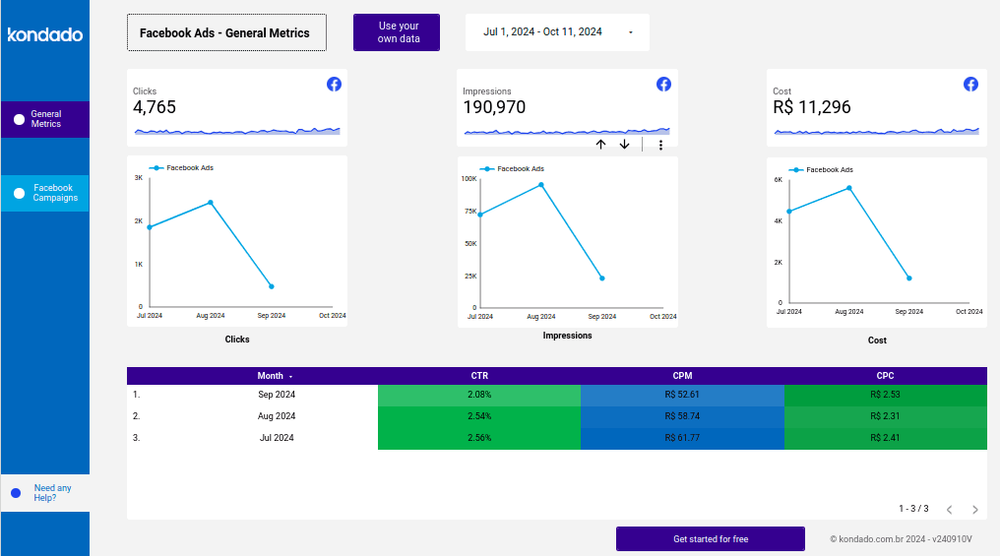
To connect Facebook Ads (Meta's advertising platform, also called Meta Ads) to Looker Studio, you need a tool that brings your ad account data into Looker Studio, because Looker Studio does not offer a native data source for Facebook Ads. Kondado does exactly that: it connects your Facebook Ads account and delivers a ready-made report in Looker Studio, already filled with your data, with no code.
Summary
- Looker Studio has no native data source for Facebook Ads. You need a platform that replicates the data into it. Kondado is that platform.
- How to connect: create a Kondado account, authorize access to your ad account, choose Looker Studio as the destination and select the ready-made Facebook Ads template.
- What you get: a report with clicks, impressions, cost, CTR, CPM and CPC, split into an overview and a per-campaign breakdown.
- No code. Your data is refreshed at the frequency you choose in your account.
Does Looker Studio have a native data source for Facebook Ads?
No. To bring in Facebook Ads data, you need a platform that extracts that information from your ad account and makes it available to Looker Studio. Kondado delivers that connection ready to use and comes with a pre-built report template, so you don't start from scratch.
How to connect Facebook Ads to Looker Studio with Kondado
Follow these steps to get your report live:
- Create your Kondado account or log in if you already have one.
- Connect your Facebook Ads account and authorize access to your ad data.
- Choose Looker Studio as the destination for your data.
- Select the ready-made Facebook Ads report template.
- Access your report: once Kondado finishes preparing your data, you receive the report link by email or through the platform chat. Just open the link to view and adapt the ready-filled report in Looker Studio.
For a detailed step-by-step with images, see the complete template guide.
What the Facebook Ads report includes
The template is split into two pages:
- General Metrics page: a consolidated view of the main campaign metrics (clicks, impressions and cost), with a table of derived metrics like CTR, CPM and CPC to assess performance at a glance.
- Facebook Ads Campaigns page: a detailed view with filters by ad account, campaign name and date, plus a table listing each campaign individually with its associated metrics.
Which metrics you track
- Clicks: total number of clicks generated by the campaigns.
- Impressions: total number of impressions generated by the campaigns.
- Cost: total cost of the campaigns.
- CTR (Click-Through Rate): total clicks divided by total impressions.
- CPM (Cost Per Mille): total cost divided by total impressions, multiplied by one thousand.
- CPC (Cost Per Click): total cost divided by total clicks.
Why use Kondado to connect your ads
Kondado replicates data from 80+ data sources to reports, spreadsheets and databases with no code, and ships ready-made report templates for Looker Studio. Instead of building everything from scratch, you connect the account and get a working report with filters and metrics already set up. Explore the free Looker Studio report templates as well.
Frequently Asked Questions
Do I need to know how to code to connect Facebook Ads to Looker Studio?
No. The connection is made through Kondado's interface: you authorize access to your ad account and choose the template. No code or API setup required.
Does the data refresh automatically?
Yes. Once connected, Kondado replicates your Facebook Ads data at the frequency you choose in your account, keeping the report up to date with no manual work.
Can I connect more than one ad account?
Yes. You can consolidate multiple ad accounts into the same report and filter by account on the campaigns page.
How much does it cost?
You can start with a free trial. Per-plan pricing is on the Kondado pricing page.
Try Kondado free for 14 days and connect your Facebook Ads to Looker Studio to make more data-driven decisions.
Create a Facebook Ads Report in Looker Studio with Kondado
Use Kondado's ready-made Facebook Ads template to build a Looker Studio dashboard.
Pick the Facebook Ads report for Looker Studio
Choose the Facebook Ads report template for Looker Studio from Kondado's report templates.
Connect your Facebook Ads account
Authorize Kondado to read your Facebook Ads data so it can replicate metrics like clicks, impressions, cost, CTR, CPM, and CPC.
Wait for automated setup
Kondado replicates the data and prepares the Looker Studio template. You'll be notified when the report is ready.
Customize the dashboard
Open the Looker Studio report. Use the General Metrics page for the high-level view and the Campaigns page to filter by ad account, campaign, and date and drill into specific campaigns.
